If it is one of two choices only, card or bank, and when it’s card it comes back as card, but if it is bank it comes back as null, I’d say assume null equals bank.
You could also reach out to Stripe support to inquire about why bank is returned as null value.
I’m interested in taking your course, but I have a question:
Your Preview video talks about Stripe Connect. From what I understand, Stripe Connect is for marketplace apps that have multiple sellers. I’m not building a marketplace. I have a subscription model on my app where I charge users a monthly fee that allows them to access the app a certain number of times. The higher the fee, the more times they can access it. Will this course help me set up Stripe to manage this?
It will go over subscriptions. It doesn’t cover how to limit access specifically, but using what you know about bubble and what you’d learn about managing subscriptions you should be capable of putting together the system you need for your app.
Hi @boston85719 , thanks for the great course!
I am having hard time uploading an image file to Stripe via API since I get “414 Request-URI Too Large,” upon the request. It seems bubble’s image url is extended due to imgix integration. Did you find any solution regarding this? Otherwise, am I missing something here?
The plugin likely has a data value exposed other than the base64 (most do, but I don’t know this plugin off hand) that could be used for saving the images in the app.
When you are on the site, in the course, on the right side of screen should see a button for materials, click that button and then the popup will have link to the editor.
Hey, thanks for the quick response. Your Course editor helps a lot. I have a question on how you structured bubble database to handle orders coming in with Stripe Checkout session.
I cannot figure out how Product order and Product Line Items are related to process orders. Do I still need Product Line Items even when I have a single Product for a purchaser?
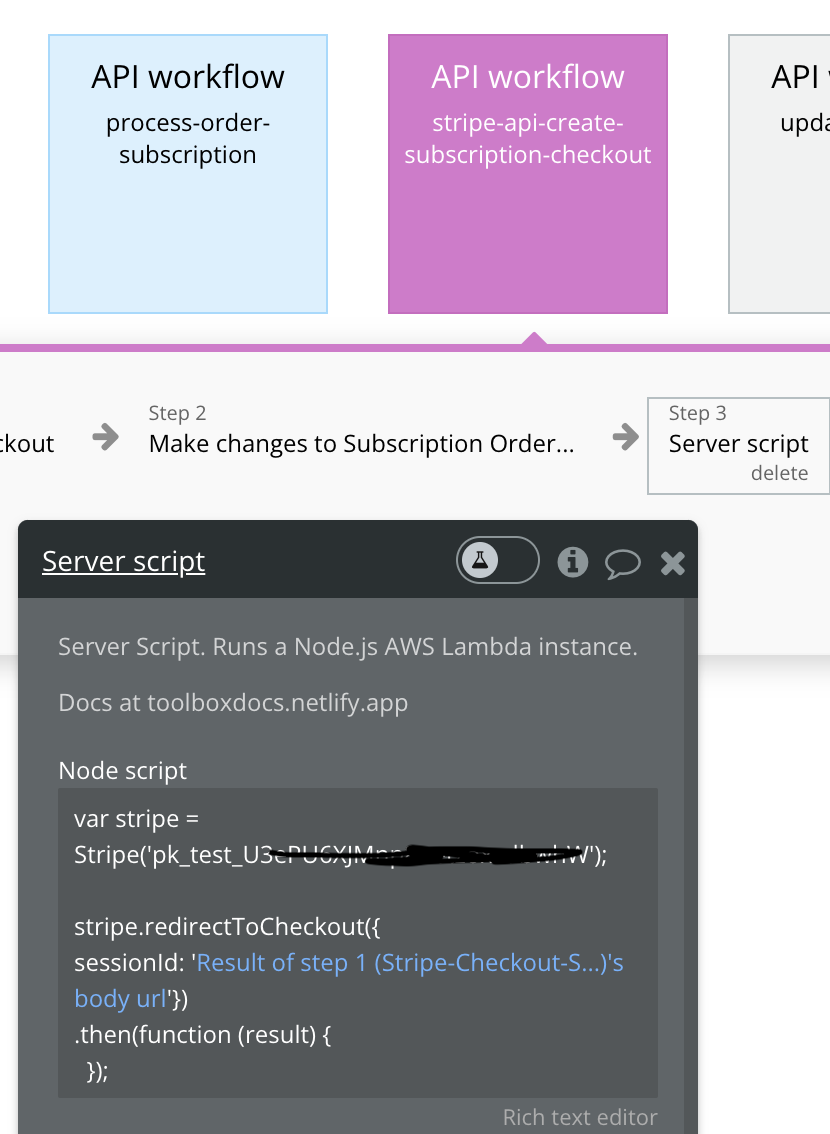
It seems there is no Open an external website in the backend workflow. I have watched your video and Editor regarding the Checkout session, but did not find a way to do that.
Will you guide me how I can redirect to the stripe checkout url?
[Update1]
This script did not initiate the redirect. I do get the URL in return but no success to open the url yet. What am I doing wrong here?
Bought this course almost a year ago,
even though I never made a marketplace since then, but different app with different payment workflows and use cases,
It’s the most comprehensive course and prebuilt APIs that serve as a good foundation to learn and build on top of.
Thank you @revulet.oleg for the kind words and feedback. I’m glad you found the course helpful and that you’ve found ways to utilize it in your development.
Hi @boston85719 - I’m looking at your course and I’m interested but I wanted to ask if it’s specific to Stripe Connect or Stripe in general?
I’m looking to implement:
One-time payments as guest, on a digital product
Term payments (“lease-to-own” basically, so like a subscription, but would stop after 12 or 24 payments)
Standard SaaS type subscriptions.
My understanding on Stripe Connect is its for marketplace type platforms, which isn’t really relevant to any of my projects (although it could be in the future).
If your course covers the above use cases, I’ll dive in.
The only difference between Stripe Connect and Stripe Generally (ie: not for allowing 3rd party sellers on site) is the Stripe Account ID you send through the API calls. So the course, although it goes into detail about how to most everything for Stripe API as Stripe Connect it is also 100% relevant to using it generally.
After reviewing all material in the course you should be competent enough with the Stripe API system to integrate these setups in your app.
They can be guests of your app but you will not have anything in your Bubble database then to link them as a customer in your Stripe account so as to be able to allow them to buy again in future with ‘one-click’ payments. But yes, can sell products, digital or not, to a guest of your Bubble app.
I purchased your course, which is very clear and well document, congrat !
However, i would like to use your templates and resusable elements but a lot (eg pagination page) are using the lift shifter plugin which is no more on the bubble plugin marketplace. i tried to recreate the page with custom states only, but i cannot get it work. Could you help me on that or provide an update on your course.
Thanks for your feedback understanding!
Best,
E
Thank you @eple0030 for your purchase and I’m glad you’ve found the course informative.
The plugin developer of list shifter removed the free version and created a paid plugin that contains list shifter and other new features/functions. I believe the name is Floppy.