
Hello Bubble community!
I’m excited to introduce Flatten, a translation tool specifically designed for Bubble.io to simplify the translation of your applications. Flatten makes the translation process faster and easier with advanced features. No more exporting/importing CSV files!

Key features of Flatten
-
Identification of missing translations: Quickly identify missing translations to ensure that no text remains untranslated in your application. During the ongoing evolution of an application with translations, it often happens that translations are incomplete in the production version. With Flatten, you can easily identify and correct these omissions.
-
Display of all languages at the AppText level: View translations for all languages at the AppText level. No more back-and-forth with the language dropdown in Bubble.
-
Automatic translations: Automatically translate your content into the languages of your choice, saving you valuable time.
-
Option Sets translation: Easily translate your Option Sets. Say goodbye to lengthy conditions for translating each option into every language.
Currently, Flatten is an MVP version, which is why I am looking for beta testers to help improve the tool. If you’re interested in testing, please contact me. I will send you the Chrome extension for testing.
How flatten works: Key steps
Install the extension
To start, simply install the Flatten Chrome extension. Initially, I send the non-packaged Chrome extension to beta testers.
Open the Chrome extension
You can launch the Chrome extension while on the Bubble editor by clicking the button at the middle-right of the screen.
Create a Flatten account
Once the extension is installed, launch Flatten and create your account. You will just need to sign up with your email address and a password.
Create a project
After logging in, you can create a new project. During this step, you will need to define:
-
Languages: Select the languages you want to include in your application.
-
Main language: Define the main language of your application, which will be used as a reference for automatic translations.
Profile setup (with Google API key)
Next, go to your profile settings to enter your first name, last name, and Google API key. This key is not mandatory, but it allows you to enable automatic translations via Google Translate.
Translation management dashboard
Once your project is set up, you will have access to a dashboard to manage translations. Here’s what you can do:
-
Modify translations
-
Filter translations: Use filters to easily find incomplete translations.
-
Add or remove languages: Add new languages or remove those you no longer need.
-
Define the main language: You can change the main language of your project at any time.
-
Translate all translations of an AppText with Google Translate: If the translation value in the main language is defined, it’s possible to automatically translate it into all other languages in the project.
Option Sets Translation
Currently, it’s not possible to natively translate Option Sets in Bubble. With Flatten, we offer a feature to translate these Option Sets using the following methodology:
Before anything else, we assume that the developer follows strict naming conventions for Option Sets and their associated values (e.g., USER_TYPE with values Administrator, SuperAdministrator, Client, etc.).
To translate an Option Set, you can create an AppText following this naming convention: OS_{OptionSetName}_{UseCase}.
For example, to translate USER_TYPE for displaying in a dropdown, you would create the following AppText: OS_USER_TYPE_filter.
Flatten will automatically detect that this AppText is associated with an Option Set and will generate translations for each value in the Option Set (e.g., Administrator, Partner, Client, etc.).

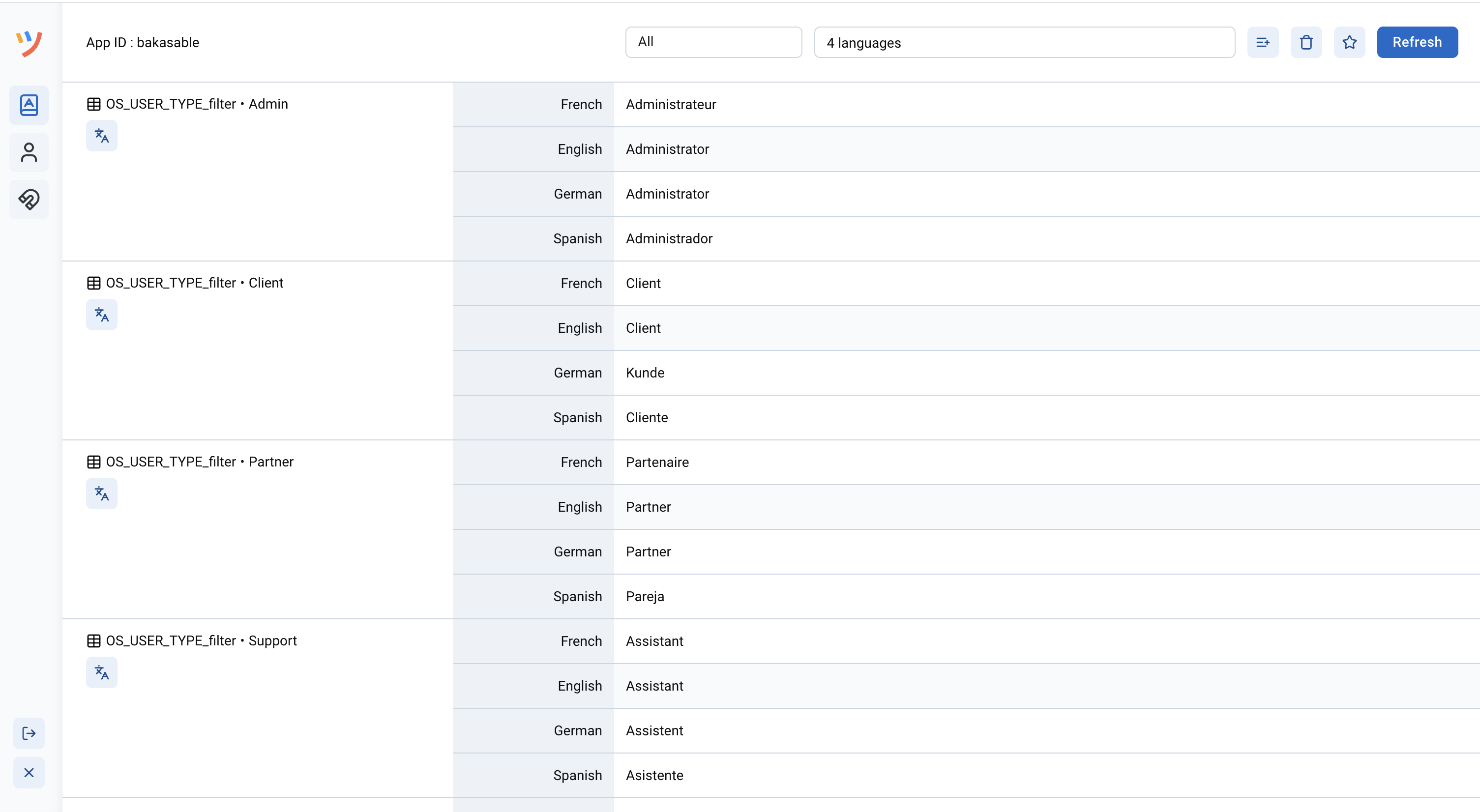
You will then be able to use the translation directly in the Bubble editor with the following expression:

It’s also possible to disable this feature in the extension settings if you don’t need it.
Upcoming features for Flatten
We are considering several exciting new features to make Flatten even better, including:
-
Translation Review: Users would be able to tag translations as “To review” or “Reviewed,” which would help with better traceability of the relevance and validity of translations.
-
DeepL Integration: We are considering integrating DeepL to provide more accurate translations.
-
Contextual AppText: We plan to introduce a feature that would allow users to add context to app text, helping to generate more accurate and context-aware translations using AI.
If you are a Bubble.io user, using Bubble’s multilingual feature, and would like to test Flatten, feel free to reach out to me. Your feedback will be invaluable, and I look forward to hearing what you think about the tool!
Maxime