@keith, awesome plugin with a lot of promise for my use case !
For now I can’t make the ITERATE function work for me and I can’t tell the nature of the error. I don’t want to push my luck and have you do detailed tech support on a karmaware plugin, but from these error messages, would you be able to tell the *general direction* of the errors ?
I’ve put a Debug Buddy event before the ITERATE event (“Iterate recurrence is about to start”) and at the beginning of the iteration itself (“recurrence iteration has started”)
The error messages are inscrutable to me, but I’m guessing an error happens just before the iteration starts, and then the first iterate loop fails ?
You’ve talked previously about the potential slowness of having data actions like Create inside an ITERATE loop, but it doesn’t seem to be the problem here. I’ve tried leaving the page open for a while in case the server side wasn’t finished, and I’m not getting a “you have unsaved changes on this page” error message either.
For reference, here’s what I’m trying to do :
users are in a popup menu above a calendar, in which they can create a recurrent event, like in Google agenda
when they save such an event, the app creates the first event and then triggers the ITERATE
ITERATE operates on a ListShifter that holds the number of days by which to offset the subsequent events (eg 7, 14, 21 if the event repeats every week)
for each offset days value, the ITERATE loop should create an event with identical data with the offset date.
So I did manage to make it work, thought I’d post an update in case somebody is in the same situation as me.
It seems like my problem was coming from the popup resetting before the ITERATE loop could run, since it apparently runs separately from the main workflow.
I don’t know exactly in which order bubble / ListShifter do things, but even though the “reset popup” step was after the ITERATE, it executed before. And since the ListShifter element was on the popup and the ITERATE used values from the popup’s input fields, it wouldn’t work.
I solved the issue by getting the ListShifter safely out of the popup at the bottom of the page, and making the ITERATE reference a database element rather than fields. I still have to fix a few other workflows, but otherwise it seems to be behaving as expected.
I still don’t know what these console errors mean, but it doesn’t seem to impede the functionality.
I figured out how to make a karma contribution so disregard the note I sent directly to you asking for a URL. In the interim, I have also lost confidence that I have figured out how to make Listshifter (together with some of your other plugins e.g. Parallels) do what I need.
I have tried creating a loop within a loop (ie. One Listshifter Iterate calling another Listshifter Iterate) but can’t get that to work and am not clear if it is even possible.
What I thought I might also be able to do was iterate a second list within a Processor but can’t figure out how.
What I am trying to do is take a list of date ranges (which would ideally be part of a larger custom Data type) and see if the date ranges within another list) are “contained by” that first range. @alix.ladent - I get the impression that we are trying to do very similar things with recurring events.
1.) Can one do embedded Listshifters - first loop creates Custom State as current iteration list one and calles a second Iterate that compares that CS value against all values in the second list.
2.) Can I use Processor to select an item in a second list, using one of the functions, a counter to select date ranges (or entire records ) as “current” records held in another Listshift to compare with the current iteration of the processor?
Thanks in advance for your help.
To all other on this thread - if you have any insights to offer please let me know.
Seems like at least one person tried to do iteration-in-an-iteration thing, with no news as to whether it worked.
From my limited experience playing around with listshifter, I don’t think it will be possible unless you can tell a workflow to ‘pause’ until the nested loop has finished running. Loops and workflows don’t seem to run in a neat sequence, and it’s possible your nested loops will try to all run at once after your initial loops are finished.
I have not tried using Processor for anything else than basic math so can’t help you with that.
I’m slowly getting my head around the List Shifter plugin (or at least trying to), the capability looks awesome but I wondered, can/how can List Shifter be used to group list items and spit out a new grouped list?
Bubble’s native :group_by is incredibly slow, even on 100-200 records and I wondered given that ListShifter is able to crank out some amazing performance if this would work, and if so, how?
My thought is to load all the data into list shifter then have it group the data based on a user specified variable (eg: creation date). The purpose is to show grouped datapoints in a line chart with filters for day, month, year, 5 years, All Time
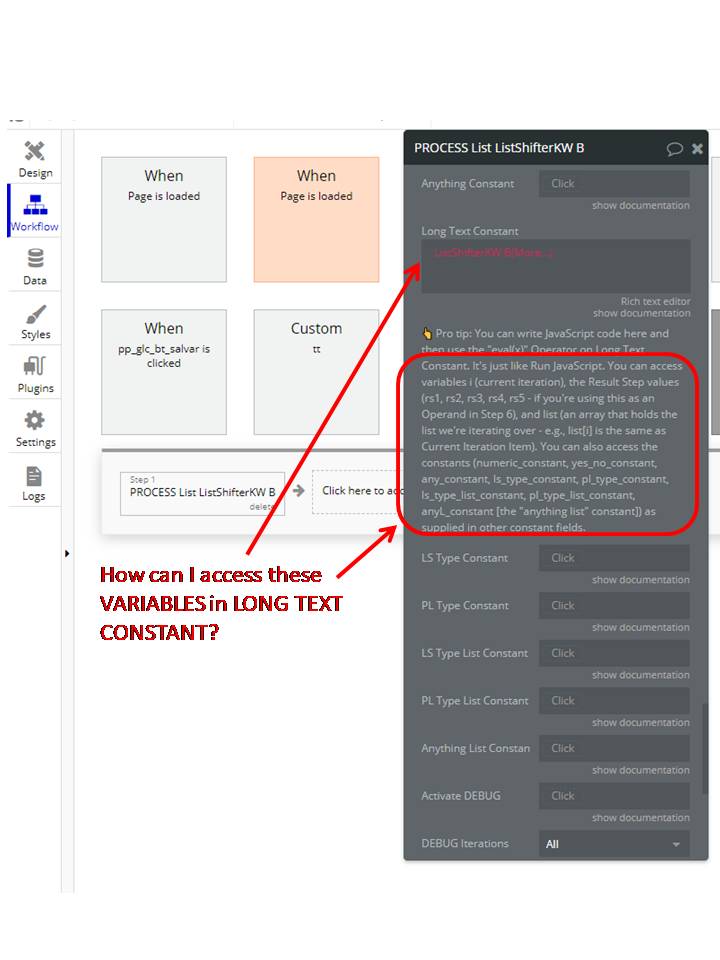
In short, import your code via the long text constant field (where you’ll find a note about a few reserved variables you can use to access, for example, the current Item, the result of some previous step, etc.).
Then, in a step, set Operand X to “Long Text Constant” and select “eval(x)” as the operator. (Now the step runs eval() on the code defined in Long Text Constant.)
The value returned by your code becomes the Result of that step.
(This is just as in Run JavaScript, where the returned value of the last statement, or an explicit return statement, is the value returned.)
The result should be: [20, 22, 24, 26, 28, 30, 32, 34, 36]
Some questions:
1- What is the option (variable) to use in list shifter LS1 in the field: Long Text Constant?
Here is the formula: var result = test(This ListShifterKW´s Original List);
function test(x){ var d = x * 2; return d; } result;
I already tried:
This ListShifterKW´s Selected Item Number = no result
This ListShifterKW´s Current Iteration Item = no result
This ListShifterKW´s Original List = only push first data from list
This ListShifterKW´s Shifted List = only push first data from list
2- What I need to do to “Process List” iterate over my list?
It only use the first data of my Data Type (table).
Can i remove an item from a number generated list. Ex: Made a repeating group with data source : list shifter auto generated number list. How to remove an specific item from the repeating group list ?
As you can see, the Issue being raised is for a “Stock Investment Performance” however, the List Shifter is set to “Crypto Investment Performances”
The system works perfectly when I run in Development mode, however, from what I understand I won’t be able to deploy to LIVE unless I solve all the issues.
@brightmike154, it’s possible that this is a bug with Bubble’s issue checker. (Or perhaps a limitation in what types one can dynamically modify via Conditions.)
Are you sure that the the issues being raised are related to these conditional fields?
(I would expect your expressions to be red color if the expression was invalid. And, as you note, on the face of it the types seem to match.)
If you click on the issue in the Issue Checker itself, Bubble should take you directly to the offending field. If you’re doing that and it’s showing you these fields, I would raise that as a bug report with Bubble.
I did wonder the same thing as the expressions are not being shown in red indicating an issue.
I have clicked on the Issue Checker itself and checked in a number of the variations of the same issue and it’s showing those fields as correct in each one. I will go ahead and raise a bug ticket on it.
Another thing to try real quick: i don’t think this will work, BUT: in your conditions, are you able to set “Data Type of List”? (If so, set that first and then put List to Shift with your new expression below that as the second parameter to change.)
Like I say, I don’t think that’ll work as I don’t think that type selector pull downs can be made to appear in the conditions tab, but it’s worth trying.
I am experiencing a bug error with the list shifter. I’ve done some digging and figure the issue is when the associated processed list has some empty values within the list…so if the list has 100 entries of date ranges and 1 is empty on the start time or end time, it will report the error.
The plugin List Shifter Karma-Ware / element List Shifter KW threw the following error: UnexpectedError Expected a date range, but got a object (original data: [])
    at W (https://dhtiece9044ep.cloudfront.net/package/run_debug_js/e6021d1350649c728dd82d8ccd27c1771ccf8640cdb86dc5d2720ee25c551fc3/xfalse/x12:6:942826)
    at Object.JS_to_bubble (https://dhtiece9044ep.cloudfront.net/package/run_debug_js/e6021d1350649c728dd82d8ccd27c1771ccf8640cdb86dc5d2720ee25c551fc3/xfalse/x12:6:972467) (please report this to the plugin author)
This happens when I am trying to set the list shifter element to have a list to shift datasource of another list shifter elements processed list.
To test, I visualized the data in the processed list and don’t see any issues with it as it is being returned prior to attempting to use it as a datasource in the other list shifter, and it is of the correct datatype.
I have setup a list shifter element labeled as LS TEST TEST TEST
The custom state is getting set when I click on an element, that is actually where I am visualizing the values.
It is not until I trigger the workflow to change the custom state value from no to yes, that the datasource of the LS TEST TEST TEST will be set through the condition on the list shifter element; this is when the error occurs
I’m not sure why it is not recognizing the processed list and indicating it has an object of a null value rather than the full list of date ranges from the processed list.
The reason to insist on this is that I have List Shifter in other modules in my app. And if I can not use this resource (Run JavaScript) with List Shifter I will have to redesign the app to use other plugins. Which is the last option for me.
So… could you please share some examples of how to use ListShifter with “eval(x) aka Run Javascript”?
My issues:
1- The variables you mention on “Documents Pro Tip” do not show for me.
2- The variable available is Original and Shifted List but they do not iterate over the list.