
I found an answer to it: Update the rank of a list's items after shifting it with List Shifter
Is there anything in the works (or some oh-so-wise advice) you have for this issue of not being able to consistently view/save the shifted list after a “Shiftup/down”?
I am trying to 1) shift the original list,2) save the shifted list to the DB (in its new order of course), and 3) display the saved list in an RG like normal.
I am having the same exact issue @michael.dascal describes above and can provide a video if needed. In some magic way your plugin is changing what the Bubble DB “thinks” is my real list is and replacing it with the ListShifters.
Really appreciate all of your work here!
Next 2 rounds of drinks on me if we can get this to work!!
Cheers!
@keith I am having a really hard time trying to make use of some of the more advanced features of this list shifter. Wondering if you could provide some assistance?
In my case I have a list of coffee beans I would like to sort. Each bean thing has 3-5 flavours. For example, Bean 1 might have cherry, cinnamon, nutmeg. The user also has corresponding flavours (upto) 40 which contains the text of the flavour and a corresponding number. For eg Cheery: 3, Nutmeg: 2, Cinnamon: 5. The sorting should be on the list of coffee beans based on a calculated field where the flavours of the users flavour profile, is present in the current coffee bean thing, and is extracted and then summed. For example. in the example above Bean 1 would sum to 10 (3+2+5). How can I achieve this level of sorting using ListShifter?
I am having a problem implementing this exact same solution that @rico.trevisan discovered.
Only iterates over the first 2 items in the list for whatever reason with a weird quirk that if you put a pause in between each update of the database in the iterate workflow it then only updates the first.
So I am not sure if there is something weird (read: that I dont understand that should be obvious) that is time dependent or something where @rico.trevisan 's solution is on a simpler app and therefore faster??? 

@anon10873777 as I’m sure I’ve explained in a video about List Shifter, you can’t really (and shouldn’t) use the Iterate action to perform repeated database create/update/delete actions. What happens is that actions like Create a New Thing (as a very good example) will appear to happen instantaneously in the page, but have (of course) not actually finished on the backend. Wait LONG enough and they will finish, but you can easily get the backend very backed up/throttled… and there is no way to know they are done (except via trying to leave the page - if you see the “not safe to leave” message you know it’s not done).
List Shifter is SIMPLY NOT FOR DOING this type of thing.
This is, of course, one of the biggest and frankly dumbest limitations of Bubble: That the only objects you can create are Things and that Things can only be created through interaction with the database.
The problem isn’t so much that Things must be predefined in the backend, but that, once you’ve created a custom datatype (a Thing) in the backend that you can’t create a local Thing of that type in the page.
In JavaScript, we create objects on the client side all the time for many different reasons. That we’re unable to do this in Bubble is a huge limitation.
It would be handy if we could create Things in the page, knowing that they are not stored in the database and, if desired, we could later take a list of such local Things and then commit them to the database if needed. It’s incredibly clunky and dumb as it is now.
The closest we can get to this in Bubble as it is right now is to create parallel lists of all of the simple data types that comprise a Thing and then pass them to a backend workflow and iteratively turn them into Things via a recursive workflow (tip - my List Popper plugin is useful in this regard).
See my video about creating shopping carts in which I demonstrate this idea of passing the component parts of a Thing (in this case, the components of Line Items that are part of an Order) to a backend workflow that then assembles them into Things.
Hmmmmmmmmmmmm…
Innnnnnnnnnnnterrresssstiiinngggggggg…
I watched most of the videos and somehow didn’t make that connection. Maybe since I am not a programmer initially I didn’t register that point.
It seemed strange that it worked and then didn’t work and then @rico.trevisan got it to work and demonstrated that the backend workflow was in fact working, when I guess something on his page meant that he didn’t trigger the Bubble Limiter?
I was avoiding the backend workflow stuff because it looked scary and don’t want to trigger paid plan on this app yet…
Guess it is time to find a workaround! Thanks for the awesome plugin!


It could be that. My demo was on a new app without much. Each item has few fields in it.
So, @keith is this a race condition? What could be happening is that Brian’s first iteration looks ok on the front end, but the actual change is sitting in a queue in the backend? When Brian makes subsequent changes all those are added to the queue and, at some point, one of those iterations actually goes through in the backend. God only knows which index it will register.
So this “defence mechanism” solution won’t work?

Nonetheless, I like your solution that only saves at the end. Mine currently fires at each button click. I will change that.
Is there a List Shift operator that tells me when the Original and Shifted list are different? That way I can show something in the frontend to tell the user to save his modifications.
Found it! 's list shiftedworks like a charm.
Which reminds me, it’s that time of the year to tithe your favorite creators: GRUPZ: Karma-Ware Plugins for Bubble
So my understanding of @keith’s message is neither solution should work reliably… yours or mine.
And unlike what is suggested in the message, on my instance the iteration NEVER completes and fully updates the database.
I can wait forever and nothing happens on a list of 4 items. Keith’s “Iteration complete” action fires off after 2 iterations, one with a pause.
So that is curious in and of itself.
Keith can of course correct me but it seems as if you’re getting lucky at this point and your solution will likely break pretty quickly for Bubble being silly type reasons as it has in mine.
Reading through the bajillions of replies I think I caught Keith mentioning something about using List Shifter to create a list of Things and then saving the list to a list in the parent Thing.
In my example, have a field called “list of exercises” and then replace that list after a save button is fired.
Then the list should appear on the page in the order saved.
Considering this is a demo app and the list will only have a few items…
… I am less concerned about what I understand (probably wrongly) to be the security and data weight reasons why this is not the best idea.
Am I completely out to lunch?
EDIT:
@rico.trevisan when rereading your original message I think there is a misunderstanding with what is happening on my side.
I don’t think there is a queue backlog as it never “looks ok on the front end”.
The iteration works and the backend is updated fine for two items only. The “iteration complete” event is thrown then with Debug Buddy suggesting to me that the whole operation has stopped, and backed up by the fact nothing happens after.
Did I understand what you were saying incorrectly?
I am not sure what/how that worked with “'s list shifted”
Mind creating a screenshot with the expression? I never had any luck with the “'s shifted list” which I think is different so I am not sure what you’re referring to…
okkkkkkkkkk
Here’s the solution I came up with for my use case as a fitness training app. It allows…
1- changing the order of a list of exercises
2- adding multiples of the same exercise to a workout… ie adding multiples of the same thing to a list and then saving it in Bubble.io
We accomplish #1 by creating a list of things and resetting the list when something is done being sorted
We accomplish #2 by creating a “Join” thing with parent-child fields. This gets around the "cant have the same item multiple times in a list.
Here’s a quick vid to show you how it works. If you have any questions ping me and maybe we will start a new thread.
A little stuck on something. I’m trying to use the response from Google Calendar to make a list of date ranges. The response is a list of items that each have a “start” and “end” value which are each dates.

I need to get a list of date ranges. So two options I see are:
-
Pass the data as is and generate date ranges. That assumes that I can access each start and end time. Tried using “List Item Field of Interest” in the PROCESS List action but no luck.
-
Create two lists (one for list of start dates and one for end dates) and combine them to create date ranges.
Are either of these possible using ListShifter? This was my attempt:

Hey Keith! I spent about 2 hours with you today  watched most of your videos from 1-2 years ago, and implemented List Shifter IN PRODUCTION to paginate some previously-infinite scroll tables to these beauties!

I went to the karma page to show my appreciation, and saw this warning message:

Is this still relevant? Or is List Shifter 100% Karma now?
Hey @jacob.b.singer, nice work! That’s a great use of List Shifter right there.
As for your question about contributing, you are welcome to pay whatever it’s worth to you and that you can afford.
My “Karma-Ware” plugins are made available freely so that all of the community — hobbyists, tinkerers and production app developers alike — can benefit from them.
For folks with production apps that rely on them, I greatly appreciate contributions as they help inspire me to keep doing new things.
List Shifter is very mature and hasn’t needed any updates or bug fixes in a long time, but there are a couple of little things that I’ve been working on adding (that don’t add any bloat to the existing code).
PS: And just to be very clear, there isn’t a “pro” version of List Shifter at the moment, though I’d toyed with the idea of a backend version of Process List. However, if I do release that, I’ll most likely just bundle it into the Karma-Ware version of List Shifter.
Happy holidays,
Keith
Hi @kieth,
I’m wondering if List Shifter is capable of sorting my list. I’ve attached an image of the setup however it’s a RG of Job Posts, and inside each Job Post is a RG of users that match the Job Role of the Job Post.
The Job Post has Required Certificates and the Candidate has Owned Certificates. By intersecting these two lists I can generate a Candidate Score for display purposes. My issue is sorting this list by Candidate score, as it doesn’t exist in a DB.
Is this type of sorting a possibility with List Shifter?
Many thanks, and great work!
Dave


Interesting UX. I’m 'onna use it as inspiration for my application.
Have you had any luck with shifting an item up/down by more than 1 place at a time? I was trying to do that and it actually swaps. @keith , is that the intended behavior?
I’ve put together a little video talking through it
Let me try to explain it here in text. So I have a list.
- Banana

- Apple

- Pear

- Coconut

If I tell ListShifter to move Coconut up by 3 places, it will actually swap it so the list will look like:
-
Coconut
- Apple
- Pear
-
Banana
I was hoping that I would get the following list:
-
Coconut
- Banana
- Apple
- Pear
Please do!
Sorry just go this, and havent played in the listshifter app for a while and not sure when Im going to be able to dive back into it.
When I do I will try to respond if you havent figured it out yet!!
Yeah, @rico.trevisan , I could see one desiring that behavior. However, the “Shift Up” and “Shift Down” actions are literally just different interfaces to the “Swap” action and that was by design.
It is possible of course for the other behavior to be implemented and I have added that in just published version 1.10.0.
What this does is adds a new “Move Items” option to the SHIFT Item Up and SHIFT Item Down actions. If it’s not present (or set to “no”), the existing behavior is used (swap the item to shift with the one it displaces). If it’s set to “yes”, the item to shift moves to its new position and displaces ALL of the intervening items, preserving their order (just like you want).
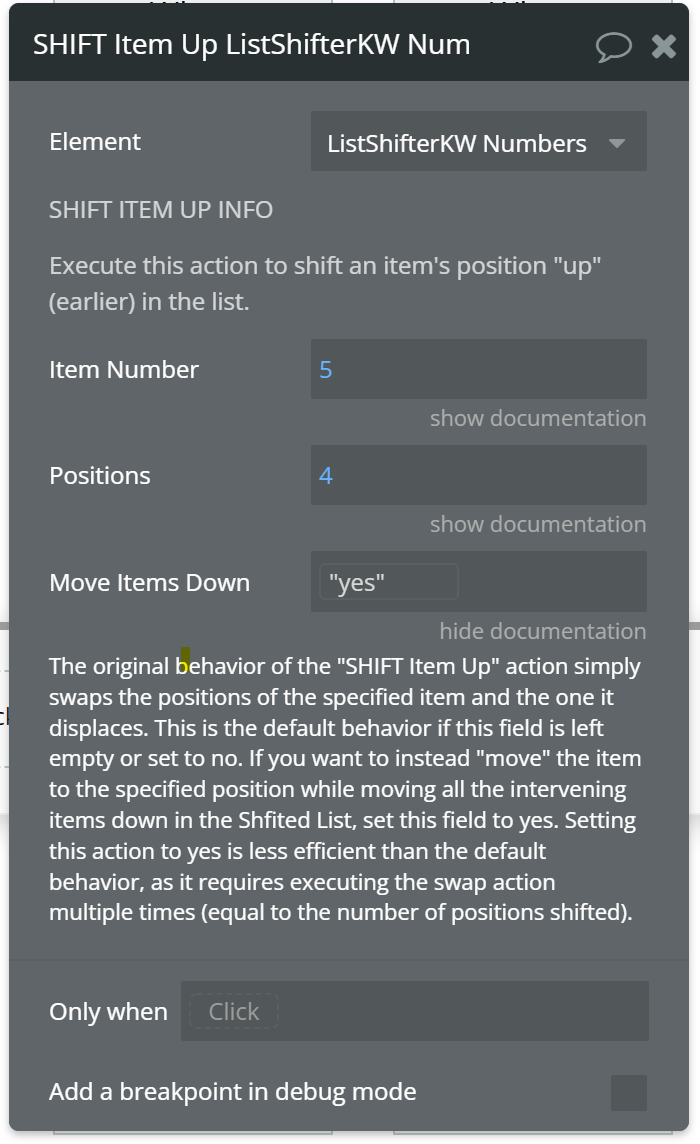
Because of selected item tracking, pagination, and stuff like that, this is implemented in a somewhat inefficient manner: What we do is, to shift the item n positions, we execute n calls to the swap function, swapping the item with the item just above or below it. Practically speaking, this isn’t a big deal, but FYI.
(If I felt like writing a bunch of new code for this, it could be done more efficiently with just 2 splice operations, but that’s a hassle.)
[Edit: When I say “somewhat inefficient”, above, this shouldn’t dissuade you from using this option in any practical application. Some performance data with gigantic lists: For a list of 10,001 numbers, moving the 10,001st item 10,000 positions so that it’s at the top of the list takes less than 10 milliseconds on my machine. And this includes the time it takes to publish the list back to Bubble. For a list of 100,001 numbers, moving the 100,001st item 100,000 positions to the top of the list completes in about 50 milliseconds, again, including the time it takes to publish the list back to Bubble. So, NBD.]
Anyway, give 1.10.0 a try and let me know if you find any issues.
I also should have tagged @anon10873777 here as they might find this useful as well.