
Oh, it’s definitely magic 
I didn’t even know i could do that! Thanks lol…
FYI i finally found the culprit… on this page i was using a plugin for search called “Search & Auto-Correct” That was actually slowing down my page and causing that error, so now that i’ve removed it, everything is working now (except for my search) … Thanks!
Greetings, @keith! Love the look of this plugin. I have a question, though. Is there a way to have an iteration on a list trigger the iteration on another list and wait until the other list’s iteration is completed?

I’ve been scouring the forums trying to figure that out and haven’t had any success. I’ve been attempting this with the Ultimate Toolkit plugin but haven’t got that working either.
You can’t really do that in the current version of List Shifter, @rheytset. When you fire the Begin Iterate action, List Shifter fires off an Iterate event which you use to trigger some workflow. When that workflow completes, that sends a callback to List Shifter, letting it know that it can send the next Iterate event (or the Iteration Complete event, as appropriate).
If the workflow in question uses steps that are asynchronous, the next Iterate event won’t wait for them.
This application would be possible if List Shifter had a manual “STEP” sort of action (where Iterate events would be generated only in response to that action). And then you’d put the “STEP” action inside of the “nested” List Shifter’s “Iteration Complete” workflow.
It’s kind of an interesting idea. (And fairly easy to implement on the code side.)
Hi there
Is there a way to use List Shifter to go to the Cell below when Enter / Return is pressed?
So basically to Set focus to Cell below.
I would truely appreciate some help. Have been stuck on this problem for months.
Regardd
Francois
Thanks for the prompt reply, @keith! Appreciate the comprehensive explanation. So glad I could contribute a “kind of” interesting question to help generate the idea.  I’d love to see that as an option.
Keith, this is a wonderful plugin and your dedication is extraordinary! I want to see if List Shifter could work for my use case. I want to combine two list with separate content types (have the same fields though). It’s a budgeting app and I’m combining saved transactions (in database) with pending ones (populated via a repeating group with date content type). I looked over your example to Killian Jan '21 but nothing is populating.
Thank you!!
@keith I am not sure if this is something that was mentioned earlier in the thread. I want to sort a list by a primary and secondary sort. What I mean by this is I have two conditions, I first want to sort the list by status, however if the two items have the same status then the order for those items would be by last modified date. Is this possible with list shifter?
Thank You!
I am Japanese and I am using a conversion software to English, so please forgive me if there are some things that are not right.
List Shefter is the best plugin I have ever used.
Thank you for providing it.
I have been able to use it, but when I restarted development after a long time, I get the error in the attached image.
Is there a solution?
Thank you in advance for your help.

Hello @keith
I’ve searched and searched this thread and this topic has been spoken about but no solutions have been outline as far as I can see. Please can you assist?
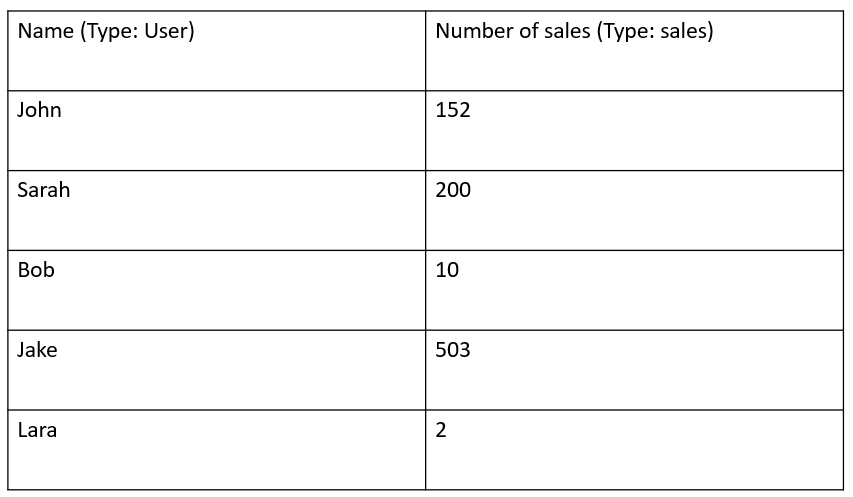
Problem: I need to sort a repeating group by a calculated field from a different data type as below. Currently, I am using the search function to find all “Sales data” that match this user and then sum up all the sales amounts. How can I use the LS plugin to sort this RG by number of sales?
Hi, @keith
great plugin, I’m using it with all my RG, thanks for the great work!
I have found that if one of the records have blank value in a field, they get put to the bottom of the list, and never come back up either for ascending or descending.
How can I avoid this?
Thanks.
Example:
Click field label to sort multiple times, but record with empty field always stays at the bottom

Sort by the field where all records have value, and all records behave normally.

my list shifter setting


Yep, empty values go to the bottom. That’s even in the documentation, I think. I mean, where else should they go?
Is it possible to calculate the difference between two dates in the process step? The use case is that I have a repeating group that shows information about insect observations, and I’m showing the number of days between the first observation of a pest in a field and the last observation of a pest in a field. I’m interested in leveraging this tool to ultimately sort the repeating group by that calculated value.
Thanks in advance!
Hey @tim17, yes, you can do that. If an item referred to in a Process List step is a date, you can turn it into its milliseconds value using operator x.getTime(). Now the result of that step is a number (the “UNIX time” of the date as some would have it). Like so:

Do the same thing with your other date in another step. Now that step is the UNIX time of the other date.
In the next step, subtract these two values. Now you have the distance, in ms, between the two dates.
In the next step, you could convert that number of milliseconds to some other time unit, by dividing by some constant (e.g., 86400000 to convert to days).
Simple example page here: https://list-shifter-demo.bubbleapps.io/version-test/time-between-process?debug_mode=true
Edit mode: List-shifter-demo | Bubble Editor
The Process Output type is set to “number” in the main List Shifter interface and the workflow that executes Process List is this one:

Great! Thanks so much!
Hi, is there a way to use list shifter as a pre-loader for a one page app?
What I’m trying to do is Have a Dashboard page with many reusable elements as App Sections.
I want to use list shifter in the Dashboard Page, and refer to the list shifter from reusable elements. Is that possible?
If not, will there be a benefit to use list shifter as a reference then also put that same search inside the reusable element? I think @boston85719 can relate to this as he does it to improve user experience.
I’m just thinking if referencing it in the Page level forces Bubble to load that data and cache, then using the same search inside the reusable element, bubble doesn’t actually need to search that data but rather, reference on the cache?
Does it make sense?
Bubble will perform a single search instance when on the same page there are multiple ‘do a search’ with the same constraints. What this means is if you have a reusable element with a list shifter element performing a search, and then on the page have another doing the same exact search, Bubble would only perform that search once. (Note, this is not known through testing: Bubble support told me they only perform one instance of a search when it is the same - but not in the context discussed here, but shouldn’t make a difference as on your single page, the reusable element will be on that same page)
One reason to maybe test for your exact use case is that a reusable will not be visible all the time, and until it is visible, Bubble will not populate for searches, but I’d expect Bubble is smart enough to know the search is the same as one performed on the page already, so it wouldn’t be necessary, and therefore Bubble wouldn’t perform the search again once the reusable element is visible.
I do this in my apps and they are definitely not slow, plus I don’t personally care so much if data on a dashboard page doesn’t load super fast, as to me, that is a very different situation compared to a search performed for an e-commerce product selection type of app, and the user is capable of waiting an extra second or two for the data to be loaded.
Overall, I think you may want to reach out to Bubble support for a clear answer to this, as they are really the only ones who would know exactly how Bubble works and how Bubble may cache or load data for a search.
Hey @boston85719 and @shu.teopengco - as far as Shu’s question: why not just test it?
Note that Bubble does cache search results and (for example), if you have some search that returns All Foobars:items to 100 and then later search All Foobars:items to 200, it doesn’t need to fetch Foobars 1 thru 100.
I’m not sure if a search in a reusable element might screw that up, but what @boston85719 says about element visibility is true. (Elements like List Shifter need to be visible for their code to run and toggling them off and on will cause them to instantiate/initialize again. Also if they go invisible you now longer have access to their outputs, which is code to how you work with List Shifter).
A little further to what I wrote above… Understanding Searches:
What is a Search? When we send a simple Search (“Do a Search for…”) query to the database, Bubble responds incredibly quickly (nearly instantaneously). The Bubble programmer/user doesn’t really perceive this as being the case, but plugin builders do.
When you input a Search to a field in a plugin (in its main interface or an action’s dialog or what-have-you), what the plugin receives is very simple: It’s a single object with some methods (functions) on it. This object is called a List. One of the functions on it (.length()) tells us how many results were found (it’s really more like just a property as the value returns immediately, so basically a Search includes the info on how many results we could retrieve if we desire). The other of these functions is .get(), which we can use to retrieve some or all of the Search results (by their index numbers). The individual Search results themselves are, of course, Things (as that’s all we can store in the database).
It is the retrieval part of this operation that takes time in terms of interacting with the database. Unless we are doing some sort of pagination (which List Shifter can do, of course), we will typically want to fetch the entire List of results.
Depending upon how many things are in the list, it can take a certain amount of time to fetch all of the individual results. Once retrieved, what we have is an array of Things. Like Search results (Lists), Things are also very simple objects. They are an object with 3 functions on it:
One tells us what properties (fields) the Thing has on it (these are the custom fields you’ve defined in the Data part of your app along with several system fields that all Things have [created and modified dates, created by, Unique ID, etc.].
Another (again .get() ) allows us to retrieve the values for a certain property (which again may themselves be a Thing or Things).
There’s a third method on Things that we cannot access, but it’s all of the special Bubble secret sauce that goes with a Thing.
But anyway, properly structured Things themselves can be individually quite small. I’m not 100% sure of whether any of the data stored in a Thing actually travels along with the Thing object (it might in the case of things like the unique ID or single value fields that are core data types )-- it just gives us instructions on how to retrieve the properties/fields of the Thing. (Things should basically be composed of Things “all the way down”, as I like to say.)
In some plugin applications, you would want or need to go and fetch some of these field values, but in List Shifiter we do not do that (unless you invoke some special action like “Get Field of Interest”). What List Shifter does is just shoves the array of Thing objects to its Original List output, and a (possibly modified/re-ordered) array of Thing objects to the Shifted List output.
So, in some sense, List Shifter is the absolutely fastest way to fetch a list of Things because it does not fetch any fields. The “get” operations for the fields are only accessed (and not by List Shifter) when you use them somewhere, as in an expression. (For example, in a text element you compose: List Shifter's Original List: each item's Name. It’s at that point that Bubble fetches the values for the Name fields).
If you feed a Repeating Group with a source list List Shifter’s Original List (or Shifted List or whatever), again, no field values are fetched until you put some element in the cell that references that field.
(This is where things start to look slow to inexperienced Bubble devs. If your RG is showing hundreds of Things and trying to - for example - show a bunch of images that are stored on those Things, well, that can get to be a lot of data really fast.)
All of the above being said: Another thing to know about Searches is that, in a given page, they are not parallelized. They happen sequentially. If you have some initialization workflow that populates some Custom States, each with the results of different Searches, you will note that they execute in series. This is also true if you try to be tricky and have several workflows that trigger off the same event. You will find that one workflow completes before the other even starts. (The Debug Buddy action plugin included with List Shifter can be used to prove that this is so.)
And similarly, there is no free lunch with List Shifter: If you drop several List Shifters onto your page, they will of course start retrieving the Search results as soon as possible, but one List Shifter will start reading and become initialized before any of the others, and then some next one, and then some next one.
(List Shifter will often be marginally faster than some other way of loading Lists, and doesn’t result in any funny preloading of unneeded field values that might happen with other Bubble elements, but it’s still limited to the core rules of Search result fetching.)
Wow. Thank you for those comprehensive replies. It really helped a lot and a lot of free knowledge for us. Thank you. 
Gonna have to do some testing and I think it will take some time for me and o absorb some of it…