Hey @ts11 - so, x.getTime() in PROCESS List is working just fine. But a couple things that could be causing the results you are seeing:
When your PROCESS List action runs, the value of Engagement’s Creation Date is in fact empty. And, looking at your workflow, this is almost certainly the case. I’m assuming that “Trigger New Engagement” is a custom event trigger. Note that the PROCESS List step will not, in fact, wait for Trigger New Engagement to complete before running. So Engagement (whatever that is, whether its a custom state or a group value or whatever) is empty and its Creation Date is empty.
A couple different ways to handle this. You could faff around with trying putting Calculate Delay Factors into its own custom event, but this may or may not work. (I suspect it does not, but worth a try.)
A more reliable way would be to use another List Shifter on your page and use its “Scalar” input field (set it to whatever “Engagement” is). Now that List Shifter (let’s call it List Shifter Engagement) will fire its Initialized/Updated event whenever the value of that scalar expression changes (for example, when it goes from empty to populated, or when you create a new value for Engagement). And you could trigger Calculate Decay Factors on the receipt of that event (which would be “List Shifter Engagement’s Initialized/Updated”).
And the Engagement in question would actually be present at List Shifter Engagement’s Scalar output (so you could use List Shifter Engagement’s Scalar’s Creation Date as your Anything Constant).
(List Shifter used in this way is essentially just like any other “local variable” type of state – e.g., a custom state or group value – except that it automatically updates when its input expression changes. And it throws an event to let you know that the new value is really, truly available at the relevant List Shifter output!)
The only other thing that might be going on is that Engagement’s Creation Date is not actually a Bubble/JavaScript date object, but I think you are more savvy than that! However, if Engagement’s Creation Date were a text instead of an actual date, the .getTime() operation will just return null (we check for whether the operand is a date and if it’s not, this operator returns null/empty).
Thanks for looking into this! I agree it’s not ideal, but unfortunately the nature of the actual data I’m working with, which has many-many relationships and huge data sets. As much needs to be offloaded to client processing as possible. In truth, my app really needs to leverage ML & AI to scale better so it can do more work server-side asynchronously.
On that topic, the method using PROCESS thankfully deals with only a small amount of data, so even if slow, isn’t a huge deal in light of the capability on offer. Will take a look at “Floppy”, but I’m not much of a JS coder unfortunately.
On a totally different topic, I am finding that if I make any changes to data loaded by ListShifter (i.e. Do a seach for), whilst triggering the ListShifter Initialized/Updated event; the modified data item is no longer in either original or shifted list; but is updated in any other data fields (e.g. an RG) that uses the same query. I have a workaround (moving those values to another data type, but I really don’t like that solution), but I have not found any reason why ListShifter would be having this issue.
Thanks so much for taking the time to explain what’s going on under the hood here, Keith. I honestly never would have figured this out on my own “Trigger New Engagement” is a custom event trigger, as you surmised, so it sounds like you’ve pin-pointed the problem, and I’ll work on implementing the solution you suggest. I had been thinking that custom event triggers would always complete before workflow steps that reference their parameters, so this is a revelation for me. Is this an issue with all third-party plugins or a design feature of LS, specifically?
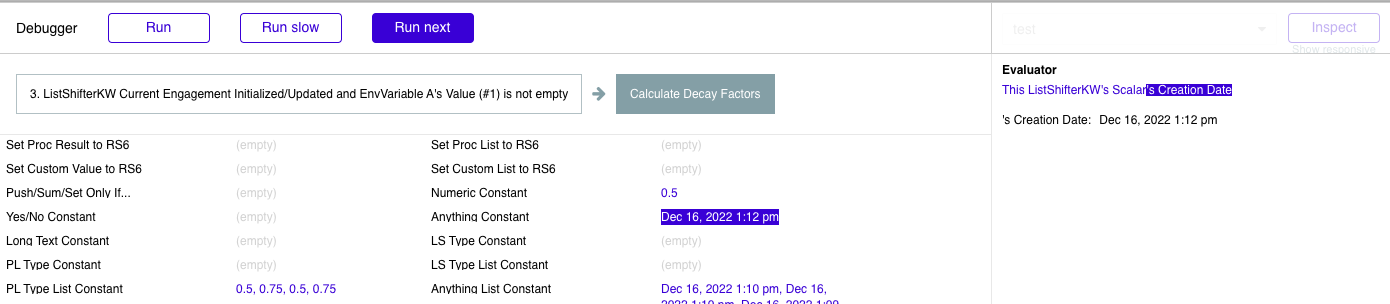
Hi Keith, so at the risk of seeming dense, I’m still struggling here. I’ve reworked my workflows as you suggested. Now, whenever the main “Trigger New Engagement” custom event is triggered, I update an env variable to hold the value for “engagement.” I have created a new LS element and bound its scalar input to this variable. Whenever the scalar input’s value is updated/initialized and the value for the engagement is not empty, I trigger the “Calculate Decay Factors” workflow. When running the whole sequence of workflows in debug mode, I can see the value for “Anything Constant” populating correctly with the engagement’s creation date, so it’s not showing as empty there. However, the result of step 2 is still showing as “Null” in the console output. (I should also clarify here that the “creation date” field on the Engagement data type is, indeed, a Bubble date object.)
Hey mate,
I’ve limited each LS page count to 15 items but when im on page 2 and change the filters and it returns 5 items (or any amount under 15 items), no items show because LS still thinks its viewing items on page 2. I was thinking to just send LS back to page 1 via a workflow, but that doesn’t work and ruins UX as it returns users back to page 1 at all times. Just trying to filter the items which are currently visible on the page.
I’m building a view of my rostering application that shows the data in a table. Been porting my front end to Bubble over the last 12 months and learning as I go. Im not a developers left finger but I am getting better.
Ideally I want to show a list of staff along the rows with days along the columns and a comment in the cell about if a shift (and what type ) has been selected
in its simplest form it would look like this
and in a more complex world (this is my app but with a react front end that I didn’t’ develop)
My question is I want to get to a layout like the simple form in the next month. I’ve dabbled with both LS and Floppy but really only scratched the surface. I’m expecting a combination of these and some repeating groups will do the job nicely but Im not sure of the best approach.
Would you have suggestions on how best to get started?
I am developing a scheduling tool for my business and I feel like your plugin could help me solve my problem.
(by the way, thanks for your incredible work, and if I manage to solve my problem with your solution I’ll be sure to buy you several coffee )
My problem is globally similar to boston85719’s post of November 20th. The difference is that instead of just modifying the end of time of a date range list, I need to modify the end of time and start of time of a date range list.
To explain more precisely I have a list of google events in BDD (bi-directional synchronization with many google calendar) and I want to modify the date range of each event by integrating a travel time in minutes (subtracted from the start date and added to the end date). So add minutes in a dynamic way.
there is a way to modify start and end time of a date range list with the process list action ?
List Shifter does not include a date/time library so it’s not super easy to accomplish what you want using Process List, @Dimo. For a more straightforward approach to manipulating lists of dates and date ranges, check out my Parallels plugin (forum topic here, plugin page here).
I’d suggest trying that out in the editor (a subscription is only $5 a month, so it’s very cheap to try for a couple of days) to see if it meets your needs. (And it can do exactly what you need: You’d be interested in the “Transform Dates” action of Parallels, which can operate on dates or date ranges. You’d execute two of those in sequence, one to subtract time from the starts and the second to add time to the ends, using section 3 of that action’s interface, “Modify Dates/Ranges by Duration”.)
Well, you sort of don’t. It’s not really for that. There are potentially ways of doing this using the Process List action (which will create a different list for you at List Shifter’s Processed List output), but again it’s not straightforward.
Now, there’s nothing keeping you from, for example, setting List Shifter’s Custom List to be List Shifter's Original List :minus item (some item), but this isn’t exactly what you want as it’s not addressing that item by its index number (Bubble makes this difficult).
For a more straightforward approach to manipulating lists in the way you desire, @dimeprocessing, you might check out the various “RAM List” actions in Floppy which can be used to (for example) change or remove a specific item in the list held in Floppy’s RAM List. See the post here over in the Floppy thread and the video linked in that post!
Sorry for the delay in responding, @ts11. This may not solve your issue, but this condition:
Should be “ListShifterKW Current Engagement Initialized/Updated and ListShifterKW Currrent Engagement’s Scalar is not empty”.
You’re storing EnvVariable A’s Value (#1) in that List Shifter. When it sees a change, it will update and publish the new scalar value to the Scalar output, and then throw the Initialized/Updated event. (And you should reference that List Shifter’s Scalar not being empty, rather than EnvVariable A.)
I don’t really know how to help you further than that. Here’s a very simple example that does exactly what you’re trying to do (in essence):
in preview mode, clicking the button on that page sets the value of a custom state to be some Product thing from my database. The List Shifter on the page gets its Scalar from that state. When the state is updated, this List Shifter echoes that Product to its Scalar output. There is a workflow that runs Process List when that List Shifter is updated and that List Shifter’s scalar value is not empty. It gets its “Anything Constant” from its own Scalar’s Creation Date and runs getTime on it.
You can see it work in the console and also in the page.
So i purchased your Parallels plugin and I managed to modify a date range list by adding minutes to each end date and subtracting minutes to each start date. (I don’t know if it was the right way to do it but it works with this process:
For this step it’s perfect but unfortunately I still have a constraint that I think will make it much more complicated.
Indeed I can add/subtract minutes to a date range list. However this minute value can be only 1 dynamic or static variable. And I need to use a variable list here. (section 3 : Modify dates/durations). like “:each item’s duration”.
To explain the situation I need to modify each date range of the list with a variable number of minutes which is returned to me by a google api matrix call (duration). And so each date range (which belongs to a different event) has a different distance and therefore a different number of minutes…
Knowing that the list of variable minutes depends on each address of a list of events (attached to the list of date range)
//
I started to combine your two plugins (Parallels & List Shifter) because I think that the solution will be able to be found via an iteration (list shifter) and inside the iteration to use the workflow “transform Dates Parallels”.
But for the moment I can’t do it. I get either a list of dates ranges which is updated x times (length of the list) with a dynamic duration each time, or a date range which is updated x times.
*This logic (Transform date Parallels) with the use of a duration via an iteration seems to me the right one because I can access “current iteration item’s address”, but there is maybe a better way to do it because for 40 events to iterate it can be quite long…’
*
Hey @Dimo - Yeah, it looks like I didn’t provide a field for a LIST of Durations, which would be useful. Working on an update to that Parallels action to allow a list of durations to be used, as an alternative to a scalar duration value. Shouldn’t be too hard to add.
Wow, It would be unbelievable !! I can’t wait for this update
Unfortunately I have a deadline that is getting closer and closer and I have to finish this early next week…
Do you think there is another workaround while waiting for your update? With just an iteration with list Shifter?
(it’s crazy, if the duration list is integrated in the workflow transforms date parallels it will be almost instantaneous compared to iterating a list of x lines)
Thank you again for your responsiveness and for all the work done on your plugins
@Dimo: Refresh your editor and check out just-published Parallels version 1.0.17. In the Transform Dates action, you’ll find a new field to supply a list of durations:
Hey @keith, I’m using the list shifter “Initialized/Updated” trigger to kick off a workflow. The source of the list is a custom state which is usually empty. So the idea is: when I update the custom state to have a value, that should kick off the Initialized/Updated trigger and it will begin iterating once.
But for whatever reason, Initialized/Updated is triggering twice in a row. This ends up messing with the results I’m going for. Is there any way to only let this trigger run when the list isn’t empty? IE. When it’s updated, not when the plugin is ready.
Is there any possibility of a race condition problem here? In my app it seems to be triggering twice simultaneously, and both times it passes the “Original List count > 0” condition.

 “Trigger New Engagement” is a custom event trigger, as you surmised, so it sounds like you’ve pin-pointed the problem, and I’ll work on implementing the solution you suggest. I had been thinking that custom event triggers would always complete before workflow steps that reference their parameters, so this is a revelation for me. Is this an issue with all third-party plugins or a design feature of LS, specifically?




 )
)
 in preview mode, clicking the button on that page sets the value of a custom state to be some Product thing from my database. The List Shifter on the page gets its Scalar from that state. When the state is updated, this List Shifter echoes that Product to its Scalar output. There is a workflow that runs Process List when that List Shifter is updated and that List Shifter’s scalar value is not empty. It gets its “Anything Constant” from its own Scalar’s Creation Date and runs getTime on it.


 (section 3 : Modify dates/durations). like “:each item’s duration”.


