
Yeah, @alan.mackintosh1, Element plugins need to be visible to do their things. This is true of all element plugins.
Hi @keith what is the state for when the iteration is complete? I’d like to close pop up but on condition that the list shifter is finished. I can’t see how to do this? Thanks!
Yeah, element plugins must be “visible” for them to work. This is true of all element plugins.
@alan.mackintosh1 seriously… is your Bubble broken?


@alan.mackintosh1: Ah, yeah, “Iteration Complete” is an event (there’s no point in there being an “Iteration Complete” state as one might trigger multiple iterations… and, then, when does such a state go low after going high?). This is different from a persistent state such as “Initialized” (which goes high after List Shifter is initialized and never goes low again) where such info is useful.
Makes sense. Enjoy a round of drinks on me 
@keith thank you for this 

Hi @keith, have been using ListShifter for a little while now - a VERY powerful tool that I’m still trying to wrap my head around, but a great piece of work (thanks)! I only wish bubble’s documentation interfaces were more intuitive, especially for plugins… but I digress.
I’m having some difficulties with a mapped sort, where two data types are involved. This case can be described as a user having 0 or more “Preferences” (each preference also has an associated arbitrary number, “Score”), and a list of “Categories” (which could contain 0 or more “Preferences”). In essence, I’m trying to iterate through each category, then SUM the arbitrary number but ONLY when that user has assigned a score to that preference. This final SUM needs to be mapped back to the Category, and sorted in descending order (which is what will be rendered on the page in an RG). Performance is of the essence for this, as it is dealing with huge data sets and user counts, so server-side updates cannot scale otherwise I’d be using the underlying data types.
I have a current version partially working using the ITERATE function (iterating each category), which is using bubble SUM in an arbitrary text field in the workflow for each iteration, then saving the output to a custom state (in text format, containing both the summed value and UID, separated by a pipe)… but I need to SORT it, which doesn’t work, since as a text value, if I have the SUM values of 1, 2, 3, 11, 22 - the rendered output is 1, 11, 2, 22, 3 - as I can’t natively split then sort this list numerically. Short of separating out into different custom states variables and hoping bubble keeps the values in sync, I’m kinda stuck on this one…
Some sample data below…
Category [Attributes]:
Category 1…
- Red
- Green
Category 2…
- Orange
- Yellow
User Preference [Name, Score]:
User 1…
- Blue, 5
- Green, 11
- Yellow, 1
- Orange, 2
User 2…
- Red, 8
- Yellow, 2
- Blue, 22
Expected results (sorted):
User 1…
- Category 1: 11
- Category 2: 3
User 2…
- Category 1: 8
- Category 2: 2
I’m relatively new to bubble and ListShifter, but no doubt I’m overthinking this and this is an easy fix! (I hope!).
Any help would be much appreciated!
So I have managed to work out how to do this with ListShifter… I had to put the PROCESS action into the ITERATE workflow, with the processing action using a custom list set to the category, filtered by the current iteration item. I then have the process action applying a SUM to the result. The next action then adds the Processed Result to a custom state list of numbers (this is necessary, since the process action does not wait until the completion of the full process action before it publishes the results - so I was getting essentially a dump of all the individual numbers into the array otherwise!).
Not sure if there is a better way to do it, but this worked for me. Ideally, I’d love for there to be a way for the process action to be configurable to only publish the results to the processed list/result when the source list has been fully processed…
Oh hey, @davidthorpie - glad you got your issue sorted before I could even respond. The only thing I would say is that, if the connection between Preferences and their Categories is so important, in Bubble we would typically put the Category on the Preference, not that that helps much in this particular case.
Process List is intended for rather simpler manipulations, though I’m glad it helped you out! I did spend some time thinking about how you might accomplish this solely with multiple List Shifters and Process List, instead of having to resort to Iterate (which is painfully slow), but various limitations in the design of Process List kind of get in the way.
There is a feature in Floppy that makes it fairly easy to write custom code to handle wacky situations like this (and, frankly, the way you seem to have things set up is a little wacky), but it involves some custom coding (though it basically negates the need to write a custom plugin just to do some plutgin-like code to handle some specific situation).
Hey @keith ,
Thanks for your tool!
I made a test-case (like that in your video), where i iterated over numbers from 1 to 10, squared them, and then displayed that in a RG. Worked fine.
Now, I want to iterate over an list of type “Position” where I create an different object for every current position iteration.
It does not work, because it somehow does not sets the list to iterate on initially. I guess, at the time the ListShifter-Element loads, the list is not ready yet - thus resulting in doing nothing.
Is there a way to manually set the list to iterate on? Like, per button click? And then, after the event “List updated/ Initialized” is triggered, I would actually BEGIN the iteration.
I tried Set Custom List but unfortunately it yields
Element ListShifterKW Position Iterator - List Shifter is not initialized. SET Custom List action did not run. Use List Shifter Initialized state or event to avoid this error.
What am I doing wrong?
Thx!
You… can’t read?
You will have to forgive Keith. Sometimes he has a snappy lip on him that gets him in trouble lol.
Not quite sure, guess your comment is in regards to the error message.
I obviously tried to fix with the given message, but could’t figure out, what it actually wants to suggest. So, there is an event called
ListShifter KW xyz Initialized/ Updated
which gets called, after the initialisation process finished. Does not get called.
Also, I don’t see any custom state I could modify nor any Element Action (besides SET Custom List, which yields the error from above).
I’m probably misunderstanding your post tho…
Thx
Here’s the thing: it’s really nearly impossible to guess where you’re going wrong with something like this, or if you’ve hit a rare edge case where - for some reason - List Shifter is not becoming Initialized due to some bug.
However, the clue here is, yes, the error message and of course, until that’s resolved you’re never going to get anywhere because if List Shifter is not initialized, it’s not ready to accept any Actions.
Of course, an element can only run when it is visible on the page. If it’s hidden, it won’t run and it will never initialize. Could this be the problem? (Again, I can’t guess. For situations like this where you want someone to take a look at where you’re going wrong, share your editor.)
There are many questions in this thread about simple things like this and the answer is pretty much always that the user hid the element, the user is trying to trigger off of “Page Loaded” instead of waiting for the Initialized state, the user is trying to use Custom List/Process List and forgot to set the Process List type in the main interface, the user is ignoring a type issue that the Issue Checker is clearly throwing, etc.
When I see questions like this that are blah, blah, blah, blah (even though the blah may be quite detailed) followed by an error message, my response is: Well, what is the error message telling you? (I mean, I’m the one who wrote that. I’m already suggesting what the problem is.)
Additionally, when one runs into some sort of issue like this, it’s good to just set up a very simple page (like I do in my videos) and make whatever it is you want to do work there and then try to integrate that technique into some much more complicated existing page. (Sometimes people share their editors, but the page in question is just way too complicated to even understand what’s going on - Bubble being like that.)
tl;dr: If you want me to quickly tell you where you are going wrong, set up a simple example that fails, make your editor viewable, and point me to the page in question with info on how to make it fail.
Hi @keith  Hope you’re well. I know you’re shifting your focus to Floppy, but I was hoping you might help me with a simple, but frustrating issue with List Shifter’s Process List action. I’m trying to run “x.getTime()” against a date stored as an Anything Constant. For some reason, the calculation keeps returning a null value. There aren’t any privacy rules applied, so I don’t know what could be causing the issue. Note that “Engagement” in the screenshots below is a parameter passed into the custom state that triggers the process action. Do you have any ideas as to what the problem might be?


It is entirely possible there’s a bug there @ts11 as that’s a pretty clever use of Anything Constant. And -to be clear - it should work.
Do the following for me: open your dev tools (hit F12) and let me know if there are any errors in the console when you hit that Process List action!
Could be simple to fix.
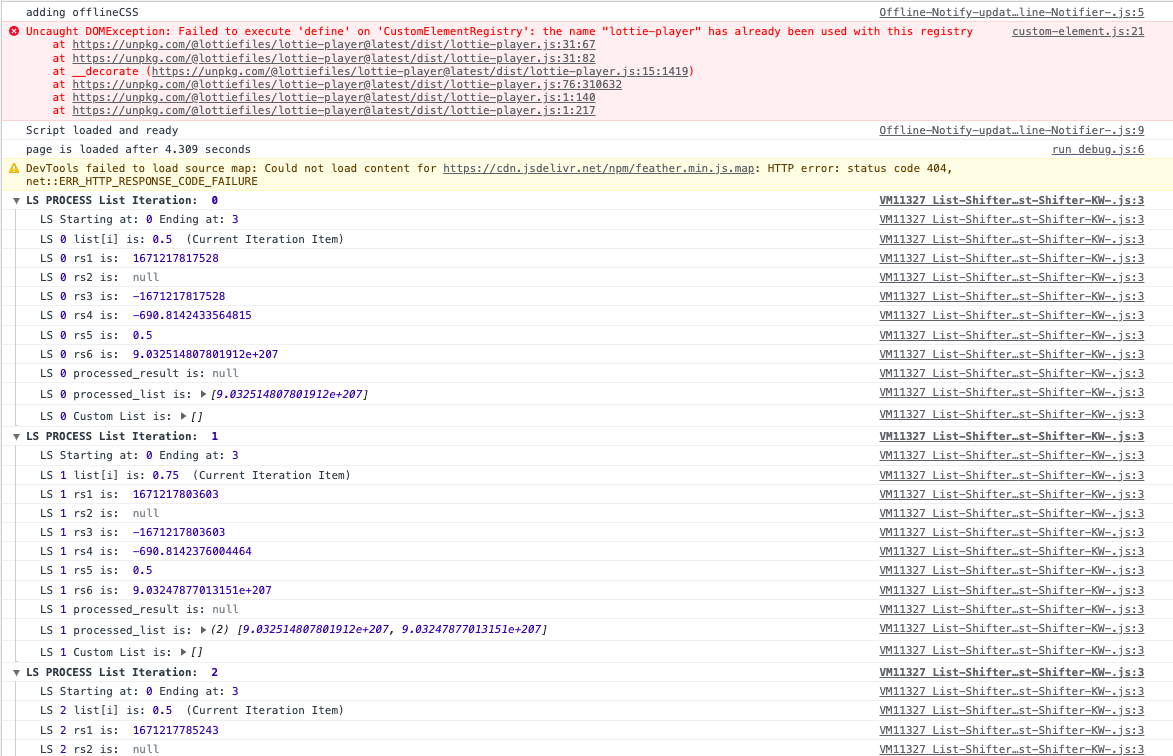
Hmm. If that Engagement ‘s Created Date isn’t empty then there’s an edge case bug there. Ima have to look at that tomorrow. Any chance you could share your editor with me over PM? (You know what to do.)
Also, good job in turning on debug mode in Process List. 