
Hey everyone,
I’ve just released a new Bubble native mobile plugin called ProgressFlow Button for Mobile.
It’s an animated progress/status button for Bubble native mobile apps. The button can move through different states such as:
-
Idle
-
Loading
-
Success
-
Error
-
Reset
The main idea is to make mobile workflows feel smoother and more native. For example, when a user submits a form, creates a thing, runs an API call, saves data, or starts a payment flow, the button can automatically change to loading, then show success or error feedback.
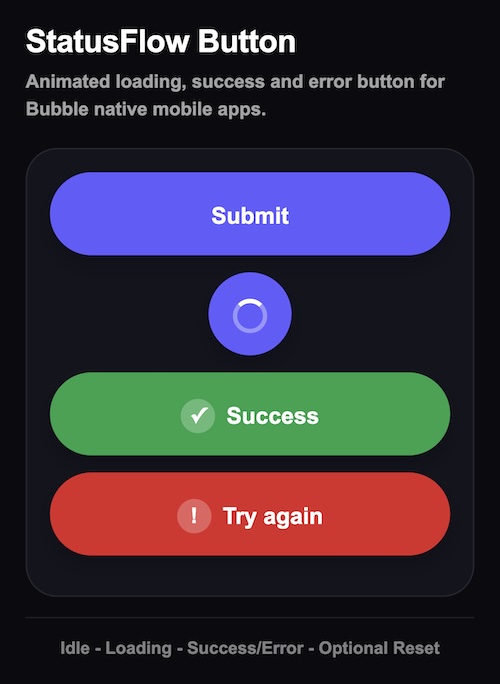
What it does
-
Animated loading button
-
Shrinks into a circular spinner
-
Shows success and error states
-
Optional auto-reset after success/error
-
Manual reset action
-
Custom labels
-
Custom colors
-
Disable after success/error options
-
Works with Bubble native mobile workflows
-
No custom state needed when using the plugin actions
Example use cases
-
Sign-up buttons
-
Login buttons
-
Save buttons
-
Payment buttons
-
Booking flows
-
API call buttons
-
Submit forms
-
Onboarding screens
Workflow example
When ProgressFlow Button is pressed
→ Create a new thing
→ Set Success only when the result is not empty
→ Set Error only when the result is empty
You can also choose whether the button should auto-reset after a delay or stay on the success/error state until you manually reset it.
Links
 Demo:
Demo:  Editor: Native Test | Bubble Editor
 Plugin: ProgressFlow Button for Mobile Plugin | Bubble
I’d love to hear any feedback, especially from anyone building Bubble native mobile apps.