This will enable you to insert dynamic data into Excel file by using tags and values with single data, lists, and custom JSON data. Go check it out and let me know what you think.
In regards to this
at the moment it is possible to insert raw (unescaped) XML, for example to render a complex table, an equation, …
With the rawXML syntax the whole current paragraph (w:p) is replaced by the XML passed in the value.
So, in your docx template you need to insert tag like {@styledXml} and in your custom json data field the text like this:
{"styledXml":"<w:p><w:r><w:t>This is </w:t></w:r><w:r><w:rPr><w:b/></w:rPr><w:t>bold</w:t></w:r><w:r><w:t>, </w:t></w:r><w:r><w:rPr><w:i/></w:rPr><w:t> italic</w:t></w:r><w:r><w:t>, </w:t></w:r><w:r><w:rPr><w:sz w:val=\"16\"/></w:rPr><w:t> different text sizes</w:t></w:r><w:r><w:t>, </w:t></w:r><w:r><w:rPr><w:color w:val=\"FF0000\"/></w:rPr><w:t>colors</w:t></w:r><w:r><w:t>, </w:t></w:r><w:r><w:t> and a bullet list:</w:t></w:r></w:p><w:p><w:pPr><w:pStyle w:val=\"ListBullet\"/></w:pPr><w:r><w:t>• First item</w:t></w:r></w:p><w:p><w:pPr><w:pStyle w:val=\"ListBullet\"/></w:pPr><w:r><w:t>• Second item</w:t></w:r></w:p><w:p><w:pPr><w:pStyle w:val=\"ListBullet\"/></w:pPr><w:r><w:t>• Third item</w:t></w:r></w:p>"}
This will give you a huge flexibility in inserting data and customizing output file.
So you should find a way to convert your formatted data into this xml format.
I am aware that implementing this solution is more difficult but at the moment is the best we can offer. We are hardly working to meliorate DocxBuilder but I cannot give you an Idea of times and results.
Let me know how it goes and if I can help you further.
Yes, it’s possible to same result by using the conditions option, like the following.
In your word template you need to insert {#ClientStatus1}Bronze{/ClientStatus1} {#ClientStatus2}Silver{/ClientStatus2} {#ClientStatus3}Gold{/ClientStatus3}
In Json-format-data field of the docxbuilder plugin, you need to insert
Essentially, the ‘conditions’ option accepts a boolean value. When composing the JSON data, you can verify whether your condition is attempted or not, and set the value of the key (“ClientStatus1”, “ClientStatus2”, “ClientStatus3”) to either false or true accordingly.
In this example, your output will be: Bronze Silver
Let me know if it is clear and you manage to implemented
Hi again ,
we have just released an important update and updated the documentation at this link:
Now the plugin supports:
Tags and values input
Json format data input
Images input
XML input
Resizing images allowed
Be careful that with the new update, the rules for the XML tag are different from what I have mentioned earlier; there aren’t many differences but make sure you check the documentation.
Hi, I was wondering if its possible to somehow inject font types that arent natively available in docx editor. For example, lets say I want to export to docx but in the font Poppins. When someone opens that docx, say in MS Word, I’m assuming Word wont know how to render Poppins. Are there any options there? Thanks much
I am inserting text in a word document from a multiline input.
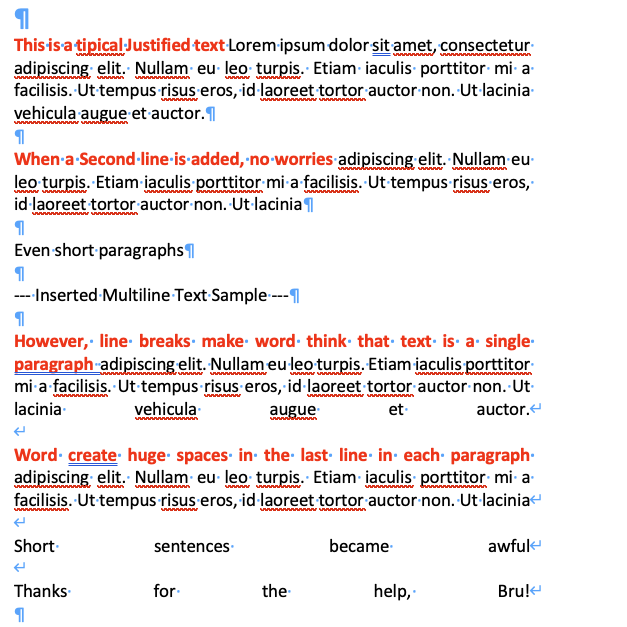
When the user hit enter on the multiline field the word document receives a line break instead of a new paragraph. This breaks the format of the justified paragraph.
Is there a way such a key press on the input, a replace action or another way to send the paragraph code?
EDIT: I think I can replace a line break with the xml code for new paragraph, but i’m not sure how to proceed. Any tip or reference to the xml?
In the latest version of DocxBuilder, using the action ‘‘DocxBuilder create word document’’ in the workflow section, If I try to replicate the issue as you indicated, processing the data using the “data: Tags/values” section of the plugin, the problem does not occur, and the text is formatted without returning an error.
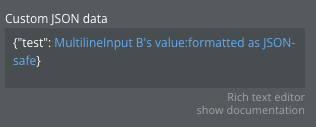
If you use the “Custom JSON Data” section instead, an easy resolution is to use the “formatted as JSON-safe” function below
Just so you know, the function ‘‘formatted as JSON-safe’’ ensures that you always have correctly formatted data.
Please let me know if I have answered fully to your question and if this is the right solution for you.
Keep in touch
Hi again,
To this day, all the features have been grouped in one action named ‘‘DocxBuilder—create Word document’’; this has been done to ease the user’s use of the plugin and enhance its features
Therefore, when you see “deprecated,” it means that further support/updates will not be provided for that action or element.
You will still have available the single features, but I suggest you to switch to ‘‘DocxBuilder—create Word document’’, as it is complete and very performing.
Let me know
Hello Bru.
There is no error per se… In a word document we have both new paragraphs and line breaks. Multiline inputs sends linke breaks that make the justified text horrible.
Ohhh!
Now the request it’s clearer for me and I’m quite confident that we find the way!
Please send me your template and a screen of your settings in bubble that generate this output:
I’ll run some tests and I’ll update ASAP with news.
Send at info@solviohub.com
Thank you so much
Hi friend,
with the last release, you are now able to justify text, eliminating the unnatural word spacing issue.
To be fear, it hasn’t been easy to manage this issue, lots of research needed but we made it.
Check the section ‘‘Adding custom classes’’ for details.
Hi, I have run some tests and if you apply the bubble formatting option “:formatted ad JSON-safe” the issue does not occur.
However, it seems strange to me that you are pointing this out to me because we emailed a few days ago regarding the problem of truncating text with spaces when applying lists through “custom states” and the solution is similar
Have you tried applying “:formatted ad JSON-safe” also on the matter just mentioned?
If yes, then I need more information to br able to support you further.
Thank you
Let me know

 Check out the plugin page: Plugin Page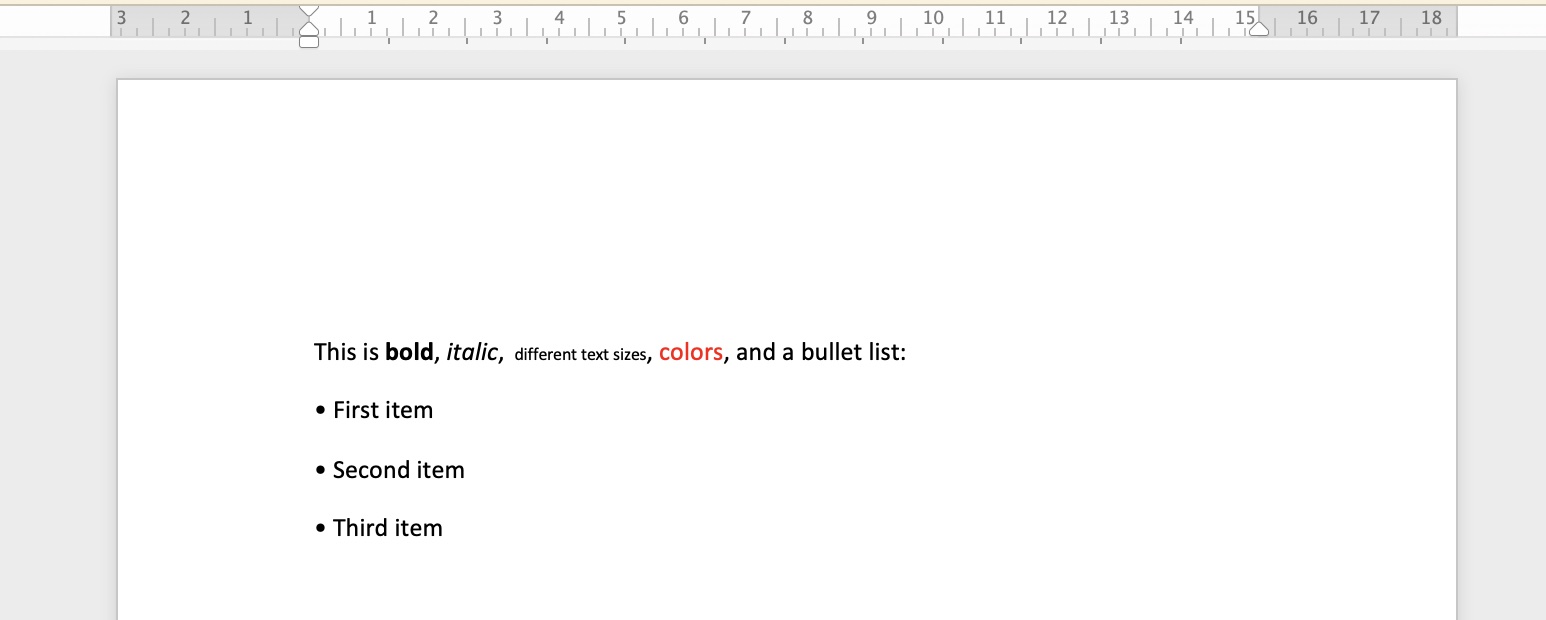





 but we made it.