Sorry for the delay in answering. This solution is not quite i need, since i need to send paragraphs to word instead of linke breaks. I’ve tried to replace json \n with \r and \r\n but it’s not working, ˆ13 and ˆp didn’t work either.
I think I need do send the ascii code 013 (carriage return) instead of 010 (line break) but i’m not reaching a solution.
I will try some changes here, and will keep you updated. If you have any clue, let me know.
If the plugin could receive \r and send the carriage return to word it would be perfect.
Hi Gilberto,
as you probably know already, by using the class:[“text-justify” , the \n gets replaced with a new paragraph. In word, a character that replaces \r, it doesn’t exist; but if you can confirm that replacing \r with a new paragraph for you is ok, we could create a class the same as [“text-justify” that replaces \r instead of \n. The \n will not be will stay the same (new line breaks).
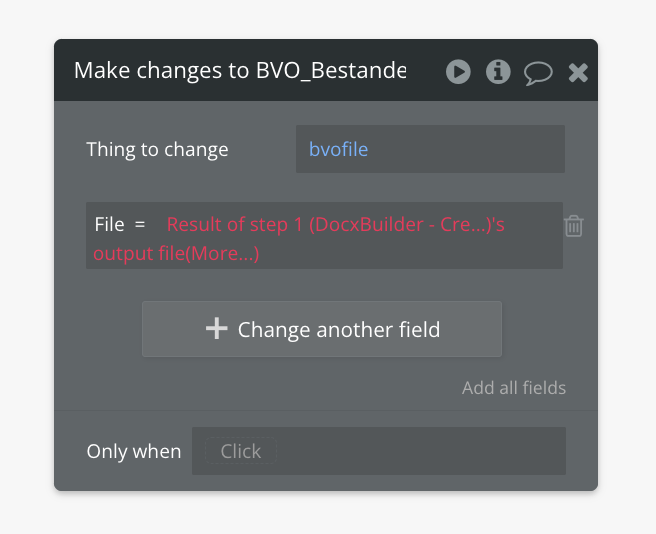
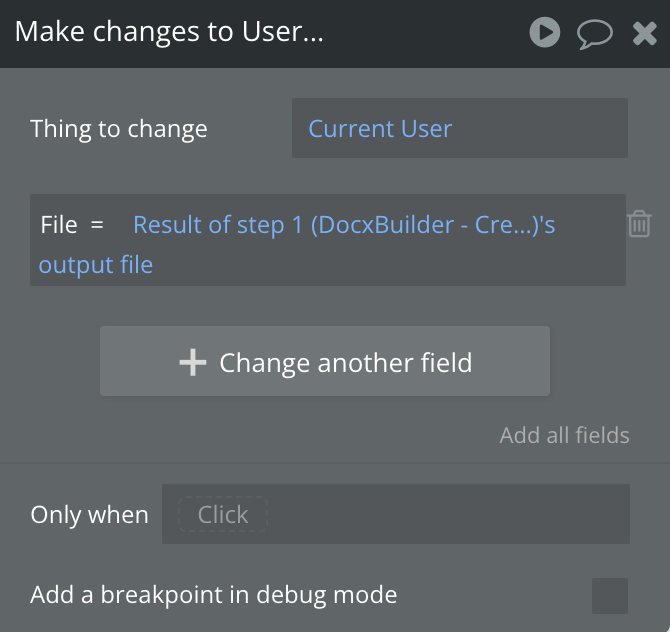
Yes, it’s definitely possible to connect the file created by the DocxBuilder plugin with an entry in your app data. It seems like you’re on the right track with your current approach.
The issue you’re encountering is likely due to a mismatch in data types. Specifically, the field in your app data that you’re trying to associate with the Docx file might not be set up as a “File” or “Text” type.
To resolve this:
Navigate to your app’s Data tab.
Go to “Data types”.
Locate the field you’ve named “File”.
Ensure that the “Type” of this field is set to either “File” or “Text”.
Here’s a visual representation of how to set the field type:
how to set a field type to File or Text in your app’s data.
Once you’ve correctly set the field type, you should be able to successfully associate the Docx file created by the plugin with the corresponding entry in your app data:
ANNUNCEMENT: NEW RELEASE Now the plugin supports “Make private file”
Hi guys ,
We’re thrilled to announce a new feature that enhances your data privacy! With the latest update, you can now make your files private directly within the plugin. Take control of your data security with the “Make private file” option.
Check out our updated documentation for more details:
Are there any videos (of the plugin in action) that show an example word document being generated and associated customization?
I think a short 2 or 3 minute video would be helpful to evaluate this plugin… as well a a longer 5 to 30 minute style video with more complexity and options would also be great.
Thanks for the kind words about the plugin! Happy New Year!
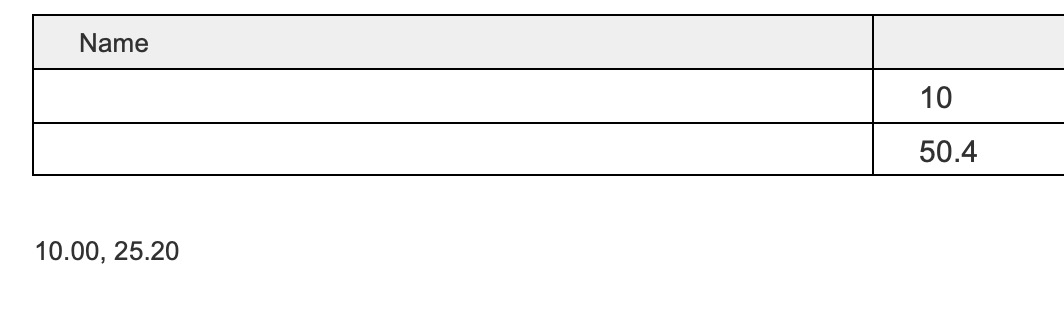
Regarding the issue with decimals being removed from numbers in arrays, you need to ensure your array is formatted correctly within the plugin settings. Please refer to the attached image for the correct configuration. This should preserve the decimal values.
Try clicking on the “Build example docx document” button and check the output. This example demonstrates the correct formatting. Let me know if you still have any issues.
Important Note: With this method, trailing zeros will only be displayed if they are present in the data retrieved from your database. For example, if you have stored a number as “11.000” in your database, you will see a maximum of three decimal places (“11.000”). However, if the number is stored as “11” in the database, the output will simply be “11”. It will not automatically add zeros.
Thanks for the answer. Actually I had to find another solution as the document took more than 20 seconds to process. But I really like your plugin. I’m sure I’ll find a way to use it in the future.
Hello
I’m struggling to create word documents using your cool plugin every time I need to display numbers with 00 in decimals after coma or at the beginning of number
in resulting document values like “4 599,00” end up like “4599” which is not ok for invoice-like documents
this how from bubble perspective looks my field
I have checked logs and from Bubble logs perspective it looks like I’m sending value with 2 decimal after coma , in resulting document they are removed
What I have tried and still no success
using “.” or “,” have same result
storing my value in Bubble like text to make sure its still “1234,00” when I’m sending it
converting number to text , text to number before sending etc
having my text in brackets like (1234,00) does works its displayed in doc file exactly the same way but unfortunately is not good for financial document
having prepend like “.” at the beginning of text field does help but again not good for resulting document if talking about financial area
by the way similar issue with zeros is happening when I used data in the filed which is like
“00123456789” its being truncated in resulting document and converted to “13456789”
I would appreciate if you could give me a hint how I can avoid this
Hello! i just added the project to my app but i have some difficulties, the editor link for the demo doesnt work and there is an example of what i want to do just there
I want the same functionality of adding products to one table
I need help
The link to the editor of the demo just keep loading

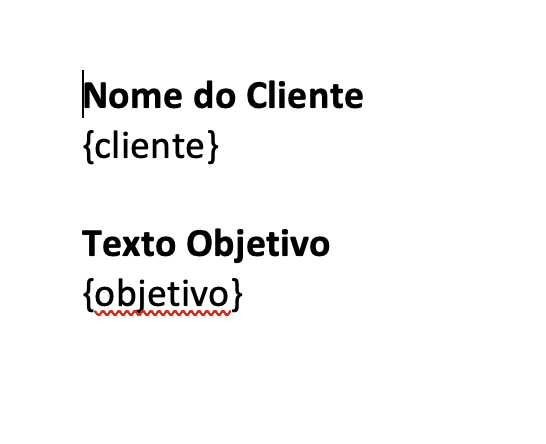






 ,
,