Date = currentDate replace date to text.splited by "/" Item1 : Converted to number replace month to text.splited by "/" Item2 : Converted to number replace year to text.splited by "/" Item3 Converted to number
There is no standard Bubble operation to convert a string to a date that I know of. However, there are plugins which can help. Such as “Text to Unix”:
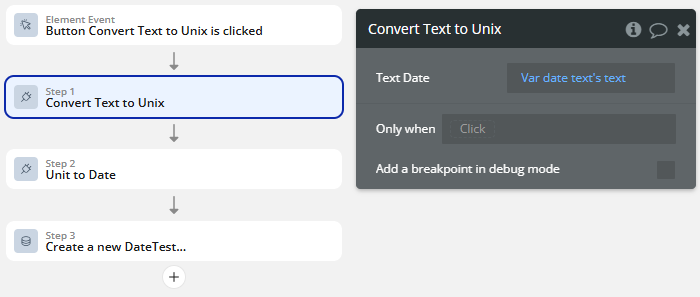
After installing the plugin, you will need to add two new Workflow steps. The first is “Convert Text to Unix”, which will convert the string you have received “01/15/2024 12:00 am” to a Unix data type.
Step by Step: Step 1: Add a JavaScript to Bubble element
Drag “JavaScript to Bubble” onto your page.
Give it a name like js_to_bubble.
Make sure “Publish value” is checked.
Set Value type to “Date”
Step 2: Add this script in a Run JavaScript action (add this action when your date is ready. Make sure to replace the date string at the end of the script by making it dynamic)
function toUnixTimestamp(dateString) {
  // Parse date string in format: MM/DD/YYYY hh:mm am/pm
  const date = new Date(dateString);

  if (isNaN(date.getTime())) {
    bubble_fn_invalid && bubble_fn_invalid("Invalid date format. Use MM/DD/YYYY hh:mm am/pm");
    return;
  }

  // Convert to Unix timestamp (seconds)
  const unixTimestamp = Math.floor(date.getTime() / 1000);

  // Send result back to Bubble
  bubble_fn_js_to_bubble(unixTimestamp);
}

// Example: Replace this with your Bubble input value
const userDate = "01/15/2024 12:00 am";
toUnixTimestamp(userDate);
Step 3: Connect it to Bubble
Whenever you have your date ready, add a workflow to “Run Javascript”
In my test, I’ve added this on the click of a button and am displaying it in a textbox, feel free to customise it as per your need
this might be useful to you, it supports plugin element for no WU usage in frontend, and a server-side action for use in backend in a workflow [🦄 New plugin] - Better Date Parser
alternatively you could try calling your own backend workflow and returning data from that as when the backend workflow receives its input, it’ll parse any date into a ‘bubble’ date
If this is on a page…the absolute simplest thing (ie: no plugins) is to just send the string into a url parameter and when saving to the db use ‘get data from url’ reference the correct parameter name and set the type to ‘date’…Bubble handles the rest.




 Step 1: Add a JavaScript to Bubble element