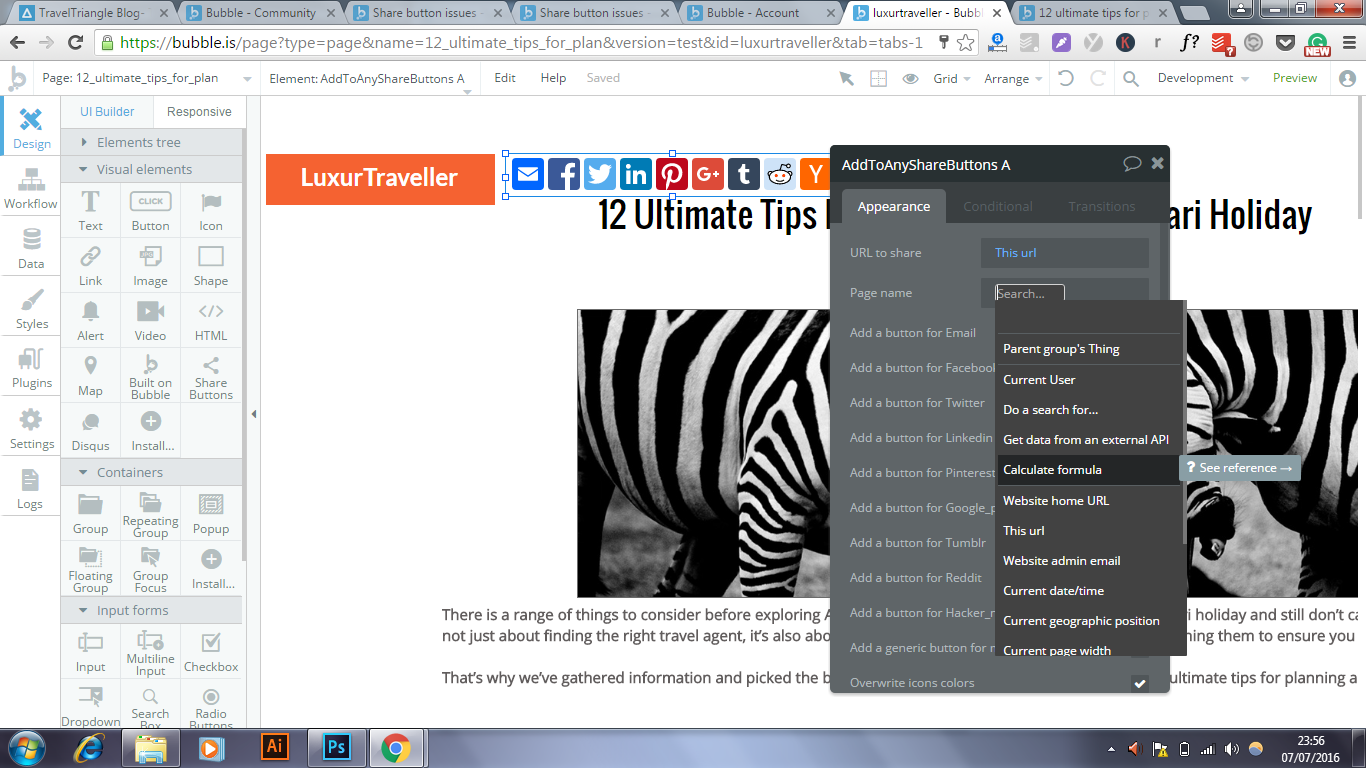
I created share buttons and intended to share the blog post i created. For some reason it does not work on and takes me back to my index on mobile. Also it shares a picture of bubbles landing page instead of a preview of my blog
Why don’t you use dynamic values for your share buttons, assuming you won’t always be blogging about 12 ultimate tips for planning a luxury safari holiday.
URL to share: This URL
Page Name: Current Page’s Blog Title
Thumbnail used for links is under Settings: Metatags.
Click on the URL to share field, select insert dynamic data, scroll to “this URL”.
Click on Page Name, and reference the title of your page in the same manner. I assume you have some sort of data called “post” with a title. Use the dynamic data to reference that title. Perhaps best to watch the tutorials again.
You probably want the current page’s blog title. However you have that set up in your database, you can navigate to that field. Is your page set to be type blog post? If so, your page’s fields will be available.
I’m not sure. is there a way to make it a blog type post? Also when i click these share buttons on desktop they work properly. But when i click them on mobile they redirect me back to my websites homepage?
Pull up the editor for your page - just click anywhere on the page that’s not an element and you’ll see your settings for the page. The field “Type of Content” is where you to set its data type. Pages don’t require them, but if you’re building a template page like this for blog posts, you’ll want to set it to your blog post data type so that you can display dynamic data (your blog posts) on it.
I just did a quick forum search with this issue - the AddToAny buttons not working on mobile, and it seems a few other people have run into it as well, determined it’s not compatible, and have possibly found a workaround:
Not sure what your goals are for your blog, but if you plan on creating many different posts with different content, then I highly suggest building out a single blog post template page that can then display your dynamic content (your posts). Right now, you have static text on this single post page that’s built specifically for this content. You’ll save yourself a lot of time and effort if you built out a template for posts and then send the post data to the page so that you only have a single blog post page and not a separate page for every single post.
For example, the big text element would just hold the dynamic text tag for content that is stored in your database instead of the content being in this element. Again, this might not be what you’re after, but thought I’d make the suggestion in case you are going for a traditional blogging site. Also would suggest doing some of the Bubble lessons on saving data and sending data to pages. For a blog, you’d have to create a CMS for yourself where you can type in your blog post in a rich text editor, save it to the database, and then be able to retrieve different posts on a single blog post page.