Any ideas of how to use the Search Bar to return only unique values? I’ve seen a few posts on this in the forum, but no real solution. I don’t want to use a Dropdown List.
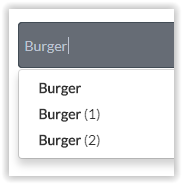
So if I look for an items e.g. Burger. It comes back with the 3 entries in my DB that has Burger allocated to it:
But how do I get the dropdown to show only 1 entry for Burger?
Thanks in advance!
@romanmg@NigelG@emmanuel - Sorry for tagging you into this, but based on the forum searches I’ve done - It looks like you’re the pro’s that may just be able to help as you answered all my other queries on existing forum posts.
Thanks for the suggestion. Let me maybe explain a bit more detailed of what I want to accomplish and be less cryptic about it And hopefully there’s an outside the box suggestion that could work!
So I upload an image to my DB. but with that image upload I have an input where up to 4 different Descriptions can be created and associated with the photo.
The Database now contains an Images as well as the 7 Descriptions. But the description TREE is duplicated with both images.
Something along the lines of:
Boy *img>
Tree *img>
Book *img>
Cap *img>
Girl *img>
Tree *img>
Flower *img>
(I’ve created my Workflow to create a line entry in the DB to assign a new row for each pic and description)
What I want my app to do now is to use a Search Bar to select one of the “Descriptions” and then in a repeating group show all the images that match the descriptor.
So if I select boy, then only 1 image will show in my repeating group. But if I select Tree, 2 images will show.
Because tree is now shown as TREE and TREE(1), I can only show 1 picture at a time. If I could somehow combine the search bar to only show the unique value once “TREE” then it will return all my images in the repeating group.
Your suggestion worked perfectly. So I had a 2nd Thing created (Tag_Table) to store the unique values and as each category got added it was saved in a new TAG as per your example (Image_Table TAGS) [Saved as text as a list].
The issue was then to use the Unique_tag “Thing” (My SearchBar) to do a search value for a Tag in another “Thing” and only return the images related to Tags that meet the criteria, It took some playing around but eventually I figured it out.
(In case someone ever stumbles upon this Thread and have the same problem)…
In my repeating group I did a search for the Image_Tables’s Images. But on the “Search For” I added 1 Constraint:
Tag contains Tag_Tables’ Unique Tag Value
And that seems to have resolved the matter. Thanks @davidyjackson.
Now onto my next issue… trying to figure out why my Repeating Group only displays Images IF they are set to “:Random Item, :First Item or :Last Item”. URGH!

 And hopefully there’s an outside the box suggestion that could work!