Hey everyone,
I’ve set up a Stripe webhook in my Bubble app to trigger when a checkout session is completed. Everything works perfectly in development mode — the webhook fires, the data is received in Bubble, and my workflows run as expected.
However, after deploying to live mode, the webhook doesn’t seem to fire or trigger any workflow actions. I’ve double-checked several things but still can’t pinpoint the issue.
Here’s what I’ve already verified:
 I created a separate live webhook endpoint in Stripe, pointing to:
https://myapp.bubbleapps.io/api/1.1/wf/stripe_checkout_completed
I’m using live Stripe API keys for the checkout session (IDs start with cs_live_…)
Backend workflows are enabled in live mode (under Settings → API)
The endpoint is public and exposed as a POST API workflow
I’ve deployed the app from dev to live after making the webhook
I already created the webhook both for the live and test mode on my Stripe dashboard
Stripe shows no delivery attempts or successful webhook logs for the live endpoint
Has anyone experienced this issue where a Stripe webhook works in development mode but not in live mode?
Is there something specific about Bubble’s live deployment or webhook setup that I might be missing?
Any guidance or troubleshooting tips would be greatly appreciated!
If the event logs in Stripe aren’t even showing any attempts, then, I’d troubleshoot that first.
- Are you seeing other evidence that a live checkout session was successful? Check your transaction, customer, subscription, etc. tables in the Stripe (live) dashboard.
- Make sure the live webhook is correctly set up with the right event type (checkout.session.completed).
- Make sure the live webhook is actually “active” in Stripe.
- Try re-creating the live webhook in Stripe from scratch (rather than copying from test).
I think you misunderstood, my logs in live stripe dashboard are showing
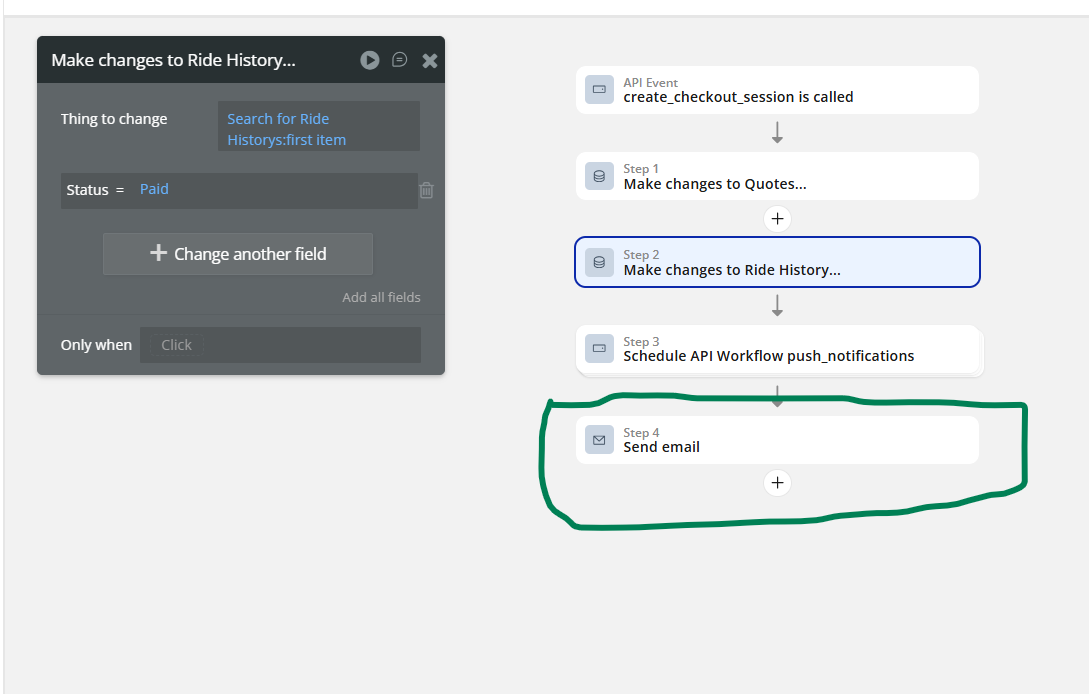
When the webhook is received on bubble, some backend worklfows are supposed to fire but it doesn’t(it works perfectly on the test version though) as seen in the screenshots
(1)Yes, i’m receiving the events on my live stripe dashboard
(2) Yes, the event it’s listening to is when a “checkout session is completed”
(3) Yes, it’s active as seen in above screenshot
(4) I didn’t copy from test, was recreated from scratch just by copying the detected data of the url the webhook sent to bubble on the dev version and i just removed “version-test”, let’s see what happens, will repeat the process once again if something changes
I see! OK, what do your server logs say? Go to Logs > Server Logs > Advanced > Enable “Error running API workflow” and also “Request for API Workflow”
Check for around the time a webhook is sent, and see 1) if you spot anything unusual in the incoming Stripe data and 2) if there are any error messages
Are you on a custom domain? If so, is your webhook URL in Stripe pointing to the custom domain or the Bubble hosted domain? I’m pretty sure it works with either, but could be worth trying to change to the the other if your app is connected to a custom domain.
It does, though POST requests to bubbleapps.io stop working if you move to a dedicated plan
That’s a new one!
Although an app i recently completed still works with posts requests to bubbleapps.io on the live version(same webhook functionality) after i moved to a dedicated plan
so i should just remove the “bubbleapps.io” and try it again right?
Although the same issue later occured on the dev mode so i had to redo the webhook again and it was then working on the dev mode, was actually waiting on the client to join me on a video call so that we could test the live together so lets’s see
If it doesn’t work, i will just remove the bubble domain then
@georgecollier @romanmg
Also forogot to mention that the webhook detected data, the website is spelt as https://uflex-37164.bubbleapps.io/version-test/api/1.1/wf/create_checkout_session/initialize
On the website url itself, the domain name: it’s spelt as “ufleex” with a double e
Remove /initialize from the webhook URL after initialization
already did on the stripe dashboard
funny thing is that that email notification actually fires but the make changes to a thing does not
If the send email action is firing, then seems like the issue is in that “Search for Ride History” expression (and/or in step 1’s change to Quote if step 2 is dependent on it). The Ride History record is not being found.
What are the search constraints you have for the Customer and Driver “Search for Users” within “Search for Ride History”?
Turns out what @georgecollier said earlier about post requests to bubbleapps.io stops once the app is on a dedicated plan
Once i remove the bubbleapps.io, it began working and just copied the destination url for the live stripe webhook directed from here