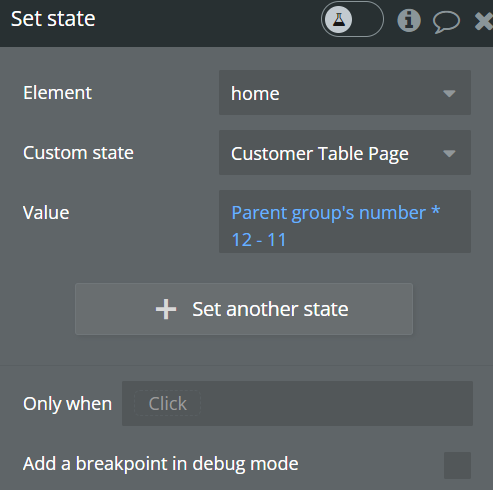
I just had to share this with everyone and hopefully it helps. I was stuck with the dilemma of trying to paginate a table so I started watching a planetnocode video (great videos by the way). He had a great work around that i adapted for my own situation. I have a table and I’m focusing on a zfold 5 aspect ration, so i only wanted 12 items to show on one page. After some excel mind bending, I found a way that appears to work.
First I created a custom state on my page like Matt from Planetnocode did
Then set up my table source to take the current state value and add 12 basically
Set up a pagination group using the toolbox plugin, created a workflow and used the repeating group cells current number as a multiplicand and then subtracted 11 from the product
Then to change the color of the pagination so users know which one they’re on, I created a conditional statement that when the current cells list number equals the state number minus the list number divided by 11 plus 1
And it works. So maybe someone can decode what I ended up doing and use it for themselves or make a free plug in? wink wink haha
2025 update. It takes some time for me to find the solution. So, I’m sharing on this relevant topic to save some time to others. What you can do now to implement Table pagination in Bubble:
- Go to “Row repeating” of the Table element. Check “Set fixed number of repeating rows“.
- Add a “previous” button. Add a “Go to page of a repeating group or table“ action to Button’s click. Set the page to go to: “Table’s page number minus 1“. Set a conditional “When Table is on the first page → This button isn’t clickable“ to this button, so it’s disabled when the user is on the first pagination page.
- Add a “next” button and set “Table’s page number plus 1“ and “When Table is on the last page → This button isn’t clickable“ instead.