Cross-region copy is not supported by underlying Wasabi system.
It depends whether you update (same UUID) or copy/delete (new UUID) the record in your database.
This UUID is generated by Bubble’s database, you have no control over it.
Cross-region copy is not supported by underlying Wasabi system.
It depends whether you update (same UUID) or copy/delete (new UUID) the record in your database.
This UUID is generated by Bubble’s database, you have no control over it.
Good to know 
Sorry I didn’t mean the Bubble unique id, when you upload a file one of the results from the “This WasabiDropzone’s Current File” is UUID

Right now just as a precaution I’m saving it in my database in case it’s needed for reference, but is this UUID something Wasabi generated? If so then after the Copy/delete method the file’s UUID needs to be retrieved again and save in the database?
No. The file’s UUID is generated by the Dropzone element without any relation to Wasabi’s storage. Said differently, this UUID is available only from the front-end element, not on back-end actions.
Therefore UUID will not change by using the copy or delete actions, which are back-end actions.
When you do “Put file to Wasabi” is limited to 22MB both serverside and on the clientside verison? And is the MIME type required or can it autodetect it? My existing storage solution I’m trying to see how to get all URLs and re-put them in Wasabi so the file’s can vary in file type, size , etc.
Only server-side. client-side does not use this action in the demo.
Optional as per the stated documentation. It is mostly auto-detected, however I encountered some cases it defaulted to application/octet-stream. If you wonder why sometimes the browser downloads instead of opening the image for instance, that’s a wrong MIME type.
If you require a more robust approach, I would recommend:
Hi , I would like to know if you have a video explaining all the steps to connect the plugin to wasabi and make the file upload work, I have followed all the steps of the description and it doesn’t work for me, I don’t know what I’m doing wrong. I don’t have much time on the platform, so it would help me a lot if you have video information, greetings and thank you very much in advance
Hey @proteuscrypto!
No video is available yet, however we are sure that the implementation of the demo will help you to pinpoint your issue!
Remember that you can copy paste the workflows or pages from the editor to your app 
Lastly, make sure that you have no warnings on your app editor and check the console for errors.
Please find the link here:
done. Thank you very much, the information helped me a lot, Another question, how can I download a file from the bucket?
I do “Generate presign download URL” then use a download a file plugin with the link from “Result of step 1”. Right now I think his uploader doesn’t upload public files so you can’t do the direct link.
Correct @tylerboodman !
Public file support depends on bucket policy, not plugin 
I tried setting the bucket to Public Override but it didn’t make a difference. On the Zeroqode plugin there was a dynamic yes/no field to make the uploaded files public/private.
@tylerboodman , @proteuscrypto ,
The “Set File Public Access” action has been added to the plugin.
@redvivi @tylerboodman Is there any way that the link that is obtained from the result of (GET UPLOAD PRESIGNED EXPIRING URL) never expires? because I am using it to display products in an image marketplace.
With his new update today you can add the action after the upload to make the file public, so you can use the direct link to the file instead of needing to generate presigned links. I would only do this if the files aren’t confidential and someone from the public will be able to copy/paste the link.
The direct URL path is
“https://s3.[region].wasabisys.com/[bucketname]/[filepath/[filename.ext]” In the Wasabi console it shows the direct link when you click on the file
@tyler11 @redvivi
mysportfile1.bubbleapps.io/version-test/

you get this error when you use (GET UPLOAD PRESIGNED EXPIRING URL) ? because at times everything works fine for me and at another it gives me that error !!!
Whats your expire time on the presigned URL? @redvivi does Wasabi have a max time limit?
@tyler11 less than 7 days, which indicates the documentation
Please make sure you are using GET DOWNLOAD PRESIGNED EXPIRING URL. The GET UPLOAD PRESIGNED EXPIRING URL action is used for the Dropzone element to upload the file.
What the documentation says. Please refer to Troubleshoot expiration of presigned URL for S3 bucket before expiration time | AWS re:Post
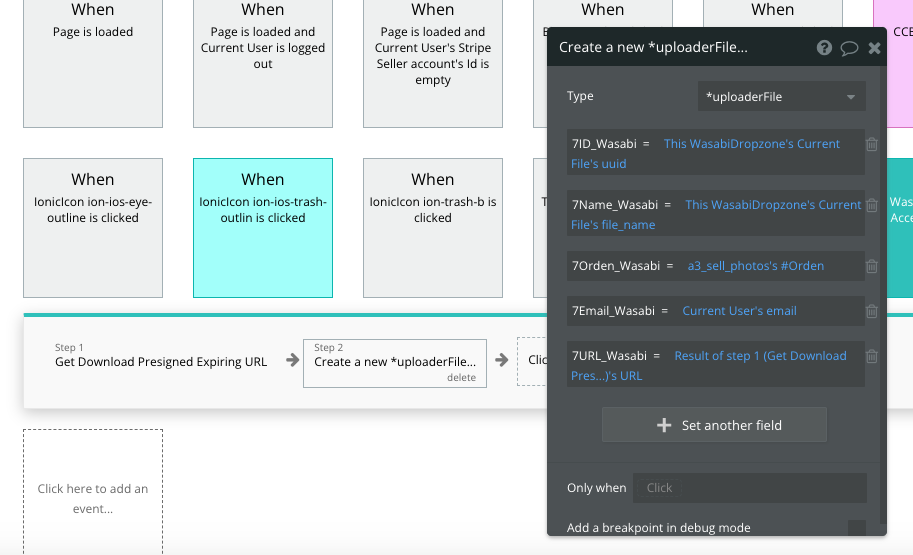
Hi, first I want to thank you for your excellent responses, they helped me a lot. Today I could see that they made changes in the plugin, could you tell me how to disable the expiration time option in (Get Download Presigned Expiring URL) . Attached to this message I send you an error that is being used (Get Download Presigned Expiring URL) . I didn’t get that error before.