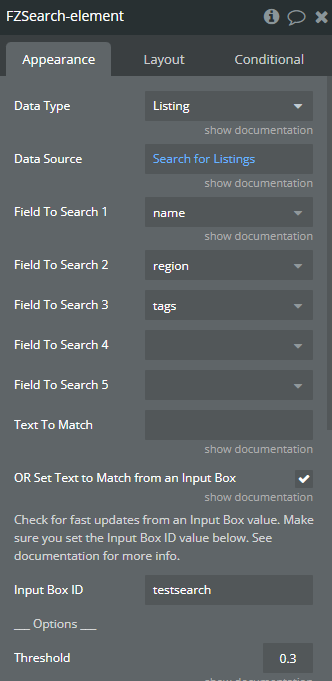
The ZQ search and autocomplete plugin needs input from a regular “input box” for search queries. Unless I’m missing something, when a user inputs values, there is no dropdown list of matching results to help the user autocomplete their query. I tried building one with a GroupFocus, but I can’t readily parse the Search&Autocomplete Matches results because they are pulling from 5 different text fields on the Thing.
Didn’t get it.
What do you mean by: “can’t readily parse the Search&Autocomplete Matches results because they are pulling from 5 different text fields on the Thing”
The plugin search through all the 5 text fields in your database based on the input’s value. But the result is only the data type you selected.
Can you add screeshot of your setup/issue please?
Indeed, the search and autocomplete do not create a dropdown with the list of results. But as you say you can build your own dropdown with GF and a RG of the same data type of your search.
Yes, close enough. Thanks so much Eliot. Looks this is achievable. How did you extract matched words from different fields on the same datatype from a regular input box query linked to ZQ fuzzy?
In your example, if a user searched “ar” on a booking site, the suggested searches would be Paris (city) or 3rd Arrival (accommodation) or even Early Arrival (feature/tag).
Then I could build a drop down into a GF and click one of those to autocomplete the searchbox with say “early arrival”.
Fuzzy Search setup to search listings based on the input’s value and the different text fields in the Listing Database. Note that you cant search on list of text fields with Fuzzysearch. That means that for search tags, your tags field must be a single text. Same problem for the region/location that cant be a geoloc field. A (quick & dirty) workaround would be to duplicate the field to have one with the proper data type and one on single text. Here the setup and a look at the database example:
One Repeating Group (RG) with the Fuzzy search matches as data source (and data type listing). Inside this RG, the different elements of the listing: name, region, tags.
(To be optimized) Conditionnals on the different elements inside the RG to find if the input’s value is in the text displayed. And replacing the input’s value by a bold/colored version of the input’s value:
You can definitely create a custom dropdown with a GF to fill the input’s value with the GF row clicked. To do that, I would create a custom state and put the input’s default value as this custom state value. So when the user click one of the GF row, it sets state and reset the input to show the custom state value.
Holy moly thank you so much. I can see this will work. I had a feeling it was a RegEx solution but I couldn’t get that operator to pull up at first. I really appreciate it Eliot.
ZQ should think about adding this feature to the plugin. It helps the user understand WHY a search result became a search result.
This is indeed a great use case, and thanks to @eliot1 for the detailed explanation
We’re glad to see this has been resolved, but if you have any questions or concerns about the plugins, feel free to contact us via email at support@zeroqode.com!