
Ok here is how it works:
The global element tree:

-
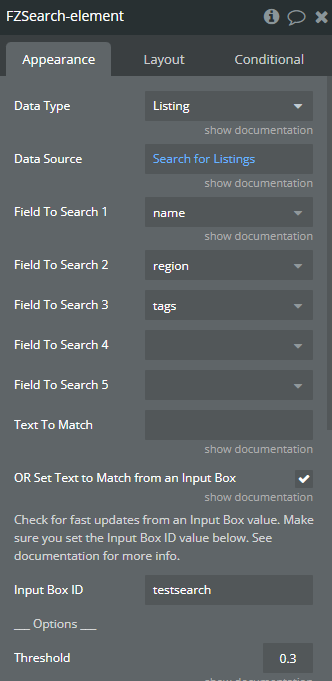
Fuzzy Search setup to search listings based on the input’s value and the different text fields in the Listing Database.
Note that you cant search on list of text fields with Fuzzysearch. That means that for search tags, your tags field must be a single text. Same problem for the region/location that cant be a geoloc field. A (quick & dirty) workaround would be to duplicate the field to have one with the proper data type and one on single text. Here the setup and a look at the database example:
-
One Repeating Group (RG) with the Fuzzy search matches as data source (and data type listing). Inside this RG, the different elements of the listing: name, region, tags.
-
(To be optimized) Conditionnals on the different elements inside the RG to find if the input’s value is in the text displayed. And replacing the input’s value by a bold/colored version of the input’s value:


You can definitely create a custom dropdown with a GF to fill the input’s value with the GF row clicked. To do that, I would create a custom state and put the input’s default value as this custom state value. So when the user click one of the GF row, it sets state and reset the input to show the custom state value.
Hope it will help you 