
Hi, so I’m trying to make a participants list that shows the list of users currently on a certain videocall. Is there any way to do this? I tried doing it by creating a separate list data type which would be updated whenever someone joined or left a call. The problem was that I couldn’t get it to account for when a person left a call by just closing out the browser rather than using the exit videocall button. Any ideas?
Hello, @justind2022
Thanks for using our plugin.
We have tested the ability to remove the user from the list of users in case of a simple browser closing with our plugin. Allow us to mention that it is possible with the new plugin element - Agora RTC.
Thus, first of all, we recommend you upgrade your plugin to the latest version.
In order to create a required scenario, you need to use the following event:


Also, please note that the user will be removed from the list of participants not immediately. Unfortunately, this process is related not only to the plugin but to the Agora platform and Bubble possibilities.
The user is closing the browser, in few seconds it will be removed from the Agora base, and in a few seconds after it, it will disappear from the Bubble database, and as a result, from the list of online users.
Hope this solution will help you.
Best regards,
Zeroqode Support Team
1 Like
Great looking update! Seems like screen sharing got added in too which I’m pretty hyped about. Time to get to work implementing it in. Thank you!
1 Like
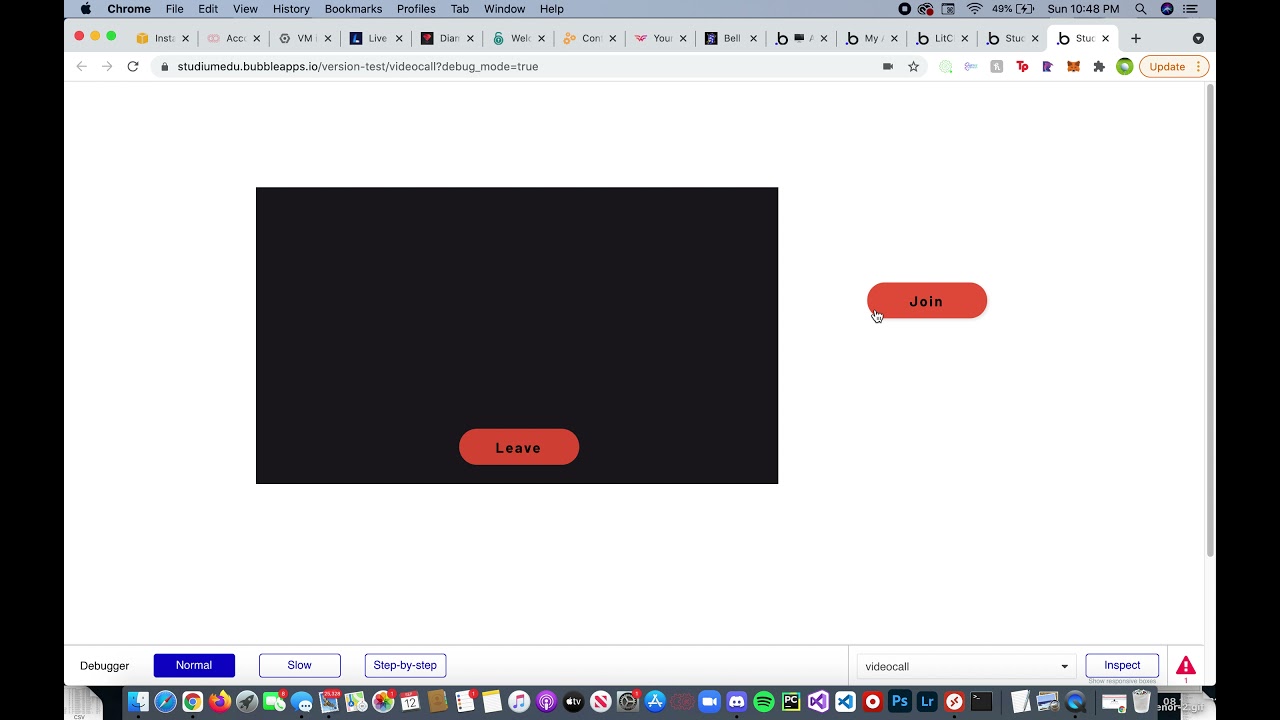
So upon trying to implement in the new system, I ran into an issue. My setup for the videocall system is that when the join button is hit, a group is made visible which displays the groups showing the call. However, there is an issue where the video will not activate the first time the join button is hit. It only activates once I hit join, have the video group pop up, hit leave to close the video group, and hit join again. This is also only an issue when the workflow is ran at the normal pace, as when I run it with the debugger on slow, the video shows up fine the first time. The old connector had this same issue as well, but I was able to work around it by placing the connector outside of the video group but cannot do the same this time due to this new connector also being responsible for playing the local video. I’ve also tried multiple different methods of showing the group including using the show action, states, etc to see if it might make a difference. When using the show/hide action, I get an error on the first time hitting join and attached an image of that error as well. However, when I go through that close and reopen process, the video works fine every time after, just not the first.

Could you help me with this? Not sure how well I was able to explain it, so I attached a picture of what the workflow looks like as well.

Did screen recording of what is going on and uploaded it on youtube. Hopefully it will help show what is going on. The black screen that pops up is the videocall working. I just had my camera covered so it wouldn’t record me.
Hello, @justind2022
Happy to hear your appreciation. 
Please allow us to mention that appeared issue is related to the fact that the platform does not have enough time to load both the group and the conference at once. So, in case you want to place the plugin element in the Group, you should Add a Pause before the next action here:

Please try it and let us know about the result.
Best regards
Zeroqode Support Team
1 Like
Hi, i’m try to implement agoraConnector, in a simple application, but when i try to connect make a double connection. In my phone this bug doesn’t happens.

In print has only my computer and my phone connected in room (The blue screen is my computer)
Think that solved it, thank you!
1 Like

Hello, @bubble40
Thanks for reaching out.
In order to investigate your case in more details and provide you a specific solution, please share with us all information like:
- screenshots with the settings of the plugin element and shape, where the conference is displayed;
- error screenshots from debugger and browser console;
- how to reproduce your issue ( which information you use, where it placed, detailed steps for reproducing the issue);
Looking to hear you soon.
Best regards,
Zeroqode Support Team
Hi @ZeroqodeSupport , I have sent you several messages through your Zeroqode forum but apparently you don’t want to provide support there, and did not answer any of my messages. I implemented exactly your demo/workflows for the live streaming plugin. It doesn’t work for my “stream-host” and “stream-audience” pages, could you please have a look at my app? My page “stream-connector” is actually working (which means my Agora API is running with my account/plugin on Bubble. I literally copy pasted your pages, but when I enter a name and click on Start Stream on my “stream-host” page it does not start any stream. Phonotribe | Bubble Editor
I precise here: i just need the live streaming feature, not video conferencing - my use is to host DJ set / one-way streaming to multiple users that watch the live stream. I also need the cloud recording to record the streams. I have implemented all this in my 3 pages, “stream-host”, “stream-audience”, “stream-connector”.
I would really appreciate you check and help me run this plugin. When you sell a plugin on Bubble’s marketplace you are entitled/required to provide support to bubblers so that the plugin works. And i already wasted a lot of my time with this plugin, which cost me way more that the small upfront $40. Thanks for your help
Hello, @quentsb
Thanks for reaching out!
We are terribly sorry for this inconvenience, but unfortunately, we haven’t found any post from you on our Zeroqode Forum.
As we strive to provide the best support for our clients, we never leave our users’ requests unanswered
In order to improve your user experience, and help with the plugin, we will check your application and will revert to our feedback at the nearest time.
Best regards,
Zeroqode Support Team
Hello, @quentsb
Allow us to mention that we have checked your application and have a few suggestions for you.
First of all, please note that not so long ago we upgraded the plugin and created the unique element both for the Streaming and Conferencing actions. The new component is called the Agora RTC and you can find it in the plugin’s tab:

Docs for AgoraConnector element based on version 4.5 please check here: https://docs.zeroqode.com/plugins/agora-streaming-and-video-conferencing.
The Demo Page for the new Agora element is ongoing, however, documentation is pretty detailed.
In case this option is not convenient for you, allow us to recommend you to Generate the Token at the beginning of the workflow. Please find the example from the Demo Page:

As we can see in your workflow, the Token is not generated correctly:

Please try to generate the Token firstly and let us know about the result.
Looking to hear from you soon,
Zeroqode Support Team
1 Like
Hi there, (honestly i think you really should allow PMs, to avoid polluting others in a same thread).
I have updated my app with Agora RTC instead of Agora Connector. It works fine for the streaming Start/Stop function. But I have several questions to allow my audience accessing the stream and joining/leaving it + enabling recording. As you can see in my app I just kept 2 pages for simplicity and per the RTC requirement: “stream-host” and “stream-audience”.
1/ How my users/audience can access the respective “stream-audience” page for the stream, what URL should I provide, and how I make the link between “stream-host” and “stream-audience” in the WF so that my stream-audience page is displaying the right live stream?
2/ Could you check that my RTC and StreamingComponent elements are fine in this “stream-audience” page so that we are sure this is set up correctly?
3/ Back on the “stream-host” page, when I started a new stream, the camera/audio launches properly and the stream is starting (stopping is OK as well). However, the “camera popup” is not opening to enable me select my camera as host, why? Plus, what about the recording, it does not launch when I click on the button, could you check it as well?
Hope you can get into my workflows to really see what I did. I basically, once again, copied your demo page, so should be very close to working mode.
Thanks
Hi, thaks for the support, this pictures represent what you asked for.
Talking about how to reproduce this, idk how to reproduce, In my application in any scene this bug occurred, but only with double computers, if i try in mobile, that didn’t happen.


Hello, @quentsb
Glad to hear that you upgraded the plugin version.
Firstly, allow us to mention that we can’t see your workflow due to the fact, that you just provided us the link for your app. Thus, we kindly ask you to add our Support Team email to the list of collaborators to your application and provide us a link to your application. This will allow us to check your settings and workflow.
To add our Support Team as a collaborator, you need to do the following steps in the Bubble Editor:
Settings > Collaboration > Add email support@zeroqode.com
Note: avoid the warning message regarding the plan, as we are an agency and you can easily add us to your collaborators.
Plugin elements are setted correctly on both pages, however, please delete the old plugi element from the “stream-audience” page:

In case you are using the Agora RTC element, only it should be used, as it mentioned in the documentation: https://docs.zeroqode.com/plugins/agora-streaming-and-video-conferencing
In order to continue the investigation of your app, we need access to your application
Looking to hear from you soon.
Best regards,
Zeroqode Support Team
Hello, @bubble40
Thanks for the details.
Firstly, please allow us to recommed you to use the new Agora element - Agora RTC.
Please find the detailed documentation for the new element here: https://docs.zeroqode.com/plugins/agora-streaming-and-video-conferencing#introduction
There are certain factors that affect the plugin’s workload possibilities such as Bubble application plan, user’s connection bandwidth, type of connection, and Agora limitations related to device and browser / OS version. Please follow Agora’s and its plugin’s documentation carefully to properly configure the plugin.
So, the reproduced error can be reproduced for one of these reasons. In order to avoid it - we propose you use the new plugin element, which can be found in the plugin’s tab:

In case we can assist you with some additional information - please be free to contact us.
Best regards,
Zeroqode Support Team
Hi 0-Code,
I have deleted the StreamingComponent replacing by Agora RTC Audience, and corrected the workflow.
Also I have added your email address as view and edit on my app. You can have a deeper look on my workflows and database. Indeed I would like to enable cloud recording, saving some data on the Agora Viewers, to have some trackrecord of the live streams. Let me know how to make the link between “stream-host” and “stream-audience” pages so that the viewers access the right URL to access the stream (since the “stream-audience” page is not a stream thing page with a slug that we could generate for instance, therefore a static URL to provide to viewers). I also need to be able to start recording the stream (the recording feature is all set on my “stream-host” page, but i cannot trigger it). Thanks for checking!
Hello, @quentsb
Thanks for the provided access!
Allow us to note that you can create a button, there will be an option to see the stream as an Audience. So, by pressing the button, your user will be redirected to the page for the audience.
There are two possibilities to divide the URLs: to indicate the parameter in the URL and to save the title in the DataBase. However, the option of redirecting through the button can be more convenient.
As for your settings, please take into consideration that using the “Generate Agora Token” twice on one page can affect the correct plugin work. So, you generated the token on the “page load” event and after it, generate the token after starting the stream:


Additionally, we would like to note that the camera works properly. So, we were able to test the streaming within the app.
Allow us to mention that some steps in configuration recording were missed. The initial content, as an example, uses the custom state “Temp. token”, but you don’t trigger this state through your workflow.
Thus, please check one more time documentation for the recording in order to resolve it: https://docs.zeroqode.com/plugins/agora-api-connector-plugin/agora-streaming-component/agora-cloud-recording-for-streaming-component
In case you will face additional difficulties - please let us know and we will be happy to assist you.
Best regards,
Hi thanks for your answers but you don’t help me much, sorry.
1/ about the “generate new token” twice on the page I 've corrected it. Please note that currently on your demo page you have 2 generate new tokens, so correct your demo page beforehand (as i told you I COPIED your workflows). Make sure your demo page is fully correct, currently it is not. And your “documentation page” there is almost nothing in in, apart from the Agora account set up. Not very complete content honestly.
2/ about my page “stream-audience” sorry but what I need is a separate URL link to provide to my viewers, I don’t want them to access the stream host page and then move to another page. I want a direct and closed URL link with the video and basically only the possibility to Join Stream and Leave Stream (no any other button or feature). So having a button “see as audience” is not at all what I need (and any streamin app would need). We need 1 page for the host with bunch of CTAs (“stream-host”) and then a simple closed page for the audience and thousands of users (“stream-audience”). What is your solution so that I can have a proper audience page with URL to provide to my users? (I need to generate an URL from my “stream-host” page with the Input of the name live stream" as slug, which I can provide to viewers so that they access only “stream-audience”).
3/ about cloud recording, your document is pretty limited. You don’t help me at all. I COPIED your demo page workflows, so if there is state trigger missing, should be the same in your demo page? Could you assist more clearly?
Thanks