Today I experienced a weird glitch that goes like this:
1 - I’ve built many functions with elements inside a general group that often referencing a custom state stored in the page level.
2 - I’ve created a reusable element from the mentioned group and replaced the now-old group with the brand new reusable.
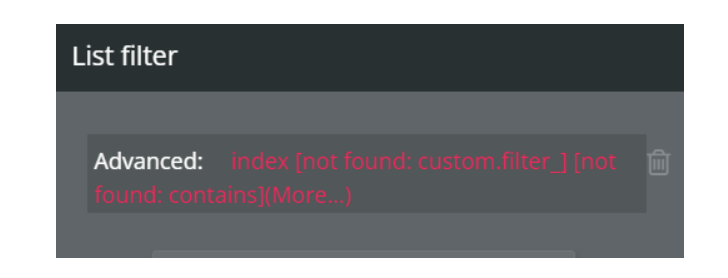
The issue: - 24 of my custom states references came back with the error saying that it cannot access the custom state, because it is not presented in the reusable but rather in the page this reusable had been placed back into.
The fun part: besides all the error, all function works as intended on the newly replaced reusable element like magic. There’s no issues in the version-test at all, everything works like before.
Of course it doesn’t allow me to deploy because of the 24 issues, but I’m surprised it works at all because in theory it shouldn’t.
It’ll be so cool to find a workaround for this problem and just let us pick a page (or a different reusable) when it comes to conditioning elements or workflows in a reusable that’s outside of it’s borders. It clearly is capable to use the previously set conditions (despite the error blast) but we just don’t have access to it right now.
It is indeed strange that it works. Because it shouldn’t. It probably doesn’t work on other pages, since custom states are at the page level and not inside the reusable…
It doesn’t work at all! I’ve duplicated the whole page with the same reusable and everything but the list (that comes from the custom state on page load) is empty on the new page.
you deleted something in the expression (ie you removed an option set value or deleted a field on a table) and then ran “clean up my app”
bubble has weird delete behavior - basically nothing is ever actually hard deleted but there are 2 levels to soft deletion
soft delete in the app editor
soft delete in cleanup my app
but the fields/options and data still exist unless you contact support to actually hard delete them
so in your case my hunch is that something was deleted, it still works in the original place because the data still exists even though you can no longer see it or access it, but when you try to replicate it on a new page the new page has an issue because the data can’t be accessed because it was “hidden” from the editor.
often no errors show until you run “clean my app” and then later visit a page or reuseable… then magically there are errors that appear when the fields/option sets are rechecked on editor page load
the original logic will still run correctly and the original expression will still evaluate because technically it’s all still there - you just can’t access it in the editor anymore
That is too be expected because the custom state reference from dynamic expressions is to your page custom state, not that on the reusable. They would most likely have identical names if the custom state from page is on the group converted to reusable and not the page itself, but if the custom state was on the page itself, it is very likely you have not added the custom state to the reusable and remapped all logic to use that custom state instead of the original.
Using the convert to reusable element on a group will not bring all custom states from other elements (ie: the page) into that newly created reusable element unless those custom states are on the group or the child elements of that group.
See that ‘index’ portion, it is the name of the page your group was on at the time you converted the group to a reusable element.
that ‘not found: custom.filter’ is the name of the custom state you had on your page index that the group you converted to a reusable element was using and that final ‘contains’ that has ‘more’ after it is likely referencing a custom state list on the page as well or a list on the page that is not in your reusable element now.
You just need to make sure you reusable element has the same custom state as the page and you remap all expressions in the reusable to use those custom states instead of those from the page.
As to the ‘why does this work?’ part, I don’t know, but clearly it doesn’t work since the reusable only works on the one page, and not others, which is most likely due to how IDs in Bubble work to reference data types, custom states and everything else, so despite the red dynamic expressions and warnings in issue checker (needed as you need to fix some expressions), when you preview this from the index page, Bubble still has those IDs on the page, but if preview another page, well, those IDs do not exist on the other page and things do not work.