Hi everyone,
I’m building a mobile app using Bubble’s Mobile App Builder and have run into a confusing issue regarding date and time handling, especially with timezones. Here’s what’s happening:
- I use two Date/TimePickers: one for the date (Input type: Date) and one for the time (Input type: Time), as the mobile builder doesn’t support selecting both at once.
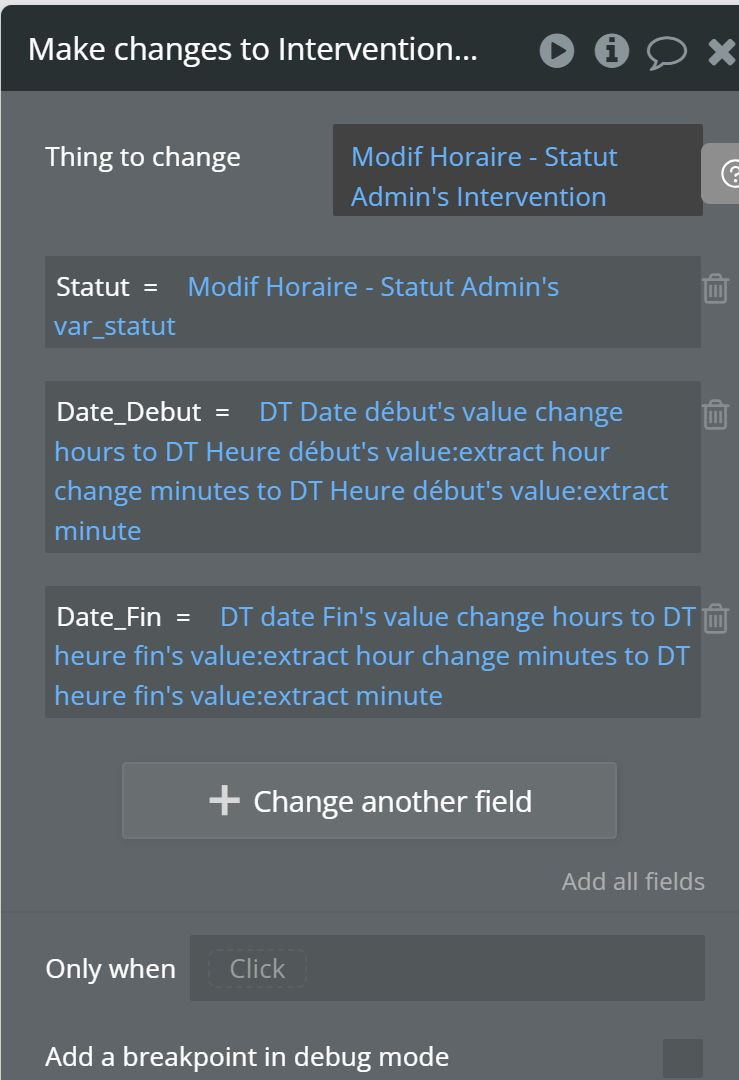
- I combine these values using the
:change time tooperator before saving to the database. - My users and I are in Japan (JST, UTC+9).
The problem:
When I select and save “7/10 0:00” (midnight, July 10 JST), the value stored in the database appears as “7/10 3:00 PM”.
I expected that, since Bubble saves dates in UTC, “7/10 0:00 JST” would be stored as “7/9 3:00 PM” UTC. But instead, it looks like the value is being interpreted as UTC and then displayed as JST (+9 hours), which is not what I intended.
What I’ve tried:
- Please take a look at the attached image.
My questions:
- Why is the database storing “7/10 15:00” (3 PM) instead of the expected UTC equivalent of my local time selection?
- Is there a way to explicitly tell Bubble that the value being saved is in JST, or to ensure the correct UTC conversion when saving?
- What is the best practice for handling local time input and storage in Bubble Mobile App Builder to avoid this kind of timezone confusion?
Any advice or clarification would be greatly appreciated!
Thank you.