Hey @ZeroqodeSupport
Just a heads up that AEST timezone just went in to daylight savings and the element hasn’t adjusted for it. Obviously this is causing lots of issues 
Hey @ZeroqodeSupport
Just a heads up that AEST timezone just went in to daylight savings and the element hasn’t adjusted for it. Obviously this is causing lots of issues
Hi @equibodyapp, thanks for your message.
Would it be convenient to share (here or in DM) a screencast or screenshots with the example of the encountered issue? It will allow us to identify any possible issue and provide the required support much faster.
Looking forward to your reply.
Regards,
Zeroqode Support Team
When using in a pop-up the calendar pops up behind the pop-up window and is not visable. Could you fix this so it pops up in front so it’s visible?
Hey there, I’m trying to do something, maybe you could enlighten me on how to do it.
I’m trying to use a date picket to select a specific month, can it do it?

I’d like to use just months and years to filter a repeating group.
@chris19, sorry for the late reply 
Fixed! Please update your plugin to the latest version (3.23.0) and let us know if it helped.
The only way to pick the whole month is using the Range feature and select manually the starting and ending days of the month:


Please let us know If there is anything else we can help you with.
Regards,
Zeroqode Support Team
@yukyha.valladares Thanks for the quick fix. It does now pop up over the pop up but only the first time the pop up comes up. If you close my pop up and then go to use the pop up again the calendar picker doesnt show and is below the pop up.
Also i have 1 other bug and one other request.
Bug: In the range mode it won’t let you select 1 day. In other calendar range pickers I’ve tried they do allow the range of 1 day. Is this a bug or something you can fix?
Other request: When using the range piker can you expose the LIST of dates of the selected range as “'s Selected Multiple Dates” to be used elsewhere in workflows. I’d like the user to pick the range for ease of doing so but need to leverage the list of dates as a list vs a range due to bubbles limitations on range dates not having points (Plural) contained in range.
Bonus request. The date picker doesn’t close if you click off it like other focus groups would you need to select a range to get it to close (without the OK button). Not sure if this is possible to hide/close the date picker if clicked elsewhere besides the date picker?
Thanks!
Hello, @chris19. Sorry for the late reply
We have tested this on the latest plugin version multiple times but, unfortunately, it is not reproducing on our side. Can you please tell which plugin version you are using?
This is not a bug, but the way this plugin works. In the range mode user should lick a date range. If the user would like to pick a single date, he has to switch to the “Single Date” mode of the v2 plugin element.

Unfortunately, it is not possible, since our plugin is dependent on the Bubble editor and the way the date data is being proceeded there, we can not change the formatting for the “range” data values, as per your request. Sorry for the inconvenience.
There is an “Auto close” checkbox in the new plugin element. Please try it out, it should do the job.

Regards,
Zeroqode Support Team
I’m using the most updated version and using V2 of the picker. I am using the workflow to show the picker maybe test that on your side? Sorry i should have mentioned that earlier to help.
I think it should operate if you pick the date once and then pick the same date a second time that sets the start and end dates of the range as the same date. All the other range date pickers i’ve tried work this way.
Bummer if you can think of a way to add another exposed list that would just take the "list of dates between the start and end that would be awesome. Otherwise, I’ll just have to manipulate it (This is a plug in I’ve used in the past. 1T - List of Dates Plugin | Bubble, the bummer thing is I’ll need to make some other mechanism to get that data to save to my database after the user has selected the range vs the one on your workflow.)
I have that enabled. Sorry i should have been more clear, Please try this…pretend you are a user and you go to click on the range and then realize you didn’t need to make a change to the range. The only way to close the calendar without an OK button is to pick the range again. Most times a user cold clicks off the group focus and it goes away. In this case, it does not.
Regards,
Zeroqode Support Team
[/quote]
Thanks for the update! The new element LOOKS fantastic, but I’m finding quite a few bugs with it. :-/
If I enable auto position, the calendar always appears in the very top left of my screen regardless of where the input is on the page. When it appears in this corner, I can’t select any dates and the buttons are unresponsive. The only thing I can do is click outside the window to close it.
There seem to be some alignment issues with the header of the calendar and the rest of the days of the calendar.

When time input is enabled, the mouse shows an icon as if you can manually edit the time numbers instead of sliding the sliders, but clicking doesn’t actually allow you to edit the numbers.
There’s a light blue color that won’t go away regardless of the color settings I edit in the plugin element. It’s showing on today’s date and in the text for each of the buttons when I display them. It’s strange to not be able to control that color.
IF the ok button is visible, the auto close setting doesn’t work even if the checkbox is checked. This is unexpected since there’s a standalone setting for it.
Have we lost the ability to do custom date formatting?
FWIW, I love some of the plugins you guys offer and use several heavily throughout my apps. But, this is the type of stuff that unfortunately makes me very uncomfortable as a user to rely on your products in production apps. Each update, I feel like I need to go thoroughly back through each element your plugins touch to make sure they still work. I recognize this is a new element and as a result, has no bearing on my existing app, but the presence of this many bugs is somewhat indicative of the experience I’ve had with other plugins of yours recently as well. I am deeply hopeful your team will take an opportunity to slow down some and focus on quality and dependability over speed to market.
@chris19, thank you for the details. 
Tried this use case as well, nothing wrong with the picker work. Please take a look at this video, is it a correct setup of your case?
https://www.loom.com/share/4b45d9cee2234fec83b36cb6c95e3c9a
If it is not, would you kindly record a short video to help us understand?
Actually, it is so at the moment. If you click twice on the same day, the “Range” picker element will pick one day in the range formatting.

We will add this request to the list of future plugin improvements to let one of our development team investigate the possibility of adding this feature to the plugin. 
Well, the case is, when you have selected the Mode for picker element, a “Range”, for example, the expected input from the user should be a starting day and the ending day. It is expected behavior for the plugin to ignore the “Auto close” checkbox if the condition for running it is not met - meaning if the user has not picked the end date. Still, at the moment, if you click twice on the same day, you will be able to pick one day and trigger the auto-close feature:
https://www.loom.com/share/801e411b5a3e4bf985d59bba43fb777a
Please let us know if there is anything we can help you with the plugin.
Regards,
Zeroqode Support Team
Hello, @avern87. Thanks a lot for your feedback.
Would you please show us your use case? It would be more convenient to investigate it from your example.
It seems like some other style library is interfering with the picker work. We are not encountering any alike issues with the picker element display. Perhaps there are some style-related plugins or custom codes on the page with a picker element?
If you are referring to this icon, then it is appearing because the browser recognizes it as a copiable text. There is no such feature as a manual time input in the new plugin element, unfortunately.

This feature was not changeable even in the previous picker element, it was always light-blue by default. We have added the ability to change the current day color to the list of future plugin improvements.
The new plugin element contains quite a lot of features for date format customization. We supposed that it should be enough to customize the date in accordance with almost all use cases. Still, we will add this feature to the list of possible plugin improvements (Custom Date input field).

We are always glad to help you resolve the issues you have got, so we will be waiting forward to your details on them.
Regards,
Zeroqode Support Team
Dear @ZeroqodeSupport , just question on whether if this is a bug and if there is a workaround for it.
Bubble’s function to “change minutes/hours/seconds etc… to X” doesn’t seem to work for the Initial date function for the plugin
Also: is there a way to automatically close the date/time picker popup after the user selects a date?


Thanks for any input!
Hello, @phetxdphet. Thanks for your question.
It seems to be working fine on the old plugin element:
And on the new one as well:
Sure thing. In the new plugin element (2.0) please activate the “Auto Close” checkbox:
Hope it helps.
Regards,
Zeroqode Support Team
@ZeroqodeSupport Thanks for the quick response! I’ve just tried the new update and it works great but there doesnt seem to be a language definition like the first version. Is there a way you could change the language on the new version or is it not possible yet?
EDIT: for the multiple dates option in the new plugin - i havent found a way to limit the amount of dates yet, is it possible?
Sure thing. It is called the “Locale” dropdown:

But it seems to be working unstable at the moment. Let us please check it.
There is no such option in the plugin at the moment. We will discuss with the dev team the possibility of implementing it into the plugin.
Hope it helps.
Regards,
Zeroqode Support Team
Thanks for the response! Would suggest adding the custom language definition like the previous version for the new one for non-supported languages - other than that thanks for the help!
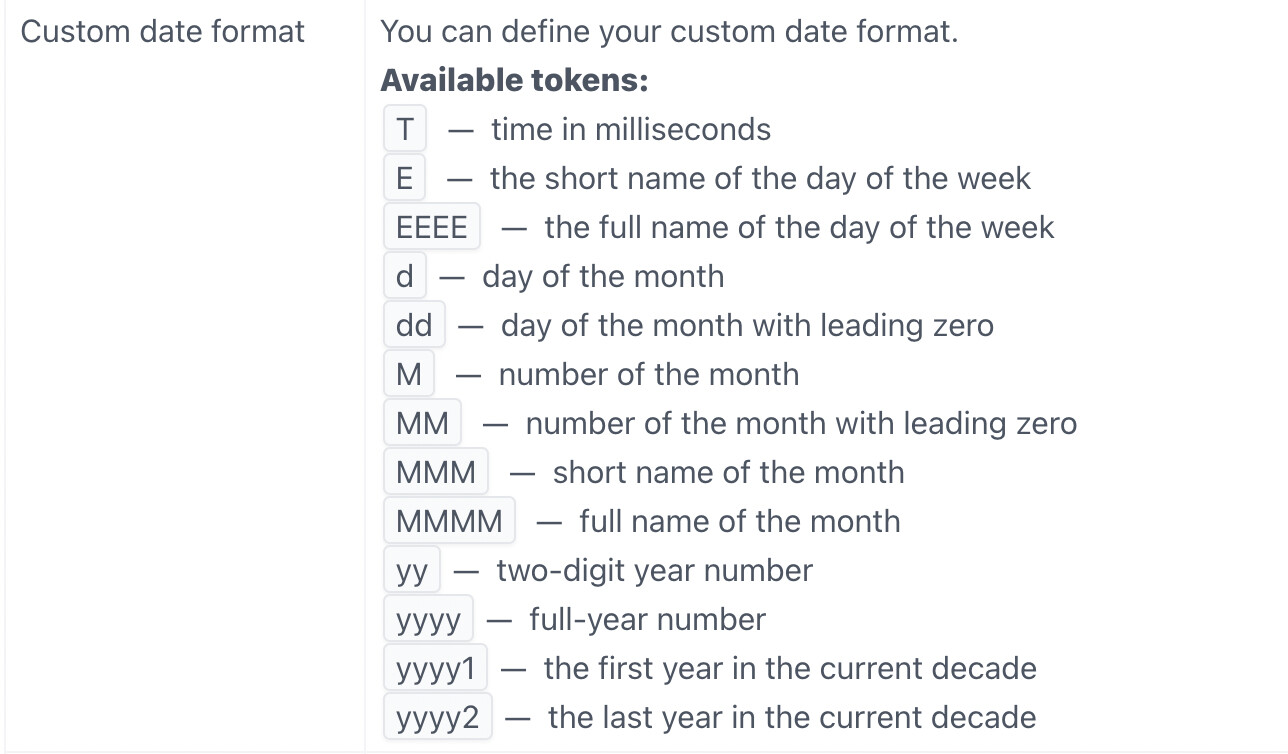
If we could have the Custom Date Format option back that would be awesome!
Ideally would just be a “Format Date As: XXXX” where we can choose the combination of dd mmm yy, etc etc
This still shows in the documentation for this plugin!
Hi @jamie5,
Thanks for reaching out.
Actually, the requested feature is already added to the plugin improvements list. It needs to be checked how feasible it is to implement the requested feature in the nearest plugin update. In case any news will become available in this regard, we will let you know.
As for the plugin documentation, this information is for the old plugin element that our users can still use. The custom date format field is not available only for the new plugin element ( AirDate/TimePicker v2) at the moment.
In case you have any other questions, please let us know.
Best regards,
Zeroqode Support Team
Hi @ZeroqodeSupport! I’m having trouble with styling my Air Date/Time Pickers.
I would like Poppins 500 size 18 but it’s not showing as that.
To test I put is at 900 weight but nothing changed.
Here are some screenshots. The date above is the regular date/time picker and you can see the proper styling.
Any ideas to solve the styling issue? Thanks!
Hi @msamandadianne, thanks for your message.
We’ve tried to replicate your case but both the default picker element and Air Picker shows a similar result with similar values.
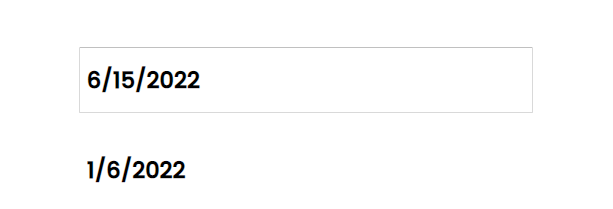
Please note that for the style display, the number which is indicated in the style title is more important than the “Bold” style.
Also, please check if there are any other settings that haven’t been mentioned and might influence the style of the displayed time.
If the issue will persist, please drop a message.
Regards,
Zeroqode Support Team