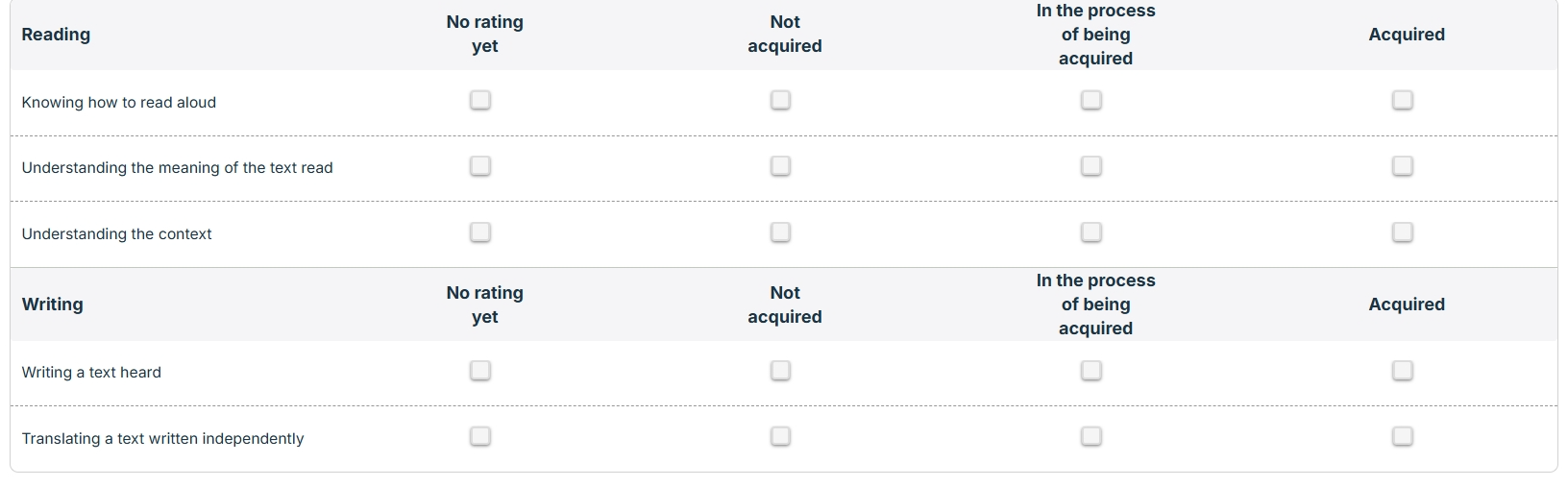
What are you seeing above are nested repeating groups.
The elements ”Reading” & “Writing” are part of a table called “Skills”
Then, below each of them is nested another table contening “Criterias”
The “No rating yet”, “Not acquired”, “In the process of being acquired” and “Acquired” are simple option sets.
Now creating this in bubble was rather easy, but I am not able to generate similar results inside a PDF using the plugin pdf conjurer.
So I am searching for someone who is specialized in this matter, and who knows how to user the older version of pdf conjurer (before being acquired by Zeroqode).
Other solutions / plugins might also be considered.
If you apply, kindly explain me briefly how would you approach this matter, otherwise if you have already done similar “projects”, it will be way better.
The method I use is create a page with the whole layout how you like (will require some tweaking on page size, zoom, etc)
Then use Website Screenshot API | CloudConvert to capture the page as a PDF. Page breaks aren’t very graceful since its just one long screenshot split across pages. Since the data is protected by privacy rules I had to make a flow where it generates a magic login link that redirects to the page and provide that in the API request.
Or even use their HTML to PDF API and create the whole block of HTML in advance. I never tried that.
For all types of PDFs, complex and straightforward, I always use and recommend Carbone. It has a bit of a learning curve, and you’ll have to create a .docx file from scratch. But it offers a lot of flexibility
I didn’t get into details, but just as a quick idea,
Screenshot the page , via prompt, send it to any AI models to process it and send it back as you would like it.