
Hi all,
I’m building out a menu, which is a RG that loads each users membership.
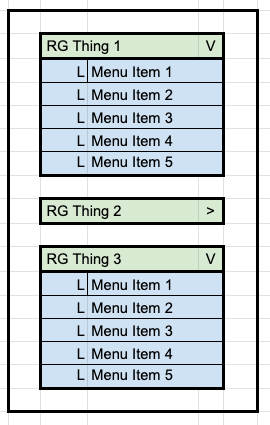
Within my RG is 1x Group (Column), with has the following two Groups:
- (Green in img) The header Group, containing the membership title and an expand/collapse (> / V)
- (Blue in img) The menu items Group (as a column) containing all children menu items.
When a user selects expand/collapse, I want the Menu items group to show hide.
I have this working outside of a RG by attaching a custom state ‘collapsed’ to the main group.
However, within a RG I’m not quite sure how to do this for each record. I can only get all menu items groups to show/hide all together, rather than for each membership…
I almost need a way to say ‘if Parent Groups collapsed is yes’ this element is visble= no
How would you handle this?