Hi all,
I have 2 similar tables (every table inlcudes a From User column).
Now I want to show data from both tables where the user is “John Doe” (in a repeating group for example).
Any ideas?
thanks,
jupxi
Hi all,
I have 2 similar tables (every table inlcudes a From User column).
Now I want to show data from both tables where the user is “John Doe” (in a repeating group for example).
Any ideas?
thanks,
jupxi
The source of the repeating group would be something like this:
source of table 1: merged with: source of table 2
Just use the merged with tag to merge to sources. To do this, you’ll have to ensure that the data types are consistent in both sources.
If having consistent data sources is a problem, try making the source of the repeating group a text and just display the fields as text → This depends a lot on your use case, it’s not the best option for all scenarios
What are the tables? If you find yourself needing to do something like this, it often implies needing them to be one table.
You’ll need two repeating groups to display two different types of data.
@jupixy the suggestion to merge two different data types into one repeating group is not possible. The ability to translate two data types into text is possible, and you can then show a single repeating group with just text, that references the data types field values and converts them into text. You need to format as string and separate values with something like | between the ‘field values’ so it might be something like red | large | 12/12/2022
I first did this 4 years ago to merge the Google Calendar and Microsoft Calendar into one single calendar. A Real pain do keep track of which item number in the string is which field (ie: item #3 is a date in example above of 3 fields as a single string). You will also lose easy reference to the actual data type entry ‘thing’.
This is true sometimes, but not often. Usually what it implies is that you have two similar tables, that are different and need to be 2 separate tables. It could be possible to find ways to combine them into one table, but of course that ignores how the data is created and how it might be used in various other parts of the app, although it may solve for the one issue you are asking about.
This above is just stating the obvious, but doesn’t solve your problem of how to display the data from the two different types of data into one repeating group, which I think is what you are asking about how to do.
As @aleemansari97 mentioned, you can do this by converting to text, just be aware of the repercussions of this in regards to points I mention above.
Now, if you want to do this, which is keep the two different custom data types as two separate data types, but show the values from those two different data types that both show ‘John Does’ as the user, inside of one repeating group, you can.
You have choices, as it would require use of JSON. There are some free JSON parser plugins out there, some paid, some are easier to work with than others. One I’m preferential toward, is one I built based on my experiences using the various plugins out there and wanting to solve for ‘impossible to do things’ like this. Data Jedi is the plugin of my choice.
What you would do is create the API object in the API connector to have all the fields from both custom data types you want to show in the single repeating group. After that, put the Data Jedi Plugin element on the page. In the JSON field value just ‘do a search’ for the first custom data type with constraints based on your user, then use the formatted as text then a comma then a ‘do a search’ for the second custom data type and format as text.
The result will be a new ‘combined’ data type as an API Object that will be the content type of the repeating group. Your repeating group will use the data jedi plugin exposed value of value list as the source, and you’ll have easy access to all fields from the api object to use in dynamic expressions just like you would with a custom data type.
Tip, for easy reference to the original data type entry in the database, when setting up the API object have a key value pair that is the unique id of the bubble custom data type entry so you can easily run a search for it if need be, by simply referencing the unique ID field value from the api object. In my apps I would have the following id fields on the api object. It would allow you to click the repeating group cell to show a popup with ALL of ‘thing 1’ or ‘thing 2’ if you want for such UI and feature ability.
Hi @jupixy
Without further information on the purpose of the two tables, we would all be guessing whether the database structure is appropriate for your needs (i.e. should these be one table or two). Searching both tables and merging the responses as a text may work if this is done rarely (but has shortcomings highlighted by others):
To use this approach:
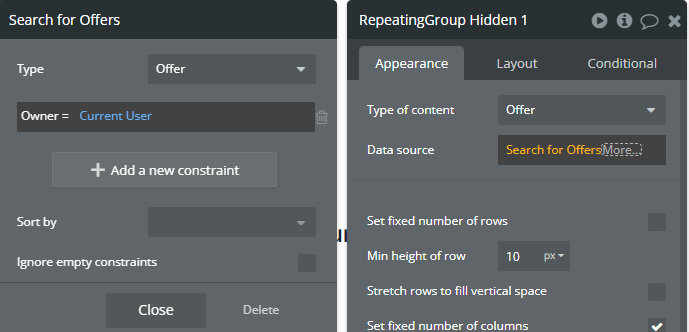
Create two hidden repeating groups on the page (to retrieve the data from your two tables), constrained to return only the rows you need (for example, “From User” = Current User and any other constraints):
Elements Tree on page:
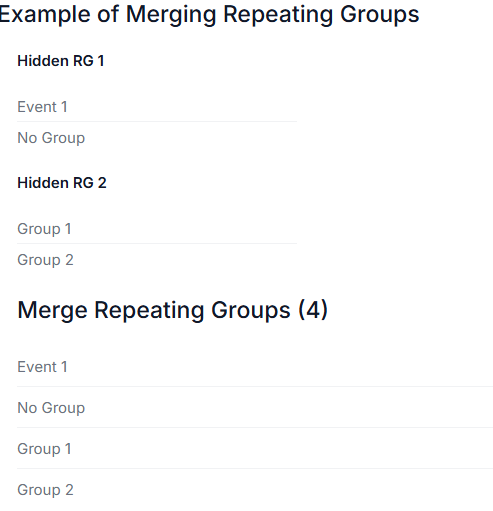
The third repeating group would be visible to display the data the users require. The Type of content would be “Text”, and the datasource would be Hidden Repeating Group 1’s [field you want] (formatted as text if required) merged with Repeating Group 2 [field you want]
The result (with the hidden tables showing for testing purposes):
You would be querying two tables each time (at an extra cost), and then need to use an extra repeating group to try to make sense of the data (merging fields from two different repeating groups and trying to format suitably).
However, if you plan to conduct this search regularly, generating an extra table may make more sense. Data Jedi may be appropriate (but I have yet to use this plugin).
For a native Bubble approach without a plugin, @petter uses Satellite tables in his work as a possible approach:
You could create a lightweight “satellite” table containing only the field(s) you care about (e.g. “[Data you want]”, “[Other data you want]”, “From User”). This table would need to be updated whenever relevant changes are made in the other two tables (on create/edit), either through workflows or database triggers.
If your two existing tables are heavy (lots of fields or large amounts of data), this approach can make searches faster and cheaper, since you’d only be querying the smaller table instead of two large ones.
This works best if your tables are written to infrequently but read often. If it’s the other way round, frequent updates but rare reads, the overhead of maintaining the extra table may not be worth it.
Another benefit is that your new table doesn’t need to know which source the data came from and can be searched, sorted, and filtered however your app requires (sorting/filtering RGs converted to text is not as easy). The satellite table can be optimised to save only the data you need for your search from two or more tables (so it could be used for global searches, for example).