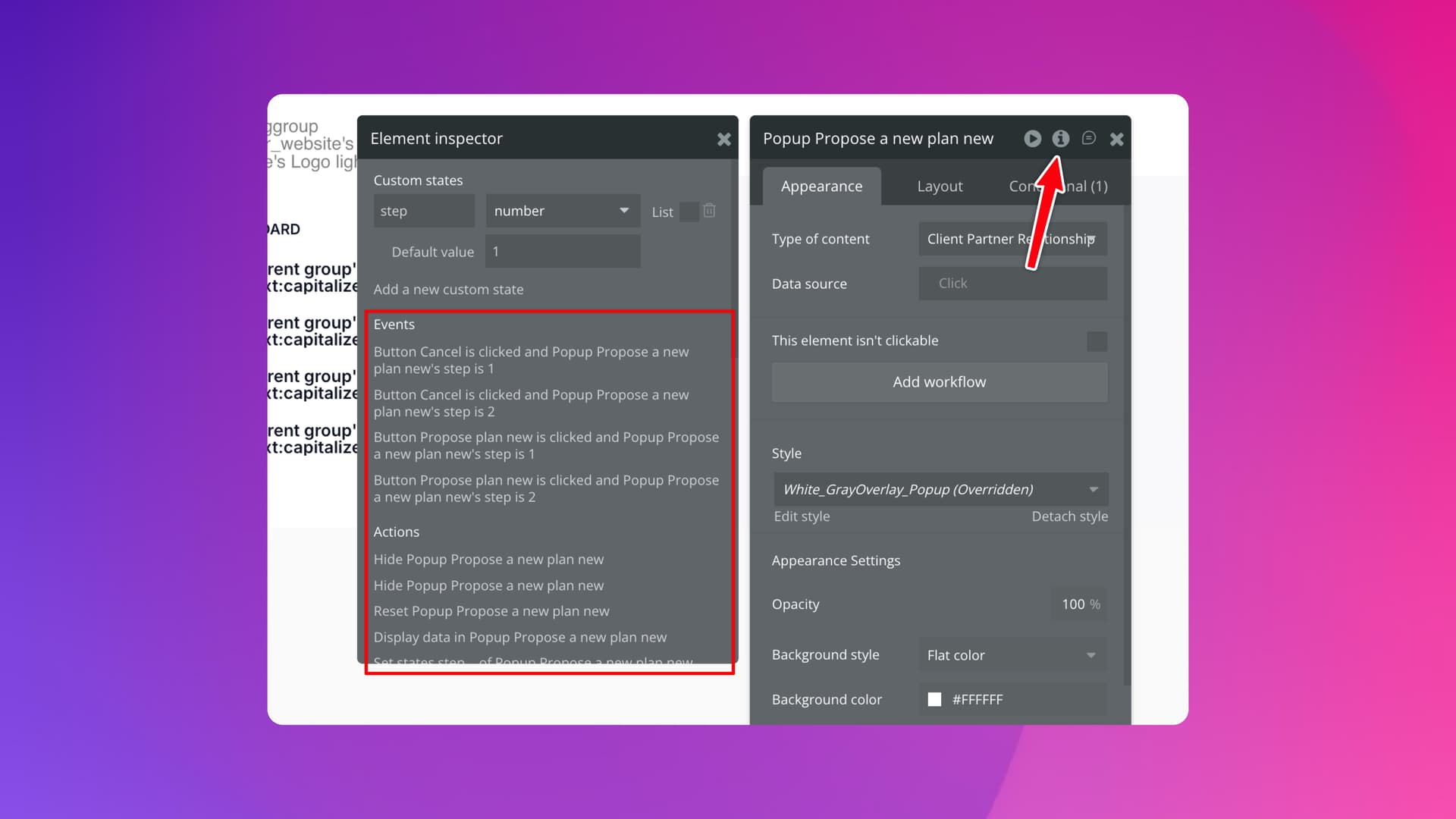
We recommend using group data variables as opposed to custom states, as they offer a superset of features and are more visible (they can be placed globally, in a hidden popup/floating group, or locally, where they’re used).
However, to identify every use of a specific element’s custom states, you can inspect the custom state, and then view the actions, events, and elements that use it. You can click each item to be taken to the relevant place in the editor.
I started using group data variables, but when I used to work with custom states, I always tried to put them all in one place, such as at the page level, so it would be easier to maintain and find them.
I’ve found storing at the page level to be useful for data that’s being used in multiple places or being set on page load but at other times I want it closer to the element. Eg a “Yes/No” State on an accordion/collapsible panel. It might be named “expanded?”… and I don’t want loads of those at page level
This method by the OP is solid because there’s no easier way to see where states are being set.
You would find out if you deleted the state of course!
Make a page level custom state that is called ‘expanded list’ and make it either a list of numbers (if using an RG and those numbers are the cell index of the expanded cell) or list of option sets (if using separate groups usually tied to options already)…this way you get the known benefits of keeping all custom states in one location (page level or reusable) and do not need to set up custom states on each group separately.
Additionally, makes super quick and easy to copy/paste the group to setup more, again, all tied to one custom state at page level. All you need to do for each, is switch out the groups default value (ie: the option set - no need for copy paste in RGs).
What is more, is when debugging, you can then use the inspector on the page and see ALL of your custom state values at once, instead of having to click into separate groups, or try to remember the names of all the separate groups you put individual custom states onto.
Also, you do not get the same clutter from the element inspector for other elements that you do from the variable groups, since those other elements are not necessarily ones that actually use the variable group value, but also includes parent and child elements that are in the family so to speak. You can see that clutter from the OP screen shot with other issues like actions on the popup involved, when really what we want is just a clear picture of the custom states and the actions to set them and which events set them and which elements use them. That clear picture is obtained when using custom states at page level or reusable level.
This is best practice and easily takes the ‘mystery’ away from custom states.
Group variables have a benefit of setting a default data source when custom states do not allow for it, like lists, or custom data types as the custom state, so they have a place, but should not be thought of as a replacement for custom states or superior to custom states, as generally they have more downsides than benefits if not considering the setting of a default value. And if that group variable is used only for one thing in the page or reusable, you can easily not use a hidden group and just put it onto the container element of the visible elements on the page, or even use an input element for it (especially useful for calculations).