How to send dynamic header values with the API

Hi everyone.

I am currently building a login flow that integrates Bubble, Auth0 and Xano.

Here is an outline of the flow I would like:

User clicks the login button on the Bubble login page


Auth0 handles the authentication


Auth0 redirects the user to Bubble (profile registration page) with a code and state parameters in the URL

I need to send that code (dynamically) to Xano’s /auth0/continue endpoint

In return I receive a token and user information

The problem I am facing is:
I need to include the code as a dynamic value in my API call, either as a parameter or as an Authorization header, but Bubble’s API connector doesn’t seem to allow me to inject dynamic data directly into the header.

Question:
Is there a standard way to send dynamic headers or query parameters (e.g. code) from Bubble to Xano?

Is there a best practice for integrating Auth0 → Bubble → Xano for this type of login flow?

Any help would be appreciated. I’d be happy to share a screenshot of my current workflow setup if needed.

1 Like

Bubble allow you yo send dynamic parameters in header if private checkbox is unchecked. You need to initialize your call first.

1 Like

Thank you. I don’t understand “initialize your call first.” How should I change the continue API settings? I got the code value from the URL of the page redirected after logging in and set it manually. You can only call once using the code, and a token is returned at that time. I would appreciate your advice.

In your screenshot, you can see that you didn’t initialize your call (in red). You will need to get a valid code and paste it (really fast) to api connector and initialize your call. Once it’s done, you will be able to use it in workflows and populate this dynamically using Get data from url.

Thank you.
That’s it.

Sorry, please help me a bit more.

But when I add this continue API to the workflow, an error message appears for some reason.
Do you know the cause of this?
I can share screenshots if necessary, so please let me know.

The other “initAPI” issues an Auth0 login URL (authUrl).
This is opened by “Open an external website”.

Next, once the login is complete, redirect to the following URL:

Redirect destination: https://xxxxxx.com/api/1.1/oauth_redirect?code=XXXXXX

The “code” is returned as a URL parameter, so retrieve it here and then execute “Continue API”.

Next, I want to use the token obtained from the Continue API to transition to the register page (user profile registration page).

■Problem

However, when I click the login button, a ContinueAPI error occurs.
As you can see in the screenshot above, initialization has been completed.

I would be grateful if you could tell me how to solve this problem.

■Addendum

After running this flow, I looked at the work again and it said,

This call has been modified since you last initialized; consider reinitializing.

What should I do?

You have a wrong authrozation when you get the code. Use step by step to check what you get and send to api.

Thank you.

Sorry, I’ve tried various things but I still don’t understand.

Is it possible that in STEP 3 the code obtained from the URL is not being sent to the API?

Could be two thing. A) You are not getting the code from the page url.
From what I see, this may be possible as you try to use open an external website that is probably the authorize url and after in the same workflow, you are trying to fetch the token.

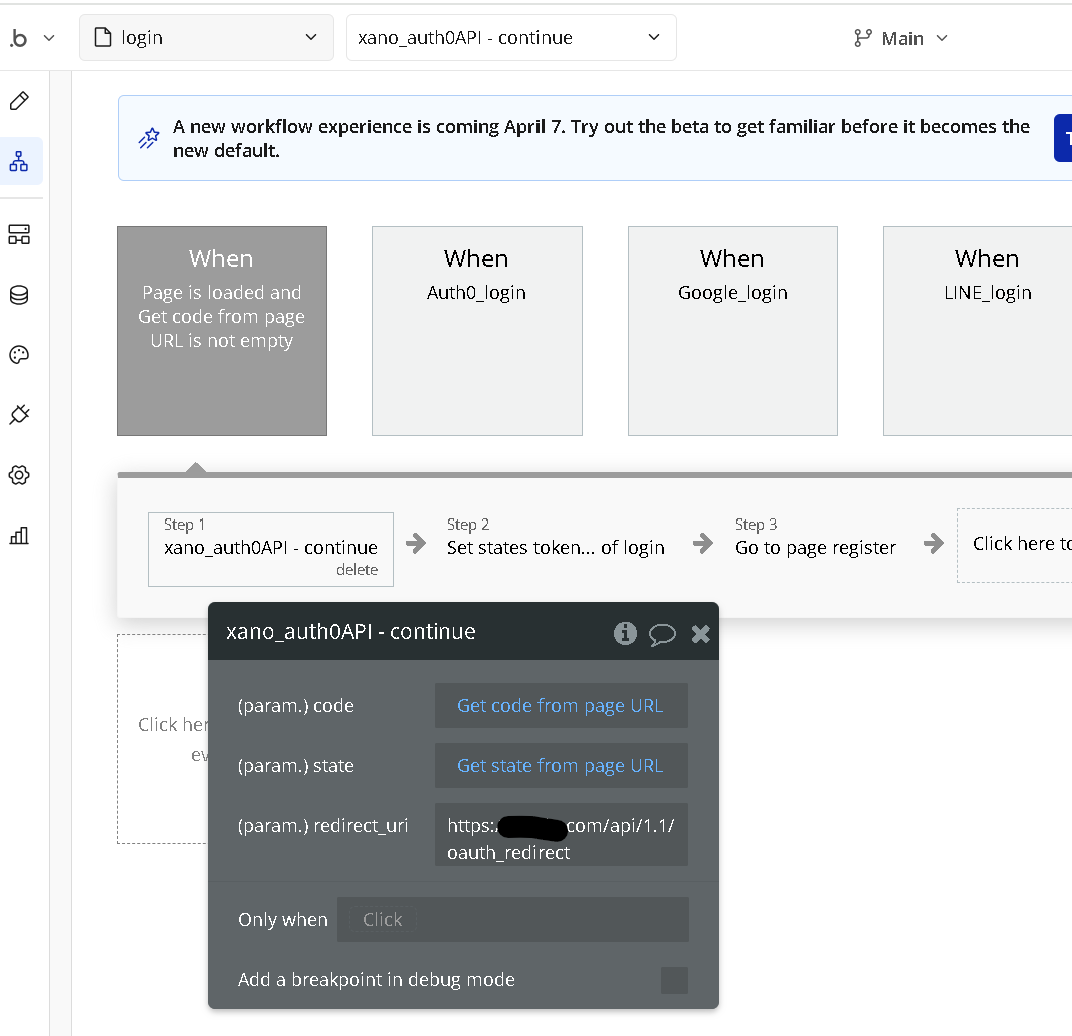
You should remove all step after open an externa website (that is probably returning an error in issue checker anyway because this should be the last step in a workflow) and instead add a workflow on page load (when get code from page url is not empty) and process to the continue step.

Thank you.
I feel like I’m almost there.

I tried separating the workflows. What do you think?

However, as it is now, the page is loaded on the login page (https://xxxxxxxx.com/login), so it seems that the continue API cannot be called.

Currently, when the Auth0 login is completed, it redirects to the following:
https://xxxxxx.com/api/1.1/oauth_redirect?code=xxxxxxxxxxxxxxxxxxxxxxxxxxxxxxxxxxx

What should I do in this case?

I would appreciate your advice.

Thank you for your continued support.

You cannot use the generic redirect url if you want to manually manage the auth process. The generic url is only used if you select the Bubble user-agent auth. You are using self-handled. You could try to use a backend WF API endpoint with redirect to a page after or just set a page of your app that will contain the continue part (can be the same page that you have the authorize link (with conditionnal that detect the code in url, you could hide button to authorize page and show a loading icon)

Thank you.
I apologize for the late reply.

I understand that a generic redirect URL cannot be used.

I was trying to create an API workflow, but I don’t know how to do it specifically.

This is what I have currently, but does this seem correct?

(In particular, I have little understanding of the following workflow:)

What exactly should I do?

I apologize for the trouble, but I would appreciate any advice you could give me.

I look forward to your continued help.

You don’t need to return data, you need to call your continue endpoint and do what you want with it after.
But it’s easier to just redirect the user to a page of your app with the continue action on page load like I’ve suggested before.

Thank you.

I’m back to the page load workflow.

If I go with the latter method, is there something wrong with the relevant part?

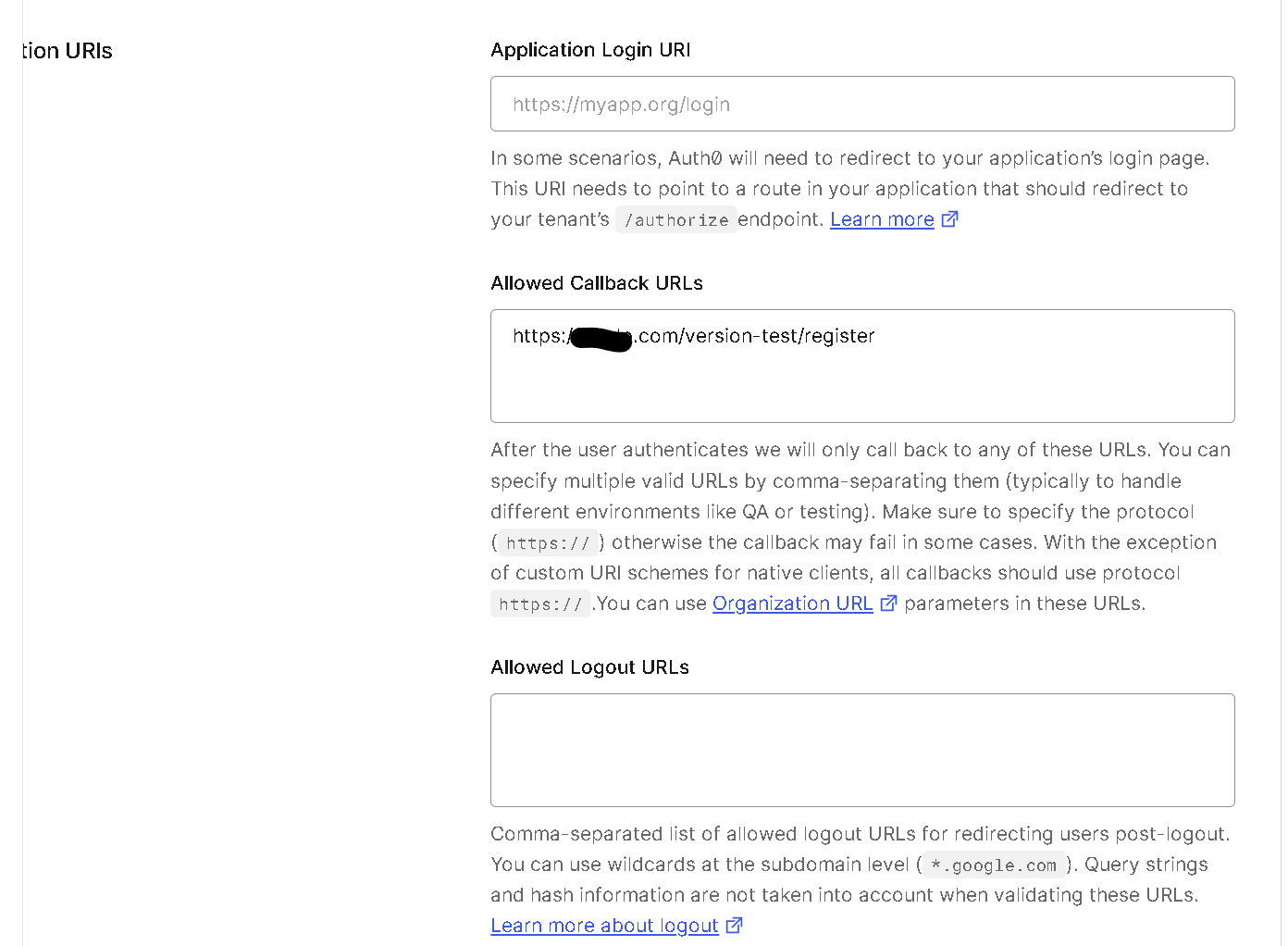
By the way, I think I need to set a redirect URL on the aurh0 side as well, but I’ve set the exact same one. Is this okay too?

but the page you want to redirect the user to
Let’s say you have https://yourappname.bubblesapps.io/auth

You will add two pages:
https://yourappname.bubblesapps.io/auth (for live)
and https://yourappname.bubblesapps.io/version-test/auth (for dev)

in this page, you will detect the code in the url and use the continue action.

1 Like

I want it to eventually redirect to the register page.

https://xxxxxxxxxx.com/version-test/register

I tried setting this URL on the Bubble side first, but the redirect destination remained the same.

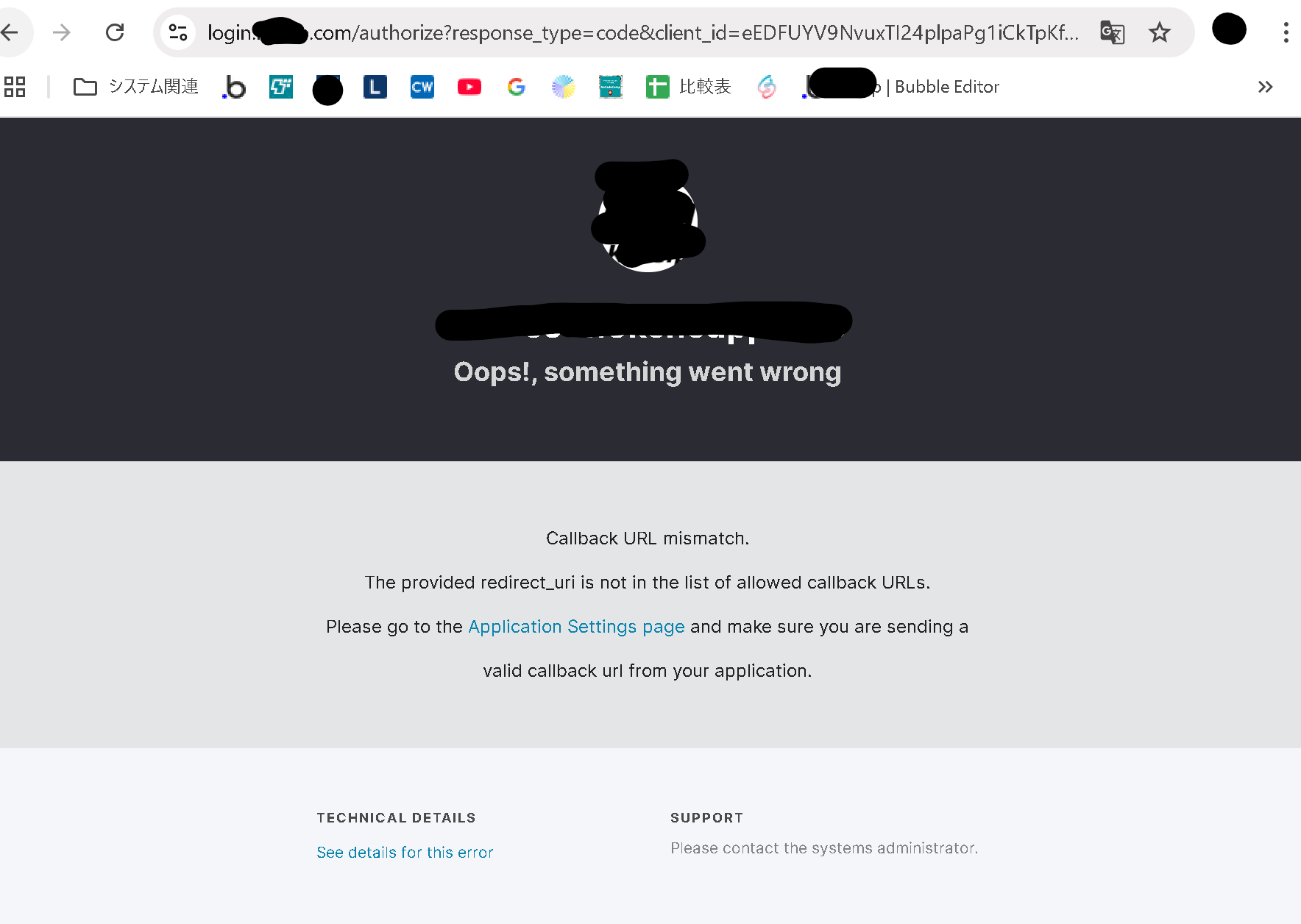
I also tried changing the URL on the Auth0 side, but an error occurred on the Auth0 login screen.


Double check your url in authorize url, auth0 and api connector. All of them need to match

Sorry for the late reply.

Thank you.

Yes, both the Auth0 Callback URLs and the Bubble redirect_uri are set to
https://xxxxxxxxxx.com/version-test/register.

Excuse me, what was the authentication URL again?

The one that send the user to the auth page. This end by /authorize in your screenshot. This url.often have the redirect url too. This need to match what is allowed in oauth0

Since it is set to https://login.xxxxxxxxxx.com/authorize?response_type=code&client_id=eEDFUYV9NvuxTI24plpaPg1iCkTpKfwi&redirect_uri=https%3A%2F%2Fxxxxxx.com%2Fapi%2F1.1%2Foauth_redirect&scope=openid+profile+email

, it seems that https://xxxxxxxxxx.com/version-test/register is not included.

How can I do this?

Do I need to set it up somewhere in Auth0 or Xano?

I don’t know where to set it up.

If you are doing manual auth, you should have an action like open an external website? This is where you set that,in Bubble.