Hi guys,
Can someone tell me, about how to use the output of POST method of an API call can be used into the GET method of API URL
Details of the steps -
- Install API connector
- Add API
- I am using Form Recognizer API here. Documentaion of the same can be found at -
Microsoft Cognitive Services
- It includes two steps to utilize the API
-Send a POST request with the input
-Send a GET request to fetch the output
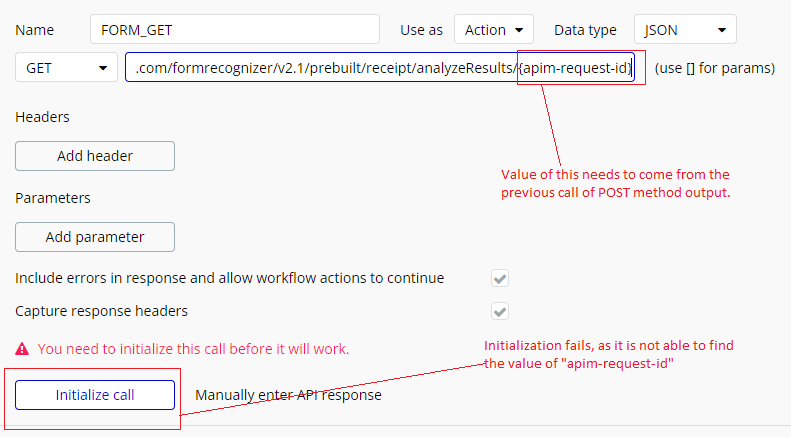
- When we send a GET request, we need to provide the “apim-request-id” at the end of the URL. The value of this “apim-request-id” is received in the output of POST request.
My question -
How do we passon the “apim-request-id” value into the successive GET request ?
Providing a snippet to see the complete flow of API call.
Make teh Post request a ‘use as’ Action and make the Get request ‘use as’ Action. Then when you use them in the workflow actions you can reference the Post results ‘results of step’ in the Get request.
I guess your initialization is failing because you use {} instead of []. You want to have this as a parameter.
After changing the curly bracket {} of , I am getting 404 error. Attaching snapshot for more details
[quote=“boston85719, post:2, topic:180366”]
C[/quote]
I tried that as well, but in the way workflow I don’t see the GET method option, since it has not yet been initialized. Now its like a stuck in a loop, until and unless I initialize the call, can’t use that in the workflow. Is there any way to solve this?
and you took the right parameter?
Are you providing sample data inside your square brackets:[your-parameter-name]?
A field will appear beneath the URL box when you add [***] and you should add some data there to complete the call.
As below:
Look, here is an example of another API constellation I think this helps.
- Get API to get crypto IDs
- Use one ID to use the second API call.
Working with parameters in the your API:
Yes.
I am strictly following the microsoft’s document.
Microsoft Cognitive Services
You guys have a point, let me try and revert back.
 – this @pranav.jha
You need to provide the Microsoft API with an actual APIM request ID for this to initialise.
This is the value that you need to put inside the field that will appear beneath the URL when you add [***]. It will be some type of unique ID code.
When you initialise the first (POST) call that you are making you will receive this value back as a response. You can then copy this value across as the sample value into the second call that you are trying to make.
It should end up looking something like this:
I did this, i.e. providing an initial value and able to successfully initialize the GET method as well.
Now the question is, how to dynamically fetch the value of “apim-request-id” through the workflow?
Attaching the snapshot, where I am facing the problem.
You find the answer in my screenshots. I did exactly this.
I guess you set the “apim-request-id” to private, otherwise it would be seen here as an input field.