Hello everyone,
I’m building a Bubble app with a signup and login system. The signup flow creates user successfully, and I can see the user in the database with correct email.
However, when I try to log in using the same email and password, I get the error message:
“We didn’t find an account with those login credentials.”
What I have done:
- Created a signup modal that collects email and password, then runs the “Sign the user up” workflow.
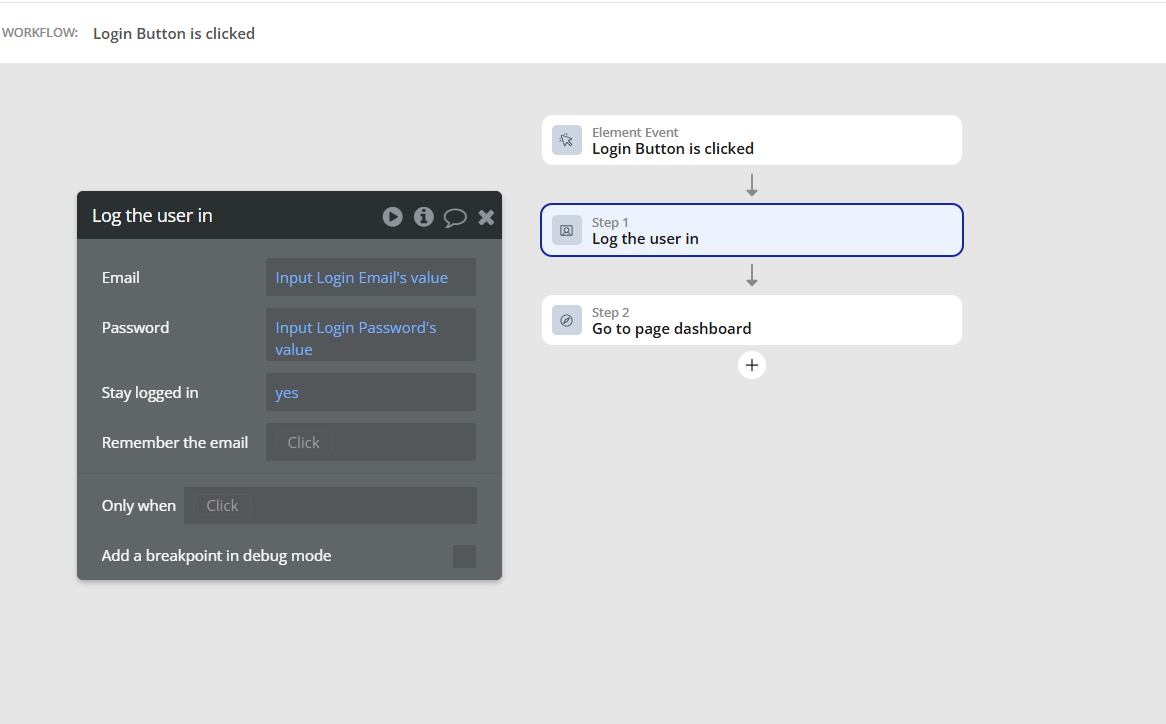
- Created a login modal with email and password inputs, and a login button with the workflow action “Log the user in” using these inputs.
- Verified that in the login workflow, the email and password fields reference the inputs’
.value properties correctly, e.g., Input Login Email's value and Input Login Password's value.
- Checked the database: the user exists, and the email matches exactly.
- Tried logging in on both the modal and a separate test login page, but the error persists.
- Tested creating fresh users and logging in immediately after signup.
- Confirmed passwords are at least 6 characters.
Hey! Welcome to the community!
I had this issue a couple years back. I tried so many thing to fix it. One recommendation I had was to make sure passwords are at least 8 characters and don’t include #$% etc…
That didn’t work for me. What ended up fixing it was removing a plugin that I had recently installed. Unfortunately I don’t remember which plugin this was (this was almost 2 years ago), but if you send a screenshot of all your plugins, I will likely be able to point it out! Alternatively, if you recently added a plugin right before this started happening, try removing it and see if it works.
Hello giorgioantanely,
I understand it might be frustrating building an app where by you’ve done all what is necessary to be done but not giving the desired output. Could you jump on a call so I can take a deep look and may be profer a suitable solution to overcome the failure in workflow you are currently encountering.
If that’s fine by you. It’s my pleasure to help you overcome the workflow failure.
I’II be looking forward to your feedback.