
Understood. This is something that Bubble has to handle with Microsoft directly.
So for now we just have to grin and bear it? Somehow inform users using edge that it’s out of our hands for the time being?
Flagging for me as well… 
same here!
@nick.carroll, can you please look into this, literally all of our apps are showing Bubble files being unsafe on Microsoft Edge since early March  If there’s someone doing bug fixes it is you
@nick.carroll I guess as remedy now the file URL is https://[bubbleappname].cdn.io
Why is our bubble app name being exposed in the file URL instead of our domain?
I managed to avoid the error using the following:

It doesn’t actually matter what you put in the domain. So this url is also flagged as safe:
https://randomurlbullshit.cdn.bubble.io/[uid]/filename
I guess bubbles cdn ignores any subdomain
Yes, that “solution” has already been mentioned, but it does not work for private files.
Right now it seems to be fixed. Anybody else noticing it fixed for now?
I can test later, what is the “fix”? Or do you mean the malicious warning is just gone now?
That the malicious warning is just gone
Hi all,
I’m not entirely sure if this is the same issue, but it seems likely.
A number of my clients reported their emails not landing to Microsoft 365 accounts (starting toward the end of last week).
Today we found that the logo used in the email was the issue. Of course, our images are hosted with AWS. When we changed the logo to one hosted elsewhere, the emails landed in outlook business inboxes again.
For the record emails were still working to gmail and personal outlook accounts but were not landing in microsoft business accounts (even to the junk folder), they were being quarantined as suspected “phising”.
As a fix, we will host our email logo in the root directory instead.
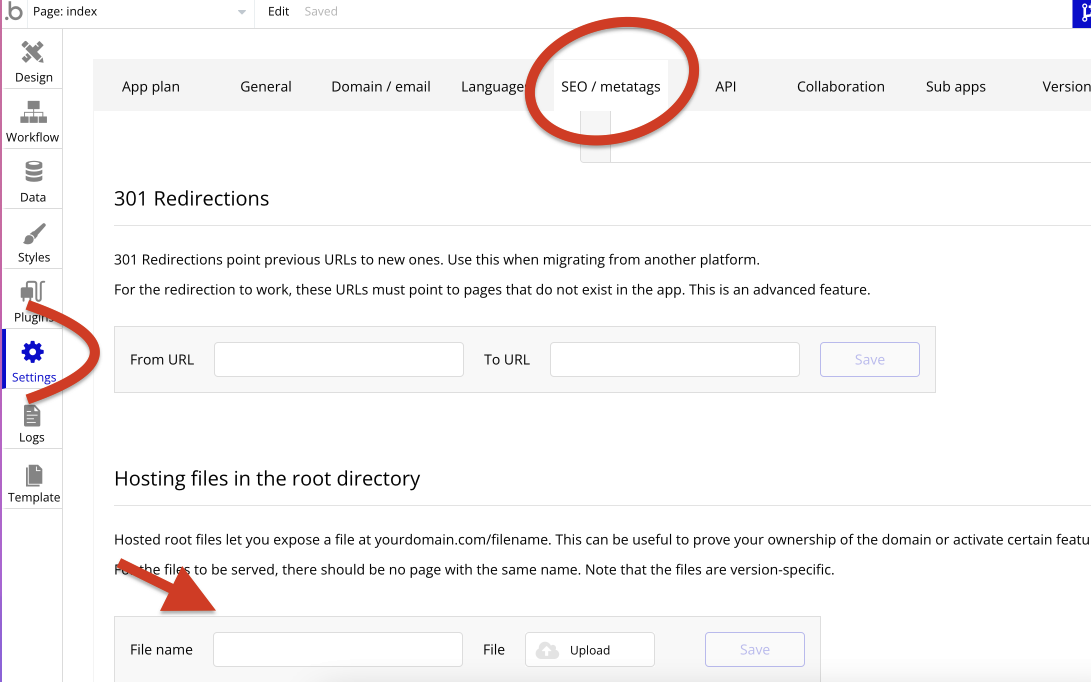
@andy.i Thanks for posting your solution.
We’ve also been experiencing issues with email delivery to Microsoft Outlook. It appears than all images or links posted to AWS S3 are being blocked and quarantined.
However this is also the case with the new CDN (e.g. https://474e41dc031231be2ce43a9233d746c.cdn.bubble.io/xxxx/avatar.jpeg). I’ve tested this on several clients and they are still being marked as quarantine / spam by Outlook.
When the URL is replaced with an external/non Bubble URL, the email sends correctly and is not quarantined. This is a problem for us as we use many dynamic images across our emails that can’t be easily replaced.

Have you experienced the same @andy.i? Could you look in this @nick.carroll?
@messly gotcha, you need to remove “bubble.io” from the links.
I believe changing the URLs to this may work, or some variation of this. If your app is google.com:
https://www.google.com/fileupload/avatar.jpeg
I haven’t had time to test that. If you haven’t already, create a bug report with bubble and see what their suggestion is. They’re definitely aware of the issue.