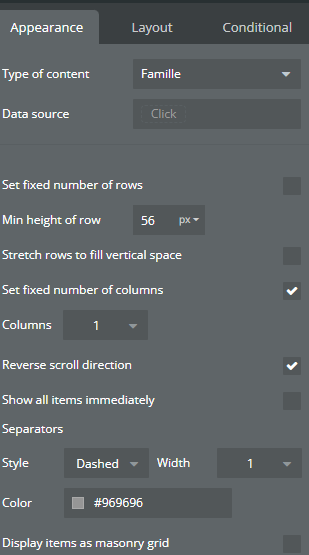
Has anyone been able to get this option to show in their app yet? Perhaps I am not getting the settings quite right…?
I have tried on two different apps with a fixed parent group, non-fixed number of rows. I have to remove the “Set fixed number of columns” to see the “Scroll Direction” option (which I set to “Vertical”). I then recheck the “Set fixed number of columns” to 1, but I cannot see any reverse scrolling option..
I think that what Nick want to say about the fixed height is not the Cell’s container layout but the RG itselt. In layout, scroll down and click make this element fixed-height.
Thanks for the response. So far as I can tell, the “Cell’s container layout” is the RG itself… The name displays differently for RGs than for other types of groups, but is in the same Layout tab location. I have clicked on the RG, changed the tab to Layout, and switched the only layout option available to Fixed (see below). I have also done so with the parent element and page element. There are no other layouts I can change to fixed on the RG or above it in the elements tree.
OK, great, thanks @Jici . I can see the reverse scroll direction now
”The repeating container is set to fixed height” from the announcement may be better to say “Make the Repeating Group element fixed height” to save confusion
Awesome to see new features being added. But I find it hard to use new features if they are hidden in such a way. A huge UX benefit would be to show the option, grey it out / disable it if the requirements are not met and show a hint what the requirements are.
I think with the current implementation this will be lost for many users which is a bummer because they will search alternative ways to make it work the same way. @nick.carroll
This is awesome!
The reverse scroll feature was something many of us really needed for chat apps.
Huge thanks to the Bubble team for making this happen — it’s going to make chat UIs so much smoother!
Hi Nick, are you able to share the dev preview. I am just trying to understand the layout as I am having trouble with some formatting issues. Also, any idea what this chat message box is?

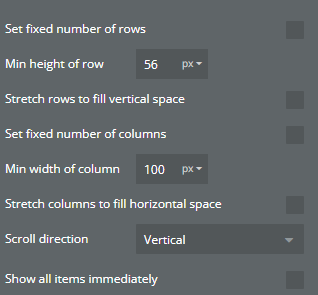

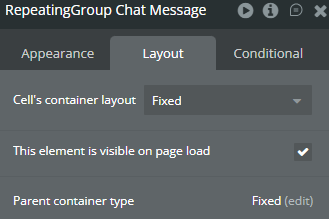


 The name displays differently for RGs than for other types of groups, but is in the same Layout tab location. I have clicked on the RG, changed the tab to Layout, and switched the only layout option available to Fixed (see below). I have also done so with the parent element and page element. There are no other layouts I can change to fixed on the RG or above it in the elements tree.