
@mvandrei
Sorry!!!
I’ve solved by my self!!!
I loved your Plug in anyway!
Hey,
I’m sorry, I am currently working on a solution to end the covid pandemic and my reply is delayed.
I am so glad you managed to solve it (yourself). It’s a great feeling when YOU solve it, right? Still sorry I didn’t reply and couldn’t help you sooner.
I’m glad you love it.
An update is set for the next year. Will make it even better.
This heled me a lot. Thanks!
L.E.2. In order to use the multiplePID workflow, you need to add the entire field between " " and inside those, after you add the PID you need to click more and add join with ", " that is double quotation marks coma space double quotation marks
Hi,
I just offered support to a customer, and Ic an share with you, the setup I did for his project.
In order for the PRO plugin to work, you need to do this:
Add this prompt when the page (where the user is authenticated) loads.

Then, use this to add current user’s PID to a LIST of texts. Maybe the user has multiple devices.

Use this to send push notification to multiple PiDs of same user.

DO NOT FORGET to delete current user’s PiD, from the multiple PiDs when the user logs out!
Best Regards,
Andrei
Hi, I just bought your Pro Plugin and I don’t get it working so far 
I get/got the notification for allowing the push notification (Web Push), but after accepting, It didn’t pushed the device id to OneSignal. In my OneSignal Dashboard, I have 0 active users.
One Page Load i tried to Get player id and I added the Workflow OneSignalPRO A New Player ID which does not get called…
Thus, the text field which should yield the player id is also empty.
What am i doing wrong?
OneSignal-Account is set up, App ID and API Key is within the plugin-page (like you showed in the video, with “Basic XYZ”)
/EDIT: I already implemented to add the current ID to the list of current User’s Player_ID’s, so i could eventually push notifications, but I need to get a playerID first 
Thanks!
DM replied. Please provide what I’ve asked and we’ll figure it out.
I have exactly the same problem. Can’t get player ID. I work in an account with the “agency” tariff plan.
Maybe this is due to the constant attempt to enter the application address?
It’s just that now the application constantly asks for a login / password to enter.
I know that from the OneSignal platform you can build notifications with actionable buttons like this:

I think that this possibility in Bubble would have many advantages. It would be very useful to be able to perform different actions with dynamic values from the notifications, or is this already possible in some way?
Hello, we purchased this plugin because we were struggling to reliably get the Player ID from other plugins. I can’t get it to work at all with yours. We have a wrapper for mobile and that is working fine (BDK) but I want to use your plugin for desktop notifications. Can you DM me so that we can share our login credentials and you can help us figure out what’s wrong with our set up?
Pretty please???
Hey,
Thanks for the purchase and for trusting this plugin!
A huge update is being done on the plugin. It will be here next week.
Unfortunately, there has been a big delay because @Onesignal doesn’t really care about helping. I can get push notification prompt on Firefox on their website, but I can’t make this plugin work on Firefox.
The plugin now automatically registers the Player ID, you simply just have to drag and drop the element on the page.
@a.blackout98 sorry that I missed this notification! Will do my best to have look and see if it’s possible in bubble and then to include it in this new update. However, there are a few setbacks with the development because of the lack of support from OneSignal.
It’ll be ready in a few days hopefully and then, as soon as @Bubble approves the update.
Great, so does the get Player id action of the element work at this point? Or is it automatic?
It works, BUT, the automation is available with the new version that’ll be available soon. Now it involves a few ‘manual’ steps. There’s a Youtube tutorial I made for that, in 3 parts. But if you can wait a few days, it’ll be easier for you to set it up.
If you can’t wait, DM the OS creds and I’ll give you an email address to add me as a collaborator on bubble to check it out.

Once approved by Bubble, the new, improved plugin will be easier to set up, operate (automatically sending push notifications to one PID or multiple PIDs registered under the same user), and also comes with new features like SMS and Email subscription for SMS and Email marketing campaigns alongside Push Notifications.
On Android Chrome and Samsung Browser confirmed to be able to subscribe to push notifications. iOS soon.
This means you don’t have to convert your bubble app into a native app, just for push notifications!
I’ll return with a tutorial and a DEMO page.
As always, with every big update, I will be giving away TEN plugins for free, as ONE per app per user, first come, first served. You just have to reply to this thread saying “I want OneSignal PRO Plugin!” You need to have some history here on the forum, new accounts with little or no activity will be disqualified, in order to maintain a fairness in distribution to 10 real users.
Thank you for using OSPP! You’ll love this update!
VERSION 2.0 is here! 
It brings:
-
bug
 fixes
fixes -
easier setup - drag and drop - no more JStoBubble

-
send SMS

-
send email

-
register and receive push notifications
 on Android devices - no more wrapping needed. iOS will follow.
Installation and setup:
-
Search for the plugin: OneSignal Push Notifications PRO (made by Two Bits)
-
Install it (by renting or buying it).
-
Search for the element and drag and drop it onto your page. You can see the DEMO here.
-
You will need two keys and set non-https while setting up OneSignal in OneSignal.com Dashboard
-
In order to get the Player ID for Push Notification/Email/SMS, you will have to create a workflow for each as follows:
-
For the plugin to detect it, it needs to generate one, and that happens only after the user is logged in:
In this example, we trigger the action when the user clicks a button, but you can set it to run automatically on page load, or in any other circumstance you may see fit, but only when the user is signed in!
The same goes for email/sms prompt! User must be logged in first! -
You will need to paste in your APP ID Key in every workflow that will send a push/email/sms message.


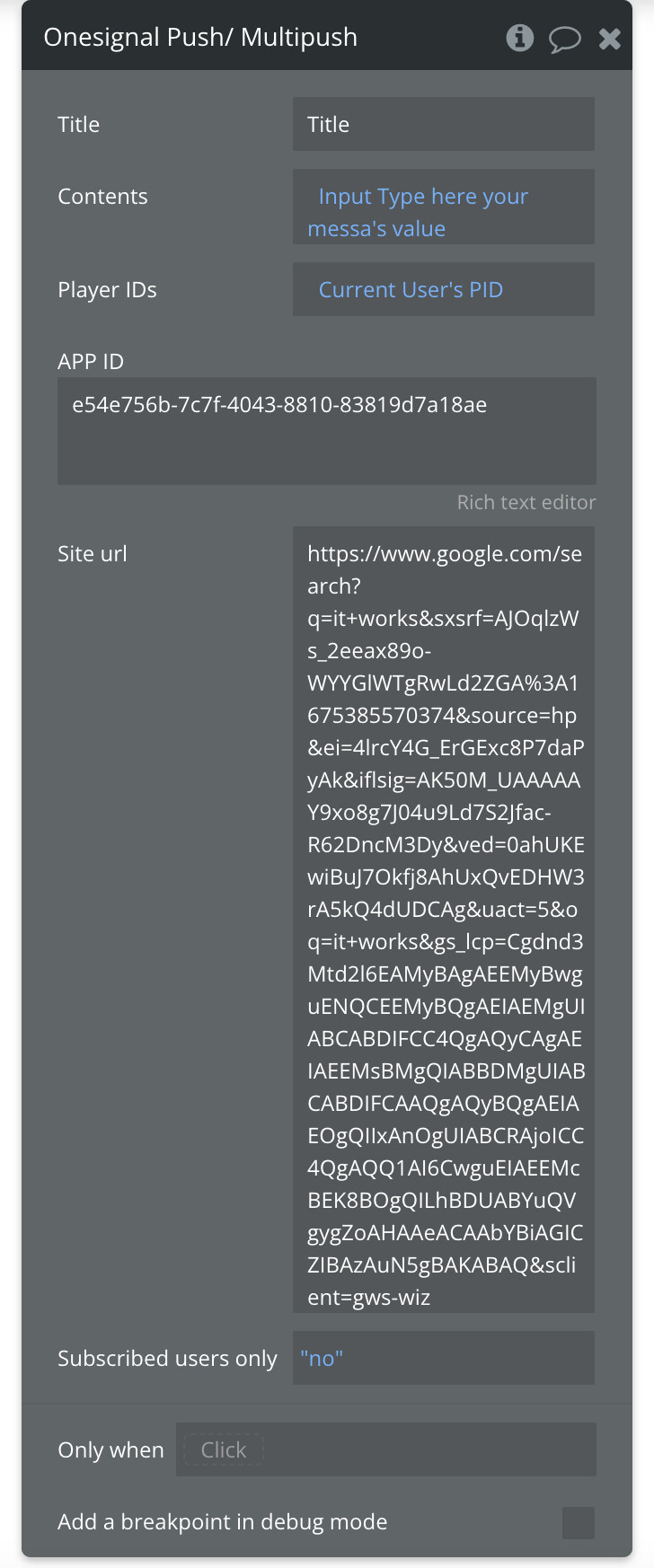
Please note the option “Subscribed users only” that translates to: send to current user list of PIDs or EVERY user that is registered in the OneSignal Dashboard. So a mass-campaign.
SMS PROOF:

PUSH NOTIFICATION PROOF:

Email PROOF:
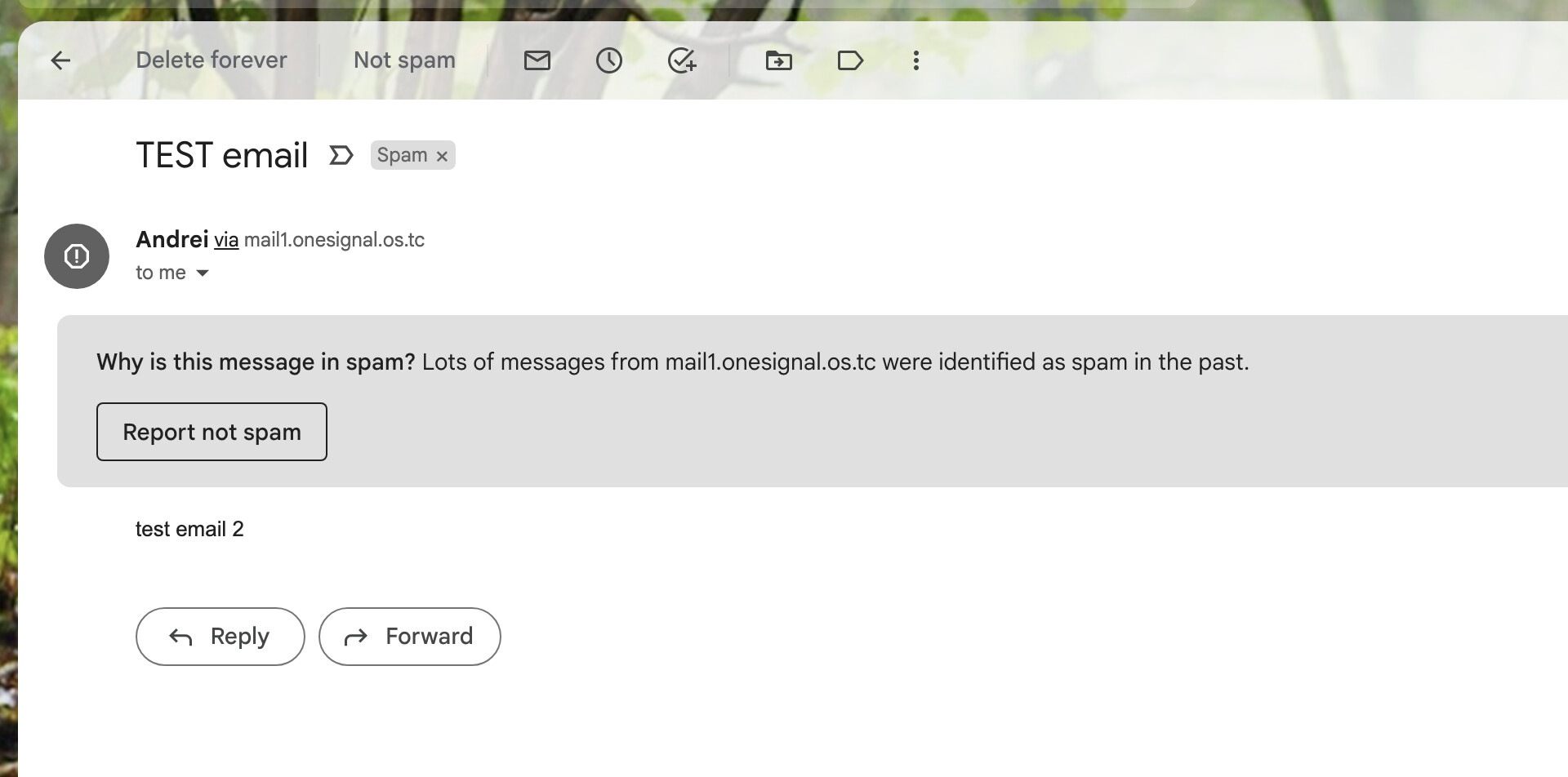
NOTE Read THIS
to avoid issues with your emails being marked as SPAM or never reaching their destination. You can also use 3rd party services:

Thank you for using OneSignal PRO Plugin and I hope you enjoy this update.
Looking forward to your feedback!
I want OneSignal PRO Plugin!
You get ONE OneSignal PRO Plugin for free! 
 . DM your APP ID.
9 left
I want OneSignal PRO Plugin !
You get ONE OneSignal PRO Plugin for free! . DM your APP ID.
8 left
I want OneSignal PRO Plugin!
You get ONE OneSignal PRO Plugin for free! . DM your APP ID.
7 left