We’re excited to introduce the Camera Capture for Bubble Mobile Plugin – a powerful new way to let your users take photos and record videos natively within your Bubble mobile app!
Key Features:
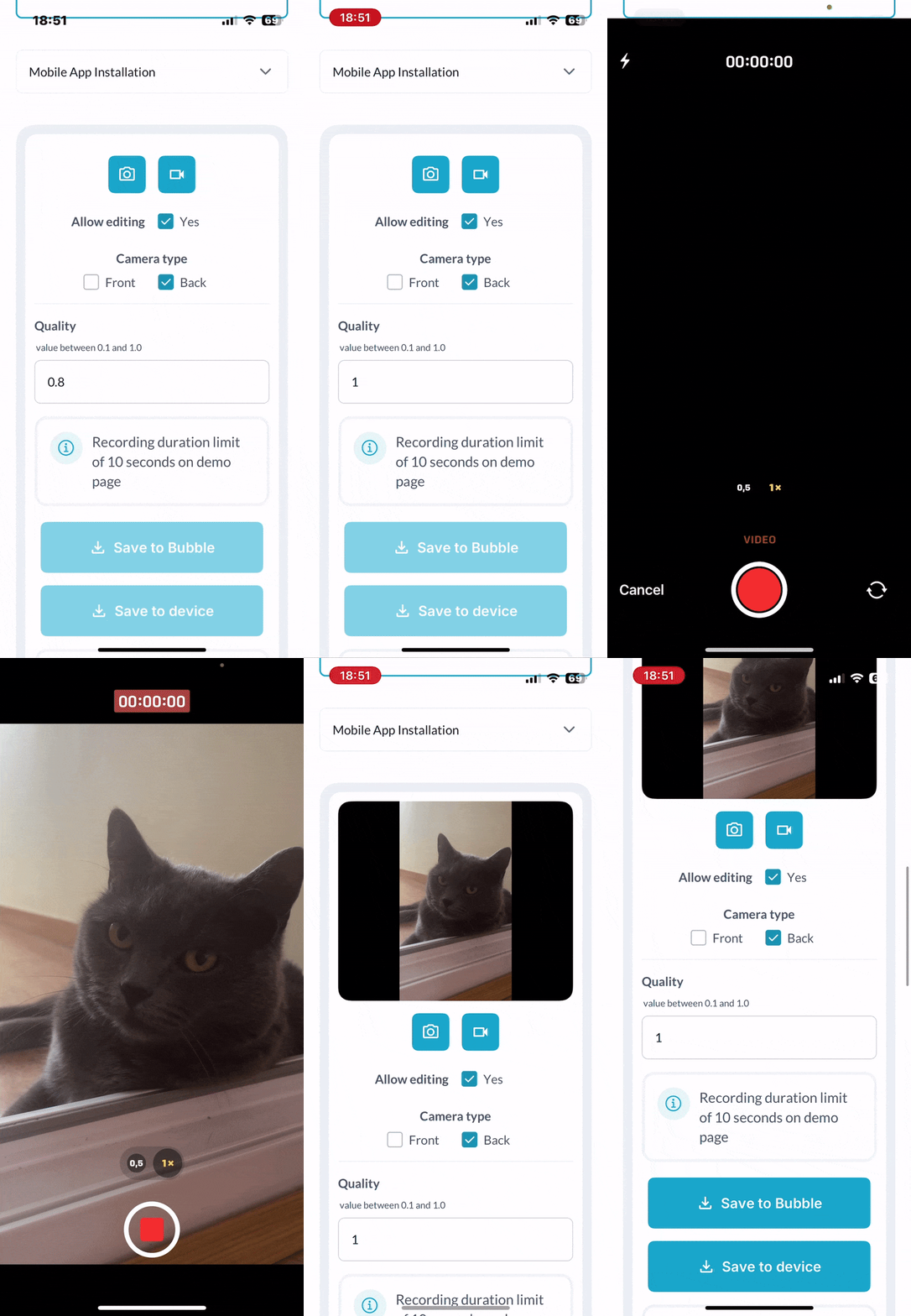
Native Camera Access: Seamlessly open the device’s camera from your app — no extra steps, no redirects.
Photo + Video Support: Let users switch between photo and video modes with intuitive, mobile-friendly controls.
Full Bubble Compatibility: Designed for Bubble’s native responsive engine and dynamic data — works out of the box.
This plugin makes it easy to integrate native mobile camera functionality into your app’s user experience – perfect for profiles, uploads, documentation, and more.
Hi Levon I’ve download this plugin but it doesn’t seem to work for me on bubble go on my pixel 8 pro. Is this something you are aware of or am I doing something wrong? (All permissions are enabled)
We are using BubbleGo on iOS. It seems to be working fine, but the files appear to be too big for bubble to handle. Even 1 database record of a 3 second video results in a crash.
To be more specific, the editor crashes after I want to take a look at the database record that’s created. And BubbleGo crashes after retrieving one file URL (again, 3 second video shot on iOS - iPhone 16 (version 18.5)).
The capture quality and video preview however work great, I think converting the files to base64 makes the file too big.
Would it be possible to not convert to base64, and just keep the Blob/File as is?
To replicate this on our side, could you please share:
Screenshots of your plugin element settings and the workflows involved (record → save → view/open record/URL).
File details for a sample video that causes the issue: duration, final size, MIME/container (e.g., video/mp4), and - if possible - an example file URL (feel free to redact sensitive parts).
A short Loom recording showing the full repro path and where the crash occurs, including the page load and the tap sequence.
Once we have these, we’ll attempt a like-for-like repro and get back with findings.
Just checking if you had a chance to share the reproduction details we requested (exact steps, expected vs actual, any error text, screenshots/short recording, environment info, and - if possible - a test page).
If you can drop those here we’ll dig in right away.
Following up to see if you could share the screenshots of the plugin element + workflows, sample video details (format/size - e.g., video/mp4), and a short Loom showing the full repro path.
With those, we can attempt a like-for-like repro and get back with findings.
So I’ve tested the plugin on bubble go on both a google pixel 8 pro, Samsung galaxy s22 and an Iphone 16. It’s functional on the iphone on bubble go but not on any android phones I’ve tested it on. Is this an issue you’re aware of when it doesn’t work on bubble go? When I click on the button to open the camera it just doesn’t open anything.
Quick heads-up: the Camera Capture element returns both a media uri and a media base64, but there isn’t a seamless, built-in option right now to upload the captured media in its original/raw format directly - the plugin exposes the data for you to handle in a workflow rather than saving the raw file automatically.
Can you tell us whether you specifically need to preserve the original file format or any metadata (for example: exact container, or file size limits), and where you want to store it (Bubble DB, S3/Cloud, etc.)? Share those requirements, and we’ll recommend the simplest workflow that matches your needs.
Thanks for testing this on multiple devices and for the clear report.
We’ve shared the issue (Camera Capture on Bubble Go for Android) with our dev team, and they’re investigating.
We’ll update you as soon as we have an answer.
Thanks for your patience - we appreciate you bringing this to our attention.
Thank you for the reply. I would just need to be able to preserve the video (in the lowest possible file format) to let users upload them and other users to view those. For now I will be using the Bubble DB
Quick note: alternatives are to upload recordings off-platform (S3 / Cloudinary) to preserve the original file/codec and keep Bubble slim, or use a native uploader flow to push the device file directly.
If you decide to try either later, we’re ready to guide you.
Thanks - that makes sense. Since you already have Wasabi on the server side, here is a suggestion we recommend to avoid the base64 bloat from the Camera Capture plugin and keep/send the original file:
Server-side transfer (Bubble backend or your server pulls the file)
Let the Camera plugin create a Bubble file (or send the base64 to a backend workflow).
On the server (backend workflow or an external server), download the file by URL (or decode the base64) and then upload it to Wasabi using the Wasabi/AWS SDK. This keeps the heavy lifting off the client/editor and prevents editor crashes.
Also, could you share one short sample video’s format & size (e.g., mp4, ~MB) and a screenshot of your current Camera Capture element + workflow?
That will help us give the tightest suggestion for your setup.
I’d like to try with the native uploader flow first, and then build in the off-platform file storage later on. Could you maybe provide me with some guidance how to do this? Thanks for the help!
Glad you want to try the native uploader flow first. Below is a short suggestion on how you can achieve this.
Steps (native uploader flow)
Add Camera Capture element to the page and set it to record video.
Capture the video - use the Camera Capture video captured event (it exposes media uri and media base64).
Save to device (if available): for Android use the plugin’s Save to device action right after capture so the video appears in the gallery. (iOS is temporarily not working)
Add the Native File Uploader element/button and set allowed type = video. This element opens the device picker/gallery.
User picks the saved video via the uploader (or directly picks the just-recorded file). The uploader returns a file reference/URL.
Workflow: When File Uploader’s value is not empty → Create/Make changes to a Thing → set your video_file field = File Uploader’s value (this stores the Bubble file URL in your DB).
Test on device and verify playback for other users - the stored Bubble file URL should stream/play as expected.
Short notes & gotchas
Saving to Bubble will increase DB/storage quickly for videos - be mindful of file sizes.
Android: gallery save works; iOS: you may need to rely on media uri → server fetch + upload if gallery save isn’t available.
For long-term / better performance, later move files off Bubble (S3/Cloudinary) and store only the URL in Bubble.
Quick note: we provide general support only and can offer suggestions and guidance. Thanks for understanding.
Please review the suggested flows thoroughly; if you encounter any issues with our plugin, we’re glad to help!
To confirm; in essence we need to do these steps to save both photos and videos, since we don’t want photo’s in the Bubble DB but stored as files (Bubble has confirmed they get issues when large files are stored in a Thing).
But we can only do this on Android and not on iPhone.
Also we need another plugin to upload the saved photo/video, which also adds a step for the User.
You’re right: “Save to device” is Android-only for now.
For a cross-platform setup, the most reliable path is: capture → upload to storage (Bubble file storage/S3) → save only the returned https:// URL in your DB. This skips Base64 on iOS (memory-heavy) and avoids storing large binaries inside a Thing. The upload can be triggered right after “capture complete,” so it doesn’t add an extra user tap-just a workflow step.
At the moment, the Camera Capture plugin doesn’t bundle that upload step on iOS, so there isn’t a single-plugin “capture → public URL” pipeline yet.
If it helps, we can consider this as a product improvement.
Could you describe your ideal flow end-to-end (what the user taps, what should happen under the hood, and what output you need, URL, file name, size, etc.)?
We’ll share it with our devs for feasibility and updates.
I have many issues with the Google Pixel phone; that is many things working on the iPhone are simply not working on the pixel phone (Google Pixel 9-Android 16).
Very frustrating. Bubble engineers are apparently on it.

 Key Features:
 For the plugin to work, you must enable file and photo permissions in the app settings on your phone.


