
@sam8 quick question, which probably is obvious to everyone, but not me. Will it work on PWAs?
Hi, good day. Please can you point me to where I can see the full tutorial on how to use the one signal web notification as this link "https://manual.bubble.io/bubble-made-plugins/onesignal-web-notifications’’ is no longer working. Thank you.

Correct! We are working on updating these links throughout popular forum posts and announcements like this one, and just did so above for easy access. You can also access the new link here. (Everything is still on manual.bubble.io; some of the destination links are changing.)
Thanks @jess!
Hi, @eurogar @marktuff @chad @JohnMark @anders.eidergard @b.j.gibson @sylvain
Good news for those who still want to use OneSignal with mobile native app or wrapper!
We have launched recently our own plugin “OneSignal MAX Push Notifications (iOS + Android + Web)” that makes OneSignal work on any mobile and web platform, including iOS and Android.
For those who are interested, I write in detail about it in my post.
I used the bubble “opt out” workflow. I now show as opted out in onesignal, but I cannot find a way to opt back in. On Chrome MAC.
I tried to reset the site permissions, and clean the cookies, but I still do not get the prompt, and I cannot opt back in 
Help!
Hi everyone,
When using the plugin’s action “Send notification to segment” and a value is entered into the URL input, when the received notification is clicked the ‘http os.tc header subdomain’ is added before the url and sends the user to Onesignal’s 404 page - not the url entered (url image below). Could this be isolated to the device type (lenovo android tablet)?
How can the notification link only use the url entered in the plugin without adding the http header label to avoid the error?
In the below example:
Header label: instantwebapp.os.tc
Destination url: www.delocus.com
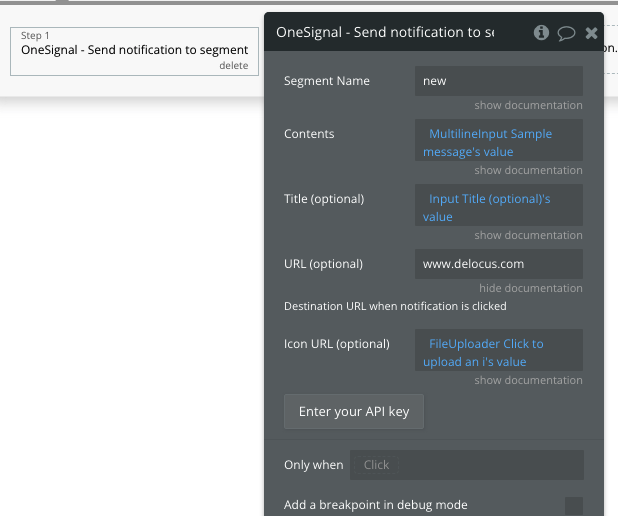

The above was solved by beginning the url with https://
Couple questions:
-
Is there a way to dynamically customize the opt-in prompt (message, icon)?
-
How can we capture and save the player id to the database?
-
Users in the application should have the ability to subscribe to multiple business’s notifications using the tag feature in Onesignal. In the event a user has already subscribed to notifications from business A in the app, later, the app should also prompt the same user when they visit other business’s page’s; business B or business C, etc.
Since the opt-in prompt can only be shown once, how can the app know if a user is already in Onesignal and to show a prompt with a bubble popup to subscribe? I would add a tag to their existing Player ID in Onesignal when successfully enrolled.
Cheers
They do now. iOS 16.4 release yesterday supports web notifications.
