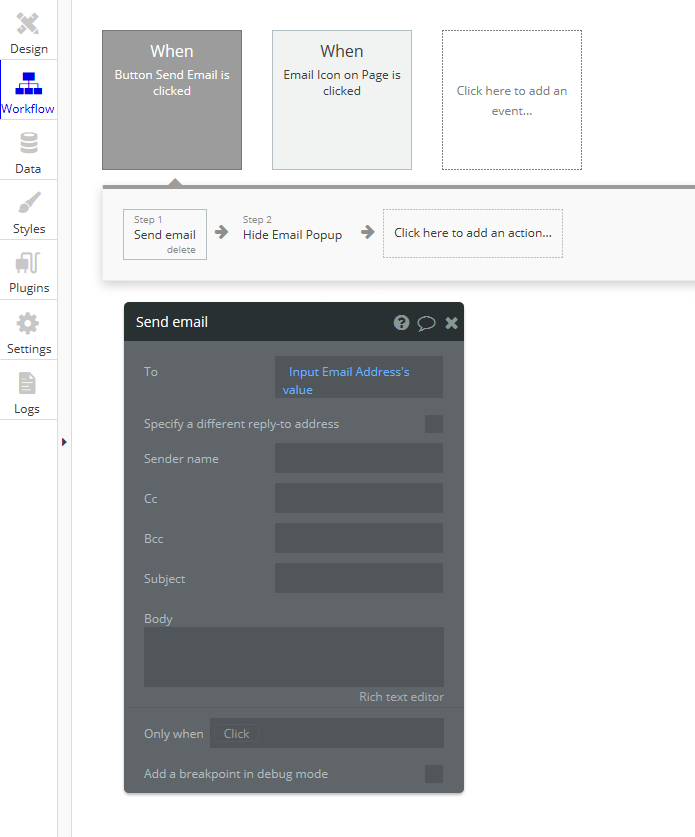
The user enters the email address of where they want the email sent. They then click the Email Send button on the popup which closes the popup. The email is suppose to be sent then using the email address provided; however, the email address in the popup seem to not be getting to the email… Can someone tell me why?
Can anyone tell me why the input box ‘Email Address Input 2’s value’ from the popup box is not correctly populating the To field on the Send Email workflow step? If I hardcode an email address into the To field it sends fine…?
Your workflow is a bit confusing to me. It looks like it’s split into 2 parts? How/why are you doing that?
The only thing I can think of is that the input you’re trying to use isn’t the one you’re looking for, but it’s hard to tell anything from these screenshots. Could you share a link to the editor?
I think I see what is going on. You need to split up the workflow into 2 different workflows.
1st Workflow: Send the data to the popup window and show the popup.
2nd Workflow: When click on the email button then send the email and close the popup.
I think I don’t understand the purpose of the 2nd workflow… All you are doing is entering an email address and closing the popup which makes entering an email pointless. It doesn’t actually do anything with the email address that is entered.
Thanks for the info; however, here is my problem… The mail icon is in a repeating group cell. I want to use that info to be in the body of the email… When I lay it out your way, I don’t seem to have the info to insert the repeating group info into the email body. The choice of ‘current cell’ field is not there?
I see; however, I am not using the bubble database at all. Everything is done through APIs so I can do the display data part, but am confused on getting that field into the email workflow piece…?
I am pretty sure you can use your same workflows you have but just split them up into two.
Right now you have it set like this:
When you click on the mail button (step 1) the “Show Email Send To Address” popup is shown and right after it does that (step 2) it sends an email to no one since no email is entered yet.
Then you type in the email address in the field (that basically does nothing since the email was already sent to no one) and click the Email Send button which just hides the popup.
Does that make sense at all? If you say the email is working correctly when you manually enter an email address then the API is not a problem. You should be able to do it.