QR Code challenge - please help

Hi guys,

I’m using a plugin called “transparent qr code generator“to generate the qr code for a booking.

Here is how the flow works:

  1. the user books a room and I generate a QR Code for that booking in the booking flow. All good so far.
  2. the user arrives at the hotel and show the QR code for the recepionist to scan.
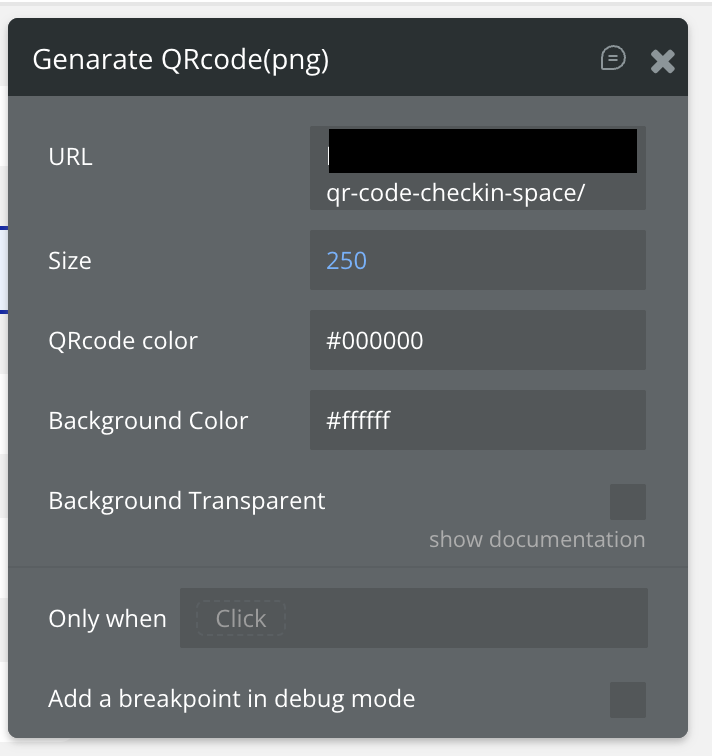
  3. When the receptionist scan the qr code of the client, it is supposed to land on a page that I already created and dynamically displays the details for each booking. Unfortunately, I cannot pass the booking details in the QR code. I can only pass a link inthe qr code that will bring the recepionist on my page. Picture below.

How can I pass the booking details in the QR code so that when someone scans the code they can see the booking details? Thanks a lot!!

You don’t pass the full booking details inside the QR code , you pass an identifier, and use that to load the booking record.

The clean setup is:

  1. When the booking is created, generate a unique ID (Booking’s unique ID or a custom slug).

  2. Create a page like booking-details with type of content = Booking.

  3. The QR code should contain a URL like:
    https://yourapp.com/booking-details/[Booking’s unique ID]

  4. When the receptionist scans the QR code, Bubble loads that Booking as the page’s data source and displays the details.

You only store the link in the QR code , Bubble pulls the booking data dynamically once the page loads.

1 Like

Hi guys,

Thanks a lot for this!! I did try it several times and it loads and 404 error page. THis is what I’ve done.

  1. the landing page is of type booking as you recommend
  2. the qr code has the dynamic booking Id at the end of the url like this. The booking id is correct.

myapp.com/qr-code-checkin-client/1753388722312x108074104422137210

A 404 in Bubble usually means the page isn’t receiving the Booking as its data source, even if the URL looks correct.

A few things to double-check:

1. The page “qr-code-checkin-client” must have:

Type of content = Booking

If the type is blank or set to something else, Bubble can’t load the record → 404.

2. The parameter must match Bubble’s expected format

For a data page, the URL must end exactly like this:

/qr-code-checkin-client/[Booking’s unique ID]

No “?id=”
No extra slashes
No uppercase characters

The ID you’re using looks correct, so it’s likely the page type issue.

3. Make sure the Booking record actually exists

If you deleted or modified the Booking after generating the QR code, Bubble returns 404 because the lookup returns no record.

4. Test manually

Paste this into your browser:

https://yourapp.com/qr-code-checkin-client/1753388722312x108074104422137210

If the page is set up correctly, Bubble will load that Booking into the page’s data source.

Yesss! Fixed it. So the problem was I had the LIVE link in the QR code creation instead of having a dev link in it e.g. /version-test/space-check-in/[booking_id]?version_test=true.

Thanks a lot for opening my eyes haha :slight_smile:

Glad it’s working now!
Yeah, Bubble treats the live and version-test environments as totally separate apps, so mixing the URLs always triggers a 404. Good catch.

If you run into anything else, feel free to ask.

1 Like