
Is the BBCode just like a static text you want to add before and after the email body?
Sorry, I’m being simple and am not sure of the answer.
My users have formatted their template emails. Each day the app sends a list of emails based on some conditions. It’s a looping backend workflow that was actioned from one button. It searches for the body of each email, but if I send with formatting then it just shows up as text example instead of looking nice.
Sorry hope that makes sense as appreciate its hard helping someone who’s not explaining themselves very well!
Okay so the formatting needs to also be in your database, so you can find it later and use it in backend workflows. Is that a field you can add to “Email Templates”?

Looks fine there, so when you are actually doing the Send Email action (your screenshot just shows creating the Thing) in backend workflows, you are just pointing to the Email Record’s Body?

You have everything in the “Text body” box, try right clicking the background of that box and doing “Copy expression” and paste the whole thing in the “HTML Body” below
See I did that before and because I didn’t have the BB Code to HTML element it just came out unformatted. Let me do a test now as maybe I did it wrong before.
Thanks for your time, I really appreciate it! I’ll do a quick test and report back 
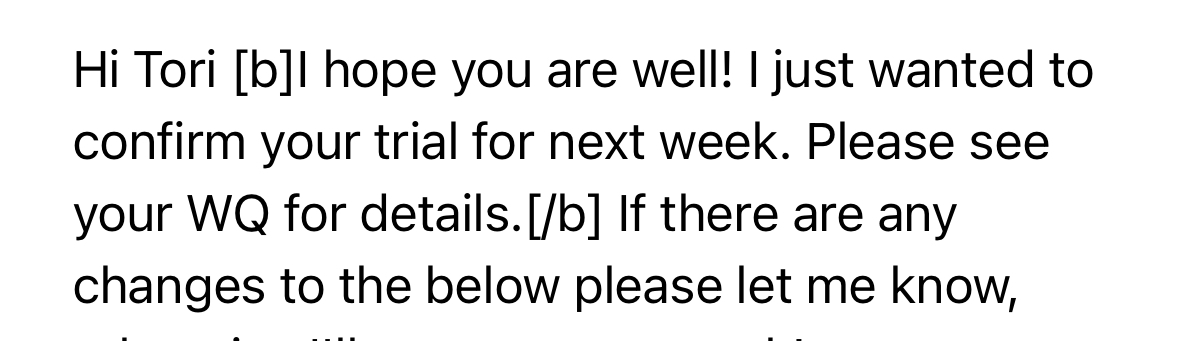

Oh I see, you are converting BBcode to HTML using a plugin when you are sending the email from the front end
The plugin isn’t available as a server side action so you need to use that plugin to convert it when you save it in the database. Then it is ready to go for the Send Email action in the API workflow.
1 Like
Legend @tylerboodman
1 Like
Hi @vini_brito, is it possible to add a field to the action “Postmark - Send email” called something like “Thread id” or “Conversation id”, the value from this field should be used on the plugin code to build a “headers” array like this:
“Headers”: [
{
“Name”: “References”,
“Value”: “<54321>”
}
]
Gmail and other email clients require this “References” field on the header to thread the related emails, creating a conversation. Find more details about this topic here: How to thread messages or prevent threading | Postmark Support Center
Thanks in advance. This new feature would be much appreciated.
2 Likes
Tried this, and plugin is sending the mail with attached file and it always miss the extension. In this case .PDF is missed always 
Can anyone explain how to iterate over a list of things in a HTML email please?
I have cobbled together a HTML email and I want to repeat a box/table for each item resulting from a search.
I can list all the results of the search in a single box/table using format as text option but don’t know what is syntax to allow looping for what is a dynamic list.
Any help would be appreciated - thanks.
Hrm, are you certain this varies depending on devices? Sometimes email accounts especially those a part of a Microsoft Org will display the full URL out to prevent any phishing or downloading of viruses (I think)
I use Google workspace so I haven’t first hand seen any of these issues 
Maybe email app as opposed to device. I’m on iPhone and don’t have any issues, but does seem to be outlook app on androids showing the link this way
@vini_brito Are you upgrading this plugin to use v4? I looked at the plugin code and got a warning that it will stop working on Jan 4.

Yes, I will.
Hi @vini_brito I had a richer postmark plugin backend workflow fail mid-way last week - wondered if it was a bug.
It was a hard bounce email in the middle of my looping workflow. It caused the workflow to fail/stop in a way that also prevented the BE workflow to loop into the next recipient. My workflow is simple; an email list, counter (from 0) and a max (count of list). It cycles each item, sends email, then loops with counter+1.
The hard bounce email caused it to fail, which cut the loop and meant no further recipient received anything. It wasn’t the first time the email had bounced, so I suspect I hit a postmark API error (for example: We hate you sending to hard bounces, so STOP PLEASE) and that must’ve been received by bubble as a OMG QUIT EVERYTHING response, instead of a more graceful, skip this dude and jump to the next.
Is there a known workaround for these? I’d happily take a hard bounce response so I can build a workflow action to suspend emails to that user then proceed to the next person.
Hi! That’s something you have to build yourself in Bubble 
Try this that I shared a couple years ago more or less:
2 Likes