
I’ve called a list of horror movies to my repeating group which works great.
Would anyone know a way to search (with search bar) for movies via the API in the same repeating group? ie: When the user types, the list shows only one result (the searched for movie).
Use SearchBox element then set the API in your data source
So I found out I can’t use the search function.
I had to set up an input.
With that being said I have to preform an api call to a search which has a “query” parameter.
I’ve set the call to “action” so I can use it in workflow I’m not having success with the query call. Anyone have an idea? No clear tutorial on YouTube. I’ve used Chat GPT as well and I’m still not having luck.
@tylerboodman “sorry to bother you again, but would you have an idea? I’ve been at this for two weeks. Thanks!
@tylerboodman
It doesn’t have to be in the same repeating group. I’ve actually set up a separate repeating group that shows up when Info is typed in the input bar
You just have to setup another API call to search their database: Search - Movies
Then add an input box, then when you do the API call the input’s value will be the query parameter value 
I’ve tried that but maybe I’m doing something wrong
Am I setting up a workflow with this ?
Or is this something outside of a workflow
Is the repeating group set to the search call?
Then a workflow that says input value will display result on repeating group ?
Not too sure what you have but here’s a quick example I made: Bubble | No-code apps
Same app as the other example I gave you previously with the scrolling/loading but this is different page. (editor scrolling-api-request | Bubble Editor)
for some reason it’s not giving me the
“Repeating Group Search Movie RESULTS” option in the data source of my repeating group.
It only giving me the “Search Movie” option.
I’ve checked my api and it seems correct. Would you know why that would happen?
FearScale | Bubble Editor
@tylerboodman again thanks for helping me.
wait…i might have figured it out…hold
You have to initialize the API call with a query value and make sure it returns at least 1 movie so Bubble learns the structure. Otherwise it returns nothing and Bubble doesn’t know there’s more data
Would this be on the query section of the moviedb.org? I didn’t see anything in the value of your API query parameter on Bubble
Yea I had a value in the API Connector for the query parameter just to initialize then I removed it. But then you dynamically add the input’s value when you do the actual API call:
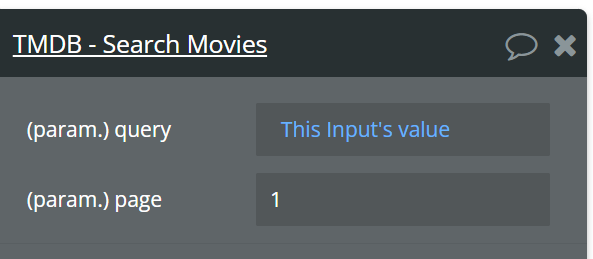
I got it working! You the man! @tylerboodman
one more question and then I’ll shut up. I’m trying to get it to search for just Horror movies. In the api i used parameter “with_genre” value 27. I used that in the state of the repeating group like the other parameters. if i search "inside out (disney movie) it still shows up. Any thoughts?
According to their docs the Search Movies endpoint doesn’t have a filter for genre, then the Discover Movies does have genre filtering but no search option.
So sounds like you’re trying to use a parameter on one of those when its not supported
As a last resort if they don’t have options for filtering you could use the Search Movies endpoint but then do :filtered after the results and manually filter it by genre client side.
I’ll give that a shot. Thanks for your help.
Still getting used to api stuff.