
@costas Nigel is correct but his explanation is probably confusing for you. Were you able to answer your question? This post was helpful to me
I want to mention something to be aware of. From my understanding there are two types of potential email recipients in your scenario: 1) an existing User (ie already in your database & thus have a unique id) 2) “cold contacts” people who are not in your database & have no unique id in the database as of yet. I note Nigel’s response from the link in your last post covers scenario 2 his answer may be hard to follow for newer bubblers. Nonetheless very likely you are dealing with the 1st scenario.
The “parameter” you need to pass from the a) email link to the b) page in your app must be something that can be read by the page you just directed them to as well not include any confidential info. I personally use a User’s UNIQUE ID but you can use something else if you thought best. See Bubble manual here for nitty gritty Data Sources - Bubble Docs
for (a) something like this

for step (b) on the page the email recipient ultimately lands on should have this function
See my setup. I suspect you should be using “Parameter type”
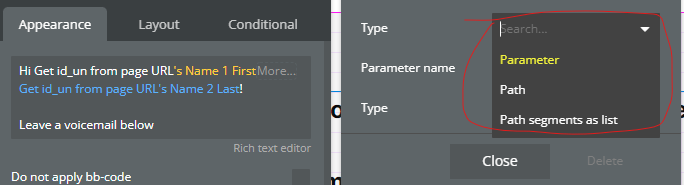
and then choose a parameter name (ie code) and the type of data being passed. You can use whatever Parameter Name you want (id_un is what I use)

If you’re sending emails to recipients who are not in your database I can’t provide exact steps but passing their name from email to your site’s page is possible. I believe you would need to reference the Bubble manual & the “Path” or see Nigel’s response from the link in your last post.