I am new to the site, and have looked over lessons and videos and well as searched the forum but still running into an issue.
Probably a very easy question, but I am having issues pointing my two different User types( lets say type 1 and type 2)from a drop down in sign in to point specific pages for type 1 and type 2.
I really would like to have the user type be sent to user specific url depending on user type selected with their being two url templates coinciding with the user type.
I have seen some examples with conditional formatting but I am just stuck at the moment. Thanks for the help!
Hi @shawn - welcome to Bubble. You can add two Steps in your login Workflow which will be similar to the image below. You’ll want to choose which Destination page for each type of User and then you’ll want to fill in the “Only when” field with the corresponding “User Type” (a data field (of type Text) under User that I just made up for demo purposes). You’ll need to determine what your “User Type” values are that correspond to the User logging in (and the page you want them to go to). Make sure when Users are created that the “User Type” field has a value or these steps won’t work
Hope that made sense and helps.
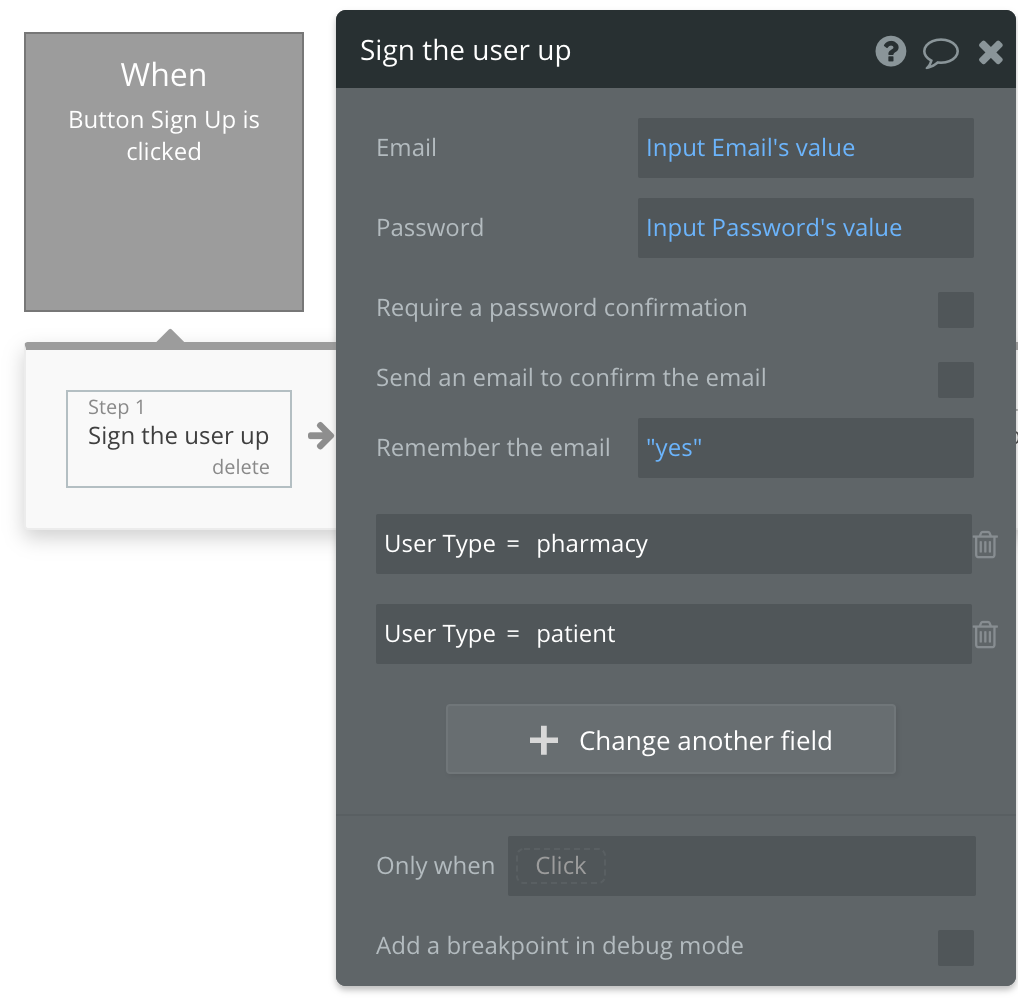
Thanks for the quick response. I am still having problems. Right now I both user types(in a dropdown) are going to only one user. Here are the screen shots of what I am working with. I think it has to do how I have the users setup? Thanks for your help!
Hi @shawn - is there are reason you have both “Patient type” and “Pharmacy type” data fields under User? I’m guessing each data field has multiple values? If not, you should use only one data field, ie “User Type”. Actually, unless your app requires it, I recommend one data field (“User type”) and then just have one pulldown with all of the options for both patients and pharmacy there (if that approach works for your app).
Then in your “Only when” statement for “Go to page pharmacy_”, have “Parent group’s…Pharmacy” is “whatever value”. Then in the next step for going to page patient_, you actually don’t need any “Only when” statement because the prior step going to pharmacy_ has already executed. And if it hasn’t executed, going to patient_ is the only other choice. That’ll help simplify your design a bit (again, not knowing your design - you may have reasons for have "Parent group’s in your steps). NOTE: If a step with Go to page
doesn’t have an “Only when” condition, it must be the last step in the workflow or you’ll get a Bubble warning. If you have more than one Go to page without an “Only when” condition you’ll get a warning (workflow won’t work)
It does make more sense and I am starting to learn more about what I am needing to do. I have a User Type set up and the following workflow screen shots are able to only go to the “patient” user, not the pharmacy.
Is it something I am doing with the dropdown properties on the actual element? I am picking up so much of this quickly but feel like this shouldn’t be this difficult. Thank you for all your help though!
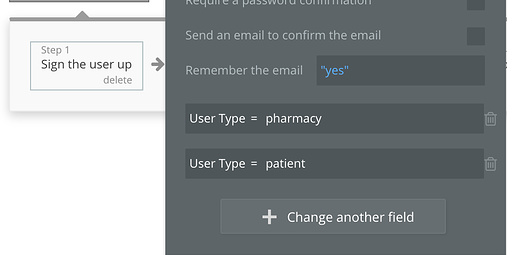
Hi @shawn - glad you’re picking it up quickly. For the workflow step below, User Type will always be assigned “patient” as it’s the bottom of the list. If the order was switched and “pharmacy” was in the bottom line, all Users would be “pharmacy”
What you need to do is have only one line for assigning the value to “User Type” And the input needs to be a dynamic value, ie it needs to come from a user input (I think you said you had a dropdown?). If you have a dropdown, then the line will be something like “User Type = Dropdown Select User Type’s value”
Thanks again for your help. I was able to set the user type to =Dropdown Select User Type’s value. When I sign it, it does not direct to the the specific pages.
Do I need to do something in the properties of the dropdown? Do I need to set conditions?
One more thing. If I change the dropdown to an Input field, then this login process works perfectly…but what could I be doing wrong with dropdown to not have this operation work when I change from text input to dropdown input.
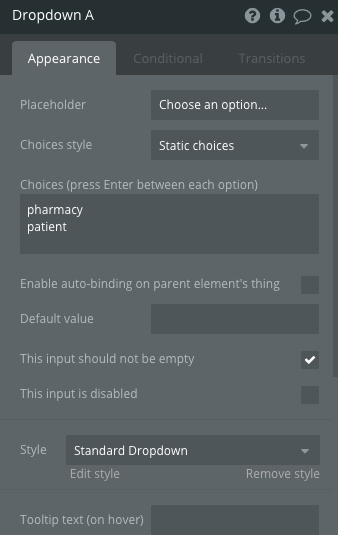
For the dropdown, you’ll want to set it to Static choices and enter the two value for “Choices”, ie “pharmacy” and “patient”. Also check “This input should not be empty” as you’re requiring this data field to be populated. Refer to image below.
Make sure the spelling and case is identical between the choices in the dropdown and your workflow steps as Bubble is case-sensitive.
If you’re having a different issue, please add screenshots of both the dropdown’s popup (similar to image below) as well as workflow steps that determine which page to go to.
Also - check the actual database values for your users to make sure the right “User type” value is being assigned.