Hi guys,
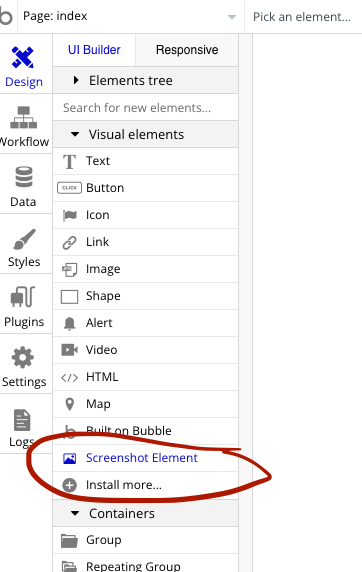
I am looking at the plugin ‘Screenshot Element’. I have defined an ID for the element I want to save and now the next step is to add event: “Download Element As PNG” (like below image) but I don’t see that in my list of option to choose from?
Hello @darren.james7518 
Are you on paid version?
This is only available for paid version
Ah no I am not … this is what annoys me about Bubble’s plugins. I tried and trued to find the price but they hide it, and I have no idea where to pay. Do you know how much it is?
Ah I have found it here Advanced Screenshot Element Plugin | Bubble
@mdburhan3 I have paid for the full version but I still don’t see ‘Generate Screenshot’?

Do you know how I can double check I am indeed on the paid version? I see this in my plugins;
Hi @darren.james7518 
They might have updated their plugin
But here is the link to the documentation to take image as png
https://bubble.digital-bird.com/plugins/screenshot-element-pro#screenshot-of-an-element-by-id
You can try this
Thanks, I will try … also, I checked my account and I have definitely paid the $8 so it should work.
Ah yes, that is the documentation I was referring to. It says “In Workflow choose “Generate Screenshot” action”. hmm, I don’t have that in my workflow.
Hi @darren.james7518
I just cross check the plugin
I think you are not adding screenshot element to page
That’s why these actions are not showing in the workflow
Oh damn, you may be right. I will test now … unbelievable that they don’t mention that in the docs.
@darren.james7518
Sadly that’s the problem with most of the plugins these days 
They don’t have proper documentation
That did the trick. Thank you so much …
Yes, it’s surprising that a Bubble plugin failed to mention this step.