Hi- I want to sanity check if ~3 seconds/page to load is good or bad responsiveness?
Perception wise, it doesn’t feel too bad on PC but on mobile web, it seems to take a long time (even though it’s the same ~3 second load time).
Hi- I want to sanity check if ~3 seconds/page to load is good or bad responsiveness?
Perception wise, it doesn’t feel too bad on PC but on mobile web, it seems to take a long time (even though it’s the same ~3 second load time).
Try adding a loader to make it seem faster! I use this one: 1T - Page Loader Plugin | Bubble
It’s easy to set up and you can add custom lottie animations as well
Bubble will never come anywhere near matching a static webpage (‘normal website’), so a lot of the web speed tests are just not relevant. A JavaScript-based app will be much slower, and Bubble may be less performant than many well-written code-based apps. For me, 3 seconds for a page load is fine. However, if the user gets a blank page for 3 seconds, that is too much, so a pre-loader like the one suggested by @aleemansari97 would be helpful.
If your users navigate to lots of different pages, the 3 seconds may feel more painful if it is after every click. This is where turning your app into a Single Page App (SPA) may help. With a SPA, if the User waits 5 seconds once, and then every transition after that is lightning fast, that may be a better trade-off. How often will they encounter this 3-second wait during a typical session?
Although you can compare objective ‘performance’, the reality is that ‘perceived performance’ is the only true metric for a user. If everyone thinks your app is fast, it is. If they think it’s slow, it is. You need to manage expectations and keep your users engaged. Check out the article below for more about how to ‘think’ about performance.
currently, it is every page load (except for pop-up’s), for example, jumping from the profile page to the search page, so that’s the part i’m trying to address.
Understanding how your users will use your app is key. If your profile page is only accessed once and then forgotten about for years (which may be common), a slow page load will likely be rare and therefore ignored. However, if two key pages are being swapped back and forth regularly, a fresh page load will be frustrating. This would also increase Workload Usage if the same data is being loaded multiple times, when it could be downloaded once per session.
The term “Single Page App” (SPA) can be a bit misleading. Most larger apps will actually be ‘multiple SPAs’. For small Apps, putting everything into a single page may work well (with a single, moderate wait on first page load). However, for larger apps, an SPA may have very long waits (10-60 seconds) and may even crash. Here is where these may be broken into multiple SPAs (e.g. a marketplace may have an SPA for “Selling”, “Buying”, “Profile”, etc.). Users may not move back and forth between the selling and the buying features every few seconds. But they may move between two different Selling listings to copy details, check pricing, etc.
For example, your profile page may have a tab for changing username/passwords, orders history, subscriptions, etc. Navigating between each tab should not refresh the page.
If you decide that there are pages which will be accessed regularly together in the same session, now is the time to move them onto a single page. I would recommend using Reusable Elements (‘REs’) for each of the pages you currently have, to save having one huge page which is difficult to maintain. REs can introduce more complexity when one RE must communicate with another. However, given that you have these separated currently, they would likely be able to run independently of each other.
Read up on SPAs before you begin. There are lots of tutorials such as:

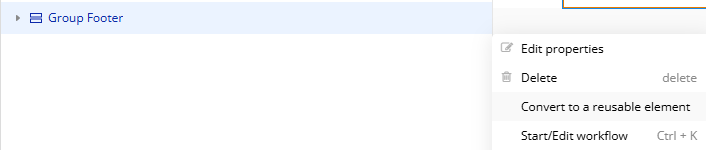
To convert a page to an RE, you can click on the Elements Tree, find the groups you need to convert, highlight the relevant group using Shift and click, right-click on the highlighted elements and select Convert to a reusable element. This isn’t always reliable, and you will find quite a lot of things will need fixing in the RE. However, it always looks worse than it is when you see hundreds of issues to fix!
Alternatively, use “Copy” > “Copy special” > “Copy with workflows”, if you find “Convert to a reusable element” is missing too many Workflows during the transfer:
This topic was automatically closed after 70 days. New replies are no longer allowed.