I need help with structuring a bubble API call. I tried this manual work flow guide. [Showcase] Manual OAuth2 Token Integration - Showcase - Bubble Forum
Thank you @
ambroisedlg for taking the time!
I have a cURL that works great to obtain an access_token when used with postman. Not that it matters but I am integrating with Square. The cURL works fine with Square API explorer too so I know the headers and parameters function, are in the correct order and syntax is all good.
Problem is bubble API initialization yields error “missing parameter”. I tried manual Oauth as well as Oauth2 custom_token(autoflow). Regardless I get the same missing parameter message. “client_id” is missing.
Here is the json body below. Have tried manually defining parameters and also tried using them in the json body. Either way I get the error. I am using static data for testing. And yes I am using new a “code” with each token request to make sure access is granted. Works great in postman.
{
“grant_type”: “authorization_code”,
“client_id”: “-IYz_WyFdiiPKQN45lqdquQ",
“redirect_uri”: “https://********.bubbleapps.io/version-test/oauth”,
“short_lived”: false,
“code”: "-OZW45otfdUaVE5lNRxRJvA”,
“client_secret”: “********Mm4hZc3HBtQBGVHzSXKjcpbG7GFT9B2IJw98pCP7w”,
“scopes”: [
“ITEMS_READ”
]
}
Not sure why it pasted like that in bold. Looks correct in bubble. Thanks for having a keen eye.
Here is the json body again:-
{
“grant_type”: “authorization_code”,
“client_id”: “sIYz_WyFdiiPKQN45lqdquQ",
“redirect_uri”: "https://k.bubbleapps.io/version-test/oauth",
“short_lived”: false,
“code”: "B*******W45otfdUaVE5lNRxRJvA”,
“client_secret”: “H****htQBGVHzSXKjcpbG7GFT9B2IJw98pCP7w”,
“scopes”: [
“ITEMS_READ”
]
}
Also validated the json body. Its good and works in postman. Not sure what’s throwing the “missing parameter client_id” error.
The endpoint URL is below. I have tried multiple auth flows including self-handled, user-agent etc. Same error “missing parameter client_id”. If I make any call GET, POST etc from bubble to Square I get the same error.
It seems to be some kind of bubble parsing issue. It’s frustrating not being able to see how bubble structures the outbound call/raw data. How do I debug what I can’t see? cURL works within Square’s API explorer and Postman so the parameter is not “missing” it must be something else within bubble. Here is the working cURL(with dummy codes):-
curl https://connect.squareup.com/oauth2/token
-X POST
-H ‘Square-Version: 2023-10-18’
-H ‘Content-Type: application/json’
-d ‘{
“grant_type”: “authorization_code”,
“client_id”: “wien56nthyiIYz_WyFdiiPwn875lqdquQ”,
“redirect_uri”: “https://wantjrnt.bubbleapps.io/version-test/oauth”,
“short_lived”: false,
“code”: “29nghti9-dUaVE5lNRxAgRT”,
“client_secret”: “nbjg85jndk94jfcpbG7GFT9B2IJw98pCP7w”,
“scopes”: [
“ITEMS_READ”
]
}’
I receive both the access_token and refresh_token just fine using cURL.
I tried URL encoding the json body and changing the content_type to match. Unsuccessful.
“client_id” parameter is necessary for all my calls. I am the “client” and that is my identifier.
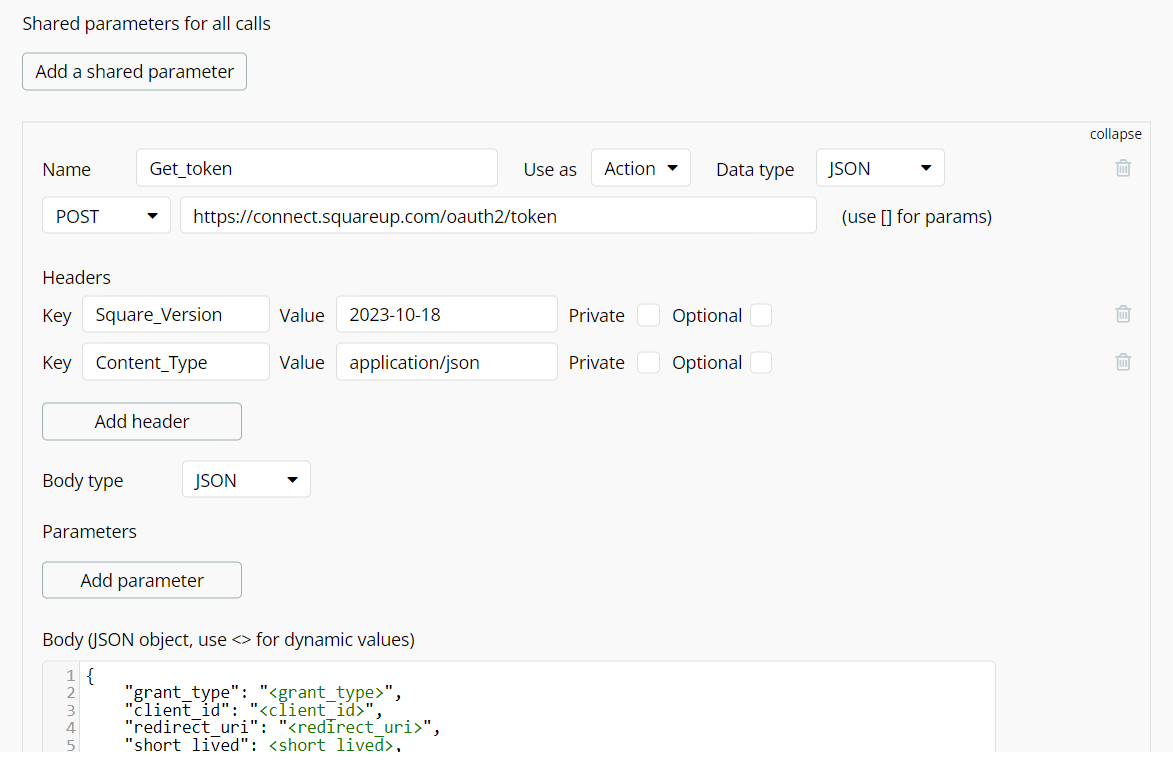
@manager4 have you tried adding all these values as parameters instead of passing them as a JSON body? Screenshot below is unrelated to Square but just to illustrate what I mean:
URL encoding and changing the content_type to match.
I’ve checked spelling, spaces, syntax, validated the json and tested cURL with postman and Square’s API explorer. Everything is fine except when the call is sent from bubble.
I have scoured bubble docs and forums. Even GPT4 is like “its a bubble glitch of some kind”
Have cleared cache, rebuilt the call a dozen times. No love.
From the list of “Body parameters” the client_id is missing. (And it is not in the “Parameters” section either). It is not getting passed on to your API. Also, when I build the Json body, I use the parameter name between the <>. Then the “Body parameters” section will automatically be filled with the necessary parameters, so you won’t miss any and wouldn’t have to manually add them.
@ambroisedlg I see how the parameter name between the <>works. Thank you! I thought <> were for dynamic values. Did not realize <> also builds the “body parameters” keys below it.
Here is my call:-
@manager4 can you please try and keep the exact same 5 parameters as in my screenshot above, and therefore remove the other 2 parameters? I don’t see why this wouldn’t work
Btw you still have a formatting issue with the quotes on the scope parameter key
Alright that worked. I’m having some auth issues but you solved my missing parameter problem! @Jici can you explain the difference between the two please? Why is it “Content-Type”?