Hello, thank you so much for reading to assist me here.
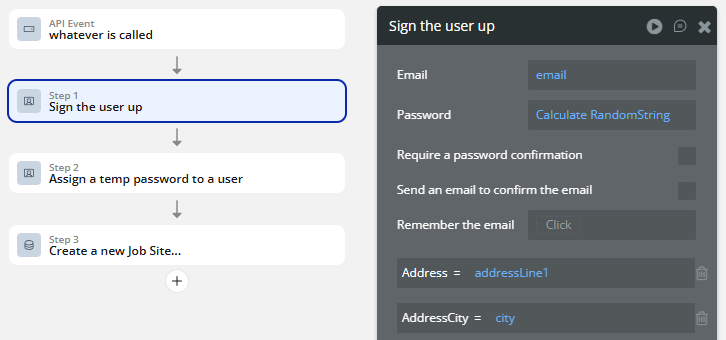
Zapier pulls our new customer contact information from our CRM and sends it to Bubble. I need Bubble to create a new user, and a new database entry (a JobSite) related to the user. However, Zapier is consistently getting the error message, “Please enter a password” when my flow runs. How do I set up Bubble to work here? A temporary password would be fine, or no password at all until the new user (who will be emailed confirmation) is also fine.
I have tried setting the Password field (at the top of Sign the User Up) to the sent data fields, but this is not working. I am at a loss as to how to proceed.
I have also tried “Create an account for someone else” but then Zapier is being rejected with “Please provide an email” even though the email is being sent from Zapier, and I have entered that email in the first section of the workflow.
You can satisfy the sign up action by using the “Calculate Formula” data source (a random string). Then later on use the “Assign a temp password” and email them that password.
Adding the Password as Calculate RandomString is still resulting in Zapier being told to submit a password. Can you be more specific? I am new to Bubble, I really appreciate your time.
Your random string is tied to the length of the firstName. Was a firstName provided? You can just type a static number like 12 for the length. I am assuming that error you are getting is because the password value is missing
When I try to type in just a number for Length of characters, it does not allow this. I am only allowed to choose a data source which is why I was trying the firstName. Yes, I am sending the customer first name. I also tried this with the zip code since that would simply be a 5 digit number. Neither work so far.