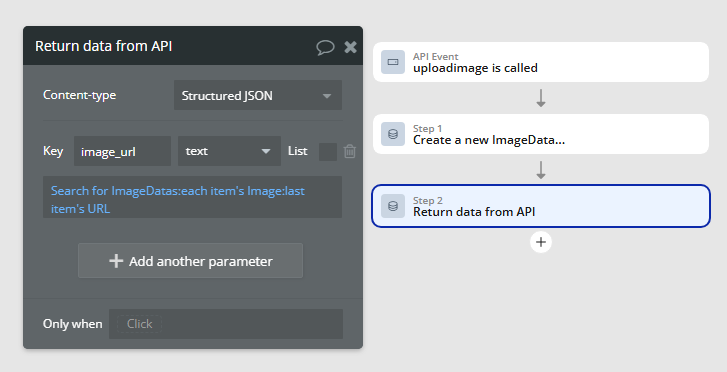
I am experiencing an issue with my API Workflow in Bubble (`uploadImage`). The API successfully receives and processes an image uploaded from my web application, but the response does not return the expected image URL.

Hello Bubble Support,

I am experiencing an issue with my API Workflow in Bubble (uploadImage). The API successfully receives and processes an image uploaded from my web application, but the response does not return the expected image URL.

Current Behavior:

  • The API request returns a 200 OK status, indicating successful processing.
  • The image is correctly saved in the Bubble database (confirmed in “Data → App Data”).
  • However, the response from the API does not include the image URL, even though I added "Return data from API" in my workflow.

Troubleshooting Steps:

  1. Checked that the file is saved as "File" type in the database.
  2. Attempted to use "Do a search for [Database Entry]:first item's image_url" in "Return data from API" (but this option is not available directly).
  3. Verified that "image_url" exists as a field in the database and is storing the correct file URL.
  4. Tested different methods of passing the image, including Blob and Base64 formats.

Expected Behavior:

The API response should return the image’s URL, allowing the application to access and display the uploaded file.

Could you please advise on the correct way to retrieve and return the image URL from the API Workflow?

Thank you for your support!

Can you show your workflow? Return data from API only works when accessing it using something like the API Connector. Is that how you are using it? Let us know. Thanks.

FYI, we are not Bubble Support. We are just other users like yourself that try to help out in our free time. :blush:


async function captureScreenshot() {
console.log(“:rocket: Запускаем html2canvas…”);

let canvas = await html2canvas(document.body);
console.log("✅ Скриншот создан!", canvas);

// 🔥 Создаём изображение в формате Base64
let imageData = canvas.toDataURL("image/png");  
console.log("✅ Содержимое Base64:", imageData);

// 🔥 Убираем префикс "data:image/png;base64," перед отправкой в Bubble
let base64Data = imageData.replace(/^data:image\/png;base64,/, "");
console.log("✅ Очищенный Base64:", base64Data);

let formData = new FormData();
formData.append("image", base64Data);  

console.log("✅ Содержимое FormData:", formData.get("image"));

let apiURL = "https://actools.online/version-test/api/1.1/wf/uploadImage"; // Проверить точное имя Workflow!
console.log("📡 Отправляем запрос на Bubble API:", apiURL);

fetch(apiURL, {
    method: "POST",
    headers: { 
        "Accept": "application/json"
    },
    body: formData
})
.then(response => {
    console.log("📡 Ответ Bubble получен, статус:", response.status);
    if (!response.ok) {
        throw new Error(`Ошибка: ${response.status} - ${response.statusText}`);
    }
    return response.json();
})
.then(data => {
    console.log("✅ Ответ Bubble:", data);
    if (data.image_url) {  
        console.log("✅ Загруженное изображение URL:", data.image_url);
    } else {
        console.error("⚠️ Bubble не вернул URL, проверь API Workflow!");
    }
})
.catch(error => console.error("🚨 Ошибка при отправке:", error));

document.body.appendChild(canvas);

}

// Запускаем функцию
captureScreenshot();

This topic was automatically closed after 70 days. New replies are no longer allowed.