I’ve got the next error when I try to apply a sound in my app.
Can you help me with this @dambusmedia?
Thank you 
I’ve got the next error when I try to apply a sound in my app.
Can you help me with this @dambusmedia?
Thank you
This type of error generally indicates that the library or other code on which the plug-in depends is not properly loaded. (The script is either not available at all or is not YET available when a plug-in action is called.)
(Aside: To avoid situations like this, many Bubble plugins add scripts for including libraries they rely on to every page in your app. This is often bad practice, of course, as that unnecessarily adds bloat and can load time to pages that do not need that plugin’s capabilities.)
The Howler plugin only loads its code on pages that use the element, which implies that – for proper function – a howler.js element must be present on the page object itself and NOT hidden by default or by any other conditional actions that might cause its script to not load.
So, the thing to try:
Try that.
The current version of the howler.js plugin uses version 2.0.9 of howler.js, as shown in the “Element code” section of the plugin (can be seen here: Bubble Plugin Editor - Audio / Sound Player Howler.js Lite).
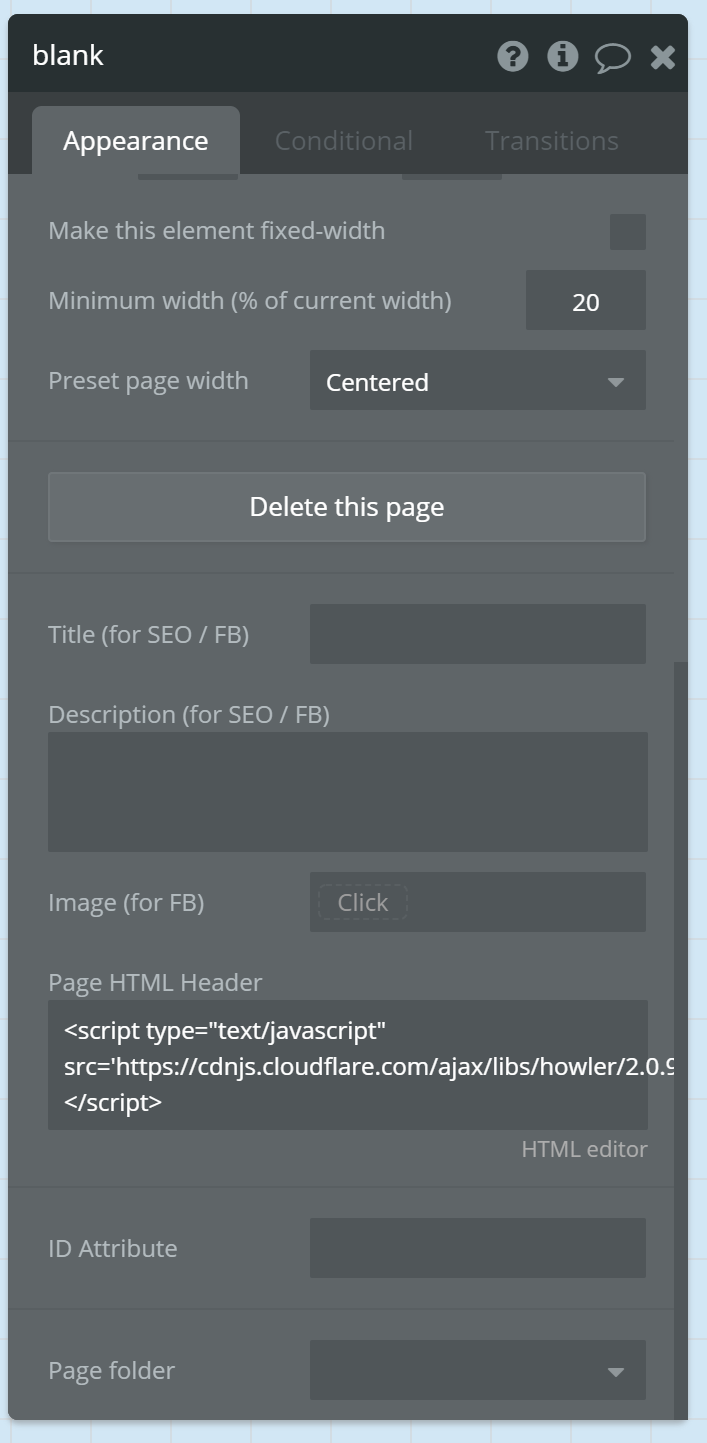
So, what you’d do in that case is double click your page object and add the following line to the “Page HTML Header” section:
<script type="text/javascript" src='https://cdnjs.cloudflare.com/ajax/libs/howler/2.0.9/howler.min.js"></script>
Visual example (the dialog below is the page object’s editor dialog):
NOTE: I do not use the howler.js plugin, nor make use of howler.js via JavaScript so have no deep familiarity with this plugin or script or the various limitations of this library.
I don’t know how large the howler.js script is, but it is possible for large libraries to still be loading and not quite ready to be called (they are as yet “undefined”) when the “page is loaded” event fires.
So, if the issue is that you are trying to fire a howler.js play action right on page load, you may need to insert a pause step or something before doing that. (There would be other technical solutions to checking for howler.js being loaded, but those start to get a bit complicated and you might as well just implement the very simple calls to this library yourself using Toolbox Run Javascript elements.)
Thank you very much for taking your time @keith
It seems to work now after many tries. It’s a little bit tricky to play a sound with Howler.js when a PopUp appear.
To solve this, did you simply include another howler.js element on the page itself?
(If the only howler.js element on your page is in a pop-up – which is of course not shown when the page is loaded – the howler.js script itself (the actual library, delivered by the CDN) will never be loaded, which I assume was the problem you were running into. For other folks who might be following this thread or run across it in the future, this is a general issue that one can have with any Bubble plugin, unless that plugin’s author has taken steps to address that specific case.
As I noted originally, the “default” way of addressing that issue is for the plugin to add the script header to all pages in your app. You can tell plug-ins that do that as they will have some <script> in the Shared section of their plugin code:
Hello @keith ,
In this case the Howler start to function (with the howler.js element on a pop-up) simply by uninstalling the plugin and and installing it again and put it in the workflow the second step. (Without the script in the page header)