
For option 1, I have the start time saved in the database, so instead of using “Current date/time+ minutes: 10 extract UNIX / 1000” , should it be written like this "Current Page’s Meeting’s Start time+ minutes: 10 :extract UNIX. Can you DM me you email so that I can give you access?

Hey @anon33759447, it looks like you’ve got the right configuration!
Just to clarify, the +10 adds extra minutes to the start time from your database. If you’ve already set a specific start time, you may not want to add the extra minutes unless you want to delay the start.
Do note that you’re applying this to the meeting token, which prevents this user from joining before the start time. However, the room itself will still be open to others unless you configure it in the Daily - create room action.
If you have more questions, feel free to ask here or email support. I don’t think you need it but if you want more dedicated help or would like me to jump into your editor, I also offer one off support sessions and support plans.
Thank you. I will look into booking a session with you. I have some questions that I need cleared up.
Thank you so much Lola, so fast and helpful!!
@subscriptions4 The Daily team just added a transcript-ready-to-download event to their API (Transcript Ready to Download). You can use this event to automatically get notified when a transcript is ready, avoiding errors in the workflow when the transcript is longer.
I also have a guide on using webhooks with the plugin here
Feel free to reach out if you have any questions!
Hi Lola,
Every time I’m on a video call, I can hear myself and background feedback. How do I stop hearing myself because it’s distracting when I talk on a call.
The feedback could be caused by your speakers being too close to your microphone. You can try using headphones for a quick fix .
You can also enable ‘Noise Cancellation’ in the Daily - Create Room action. This will enable the ‘Noise Cancellation UI’ which will allow users to reduce noise.
However, if your mic and speakers are too close, feedback can still occur.

@anon33759447 There haven’t been any changes to the plugin itself.
One thing to check is your daily developer dashboard here. What do the logs show?

Errors related to room creation should appear in red. The error message points to an incorrect parameter in the Daily - create room action, but the logs might provide more details about what’s causing the issue.

Can you offer any direction here, @lola ? No changes were made on my app, however today this has been happening for every user.
Specifically, they are joining a room (which triggers auto-transcription).
I’ve captured 100,000s of minutes of transcription this way - without issue. Hoping you can shed some light? Changes on your end? Daily’s end?
Hi @subscriptions4, can you share a screenshot of your workflow? The error suggests you’re starting transcription before the user has joined the room.
You can’t start transcription before the user joins. To ensure it starts only after they’ve joined, you can use meeting events (joined-meeting) to trigger it on demand.
If auto-transcription is enabled with the correct meeting token, you shouldn’t need to “start transcription” at all. Here’s a guide on using auto transcription. If you share your workflow, I can likely help pinpoint the issue!
@lola Great plugin! I just had a few questions. Is there any way for a user to test their microphone or camera prior to joining a room. A few of my users are having issues with this and there doesnt appear to be a way to fix it.
Also, every time a user joins a room it asks them to re allow Camera/Microphone. Is this something that we can do once and then not ask again for a time period.
Thanks!
Hi @dbom009!
Thanks for trying out the plugin! To allow users to test their mic and video before joining a call, set “Enable Prejoin UI” to true in the “Daily - Create Room” action. Here’s an example of the prejoin UI.
Permission prompts are typically handled by browsers:
- Chrome: Prompts the first time a user joins a call on a specific subdomain.
- Safari: Prompts once per meeting session.
Let me know if you have more questions!
Hi again Lola,
Will your plugin in the future support Virtual Backgrounds? Or do you have a separate plugin for that?
When creating a room you can enable the video processing UI,

then in the settings during a call users will be able to add a custom background
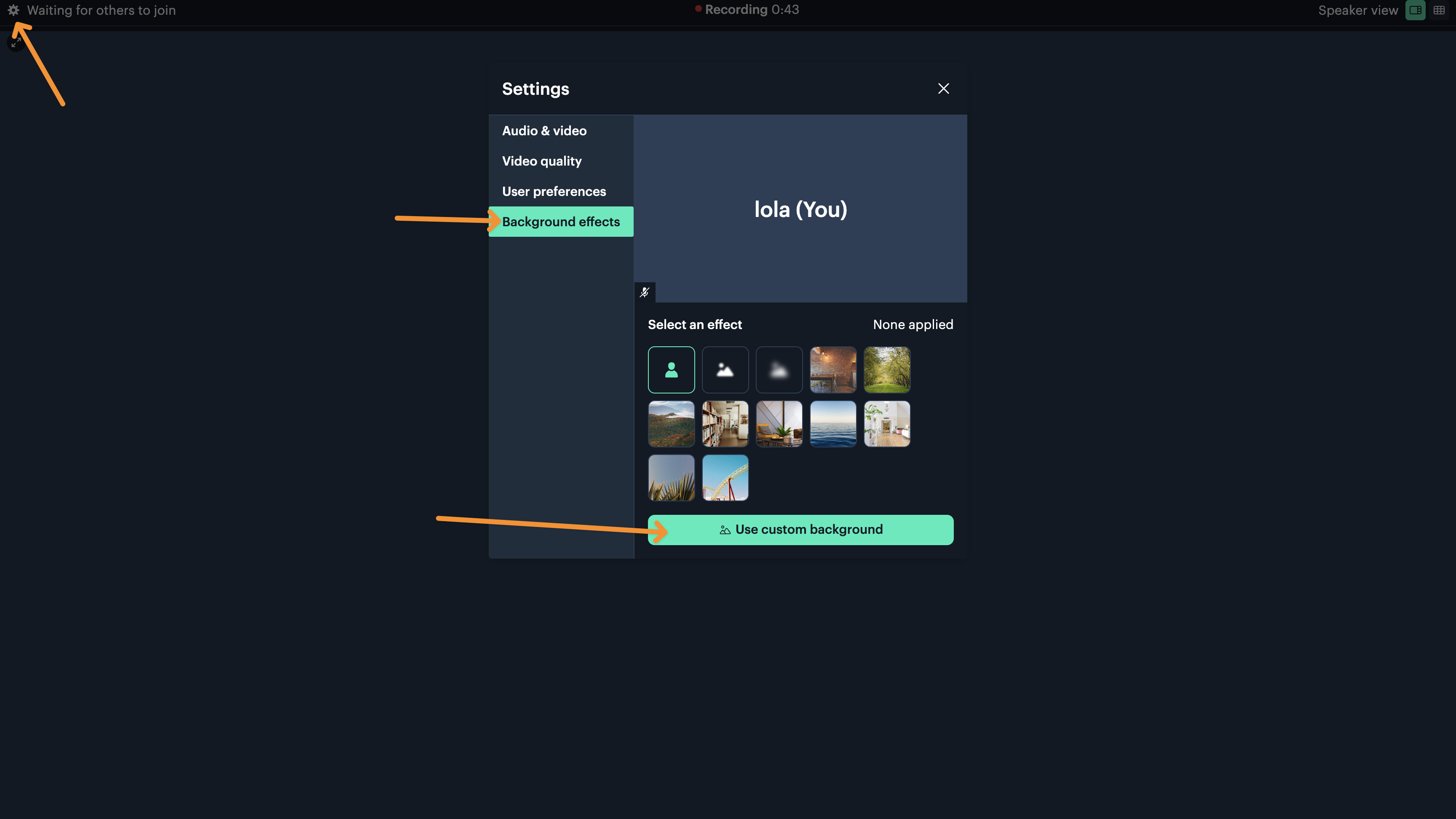
There’s not a way to upload a virtual background programmatically a user will need to add it in the settings of the call.
Thanks Lola!
Hello, @lola!
Have you tried video recordings summarisation and transcription?
Is it available in your plugin?
Appreciate,
Hi @igorperep!
Thanks for reaching out and sharing! It’s not currently in the free version of the plugin but I just added it to the video, audio & live bundle.
You can submit a job as well as save the output of the job as text directly in your bubble database.
They are API calls so even outside of either plugin should be possible with an api connector api call if you do need to implement it separately in your app.
Is anyone else getting an error while trying to create a room? This problem has started recently, maybe a week a go.
I’ve tried using multiple devices and I’m still getting the same issue. I’ve tried using my Phone internet stead of my home internet connection and still the same issue. I’ve tried using different browsers, but nothing that I have tried has worked. I have even created a new account and still the same problem! Is it a problem on daily.co’s end? Did they block my IP address or something?


@anon33759447 Just tried out the plugin, and I’m still able to create and join rooms. Looking at your screen shot, looks like you’re able to create rooms but you’re not able to join a room.
What do the room settings look like? For example in your rooms screenshot click on toastly-123 and share the settings of the room you’re trying to join.
Also when you open the room link directly, (ie not inside bubble, visit the URL directly) do you still see something went wrong?