Great to hear @levon @ZeroqodeSupport !
Can we prioritize the calendar plugin please 
Great to hear @levon @ZeroqodeSupport !
Can we prioritize the calendar plugin please
Sure @muneer.hameer we already did
We’ve update the plugin’s library (Full Calendar) to the latest version (Still testing) and will add some bug fixes, improvements etc. Will keep you posted
Excellent! I was just about to move away from Air Calendar because it’s really buggy but I might just hold off now…I’m an using a few other ZQ plugins so I’m really glad you guys have taken these over.
Rough idea on timeframe for an update to the Air Calendar plugin?
thanks for your faith in us @equibodyapp 
hopefully next week 
@levon - excellent! I’m just doing an overhaul of the scehduling/calendar function of my app so good timing!
This is good news. Only just today realized the calendar is all of a sudden throwing a few errors for me. Am hopeful you guys can turn this one around.
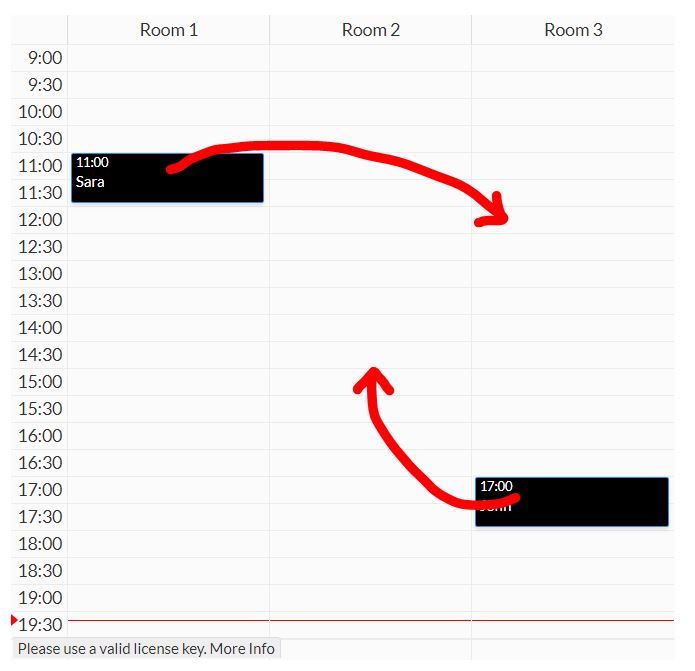
Anyone tested the “Resource Calendar” and try to move the events between the Resources? What i am missing?! I am desperate…
Before someone asks… I already checked the option below:

@levon , please, can you confirm the above bug exist?
I know you guys are working hard to fix some plugins you adquired from @seanhoots and i have faith in it. But i bought this plugin already from Zeroqode and i am a little frustated with this issue…
Do you have any forecast to fix it? 
Or, at least, a temporary solution?
Thanks for your time, mate! 
I may be incorrect, but I believe there also has to be backend logic to tell what data to change, I believe that the checkbox just allows events to be clicked and dragged. You have to tell it what to change specifically.

Hi @rpetribu, thanks for reaching out.
Allow us to check on our side for a possible issue/solution. We will provide feedback asap.
Meanwhile, I would recommend checking the settings on the plugin:
Hope it helps,
Regards,
Zeroqode Support Team
@rpetribu we’ve already updated the library and are almost done with bug fixes, doing final round of checks and iterations. Hopefully we’ll update beginning of next week
Thank you for your patience
Great news ! All the love for Sean and his work but not having him around at all was kind of disheartening.
If you guys are taking feature ideas : it doesn’t seem possible to have a dynamic value for event colors, which is kind of a bummer to let the user change on the fly. The alternative is having a scheduled workflow change the color field in every single event, which is very heavy-handed for a simple cosmetic change.
Related, if someone here has any suggestion as to applying styles over the calendar to have it look different from the standard FullCalendar, I’m all ears.
Hi @bcart0v , thanks for you reply!
Humm…  I don’t think so, because even with nothing written in the “events”, the plugin saves the changes temporarily so it is possible to see it the action of dragin and dropping and item was made proprely (at least, it is what happends when you change the hour of an appointment). I will study further to see if i realise what is happening, but as far as i know, no one was being able to do it as well.
@levon , this is such a great news!!! 

You made my day!
Thanks for the effort and the feedback here in the forum. It is very nice to see this kind of proximity with the developers.
@levon Thanks for the update! Was excited about this one, but have noticed a few pretty visual new bugs. It seems it’s no longer properly rendering HTML in the event titles and the event colors aren’t being referenced any longer.
Here’s version 2.1.2
And, what that same month looks like on version 2.2.0
Hey @avern87 , do you mind to share how you inserted HTML into your appointments?
This is very cool… 
And the colors are beeing pulled from the HTML as well? Or, for every event, you have a column with the event`s color HEX?
Nice work. Thanks!
Great! Now i can change my appointments between my resources 

Thanks.
@rpetribu Sure! I have a ‘Calendar Title’ field that I update as part of creating a job where I construct the HTML but with dynamic data about the job.
Throughout the app, users can set up job types and each job type can have a calendar color picked from a few colors I’ve made available in an option set. When a new job is created, I save it’s Job Type’s calendar color’s hex value to a ‘Calendar Color’ field.

Hey @levon , Just updated and noticed a few things.
I use the Resource heavily on my app for a Grooming Salon, we have Pet Name and Breed as the title, and I use the status of the appointment as the color (Appointment/Checked-In/Checked-Out). After updating I noticed looking at the Resource Day view is not seeing the color entry in the data anymore;
Before Update.

After Update (You can kind of see the white dot to the right of the time on the highlighted appointment) :

Although I do love the double line, this is something that’s been requested of me for a long time.
Also, one of my clients only uses 15 minute blocks on the calendar for whatever reason, and when it’s that small it kinda doesn’t fit everything on one line anymore.
Before Update:
After Update:

So far everything else is working great, I do appreciate the updates!
Thanks for sharing!
So you save the color HEX of each event in the database, right? IIt will be nice if we could change the color of the event thru a “Search for” in the database. This way we could change the color dynamically based in an specific category/type.
Anyway, hope @levon and the guys in Zeroqode think in this possibility int the next updates!