Yes I do, the client sets their colors in their company settings, and each time an appointment is made/edited it sets the color, or if they change it in the company settings it does an update to a list of appointments and just updates the color.
It would be awesome to have a do a search for when setting colors, that way everything is uniform when changing colors.
@avern87 , this issue should be fixed in the new plugin update. Hope to inform you soon that the new update is available.
@bcart0v , can you please share a bit more details of this feature setup on your side? Like, what is the current setting of your Event border color? If it is white, please change it to something another or dynamic, or leaving it blank in case if you are using some workflow that changes the event color (referring to saved hex colors in the database, etc):
@ZeroqodeSupport Thanks for the quick update on this. Unfortunately, it’s not up and running yet.
It appears this totally solved the issue for the week view in particular, but on the Month and list views, it’s not showing colors. And the month view isn’t respecting the HTML in the title and is overflowing the bounds of the event.
@ZeroqodeSupport No luck. Still not rendering colors correctly and the text is overflowing the border of the calendar event. Basically, my previous screenshots remain accurate as to the behavior I’m seeing.
This is happening because Fullcalendar stopped loading Custom CSS the old way, they overhauled a large part of their documentation and a few other functions in the 5.60 update, and now 5.60+ requires a license key to get all the new features. Their website does state you are allowed to still use a downgraded version and custom load your calendar without the license key.
The Zeroqode demo page still works because their license key authentication is using an open-source parameter. If your app is live and commercial i wouldn’t recommend using the opensource or non-profit keys full calendar provides.
reverting back to v2.1.2 of the zeroqode full calendar app will fix your issue.
We have checked this point with our dev team - the trouble with the event’s background color disappearing is a new calendar feature (dictated by the calendar library, not our improvement). It seems to be added for the visual separation of the “All-day” events and “Time” events.
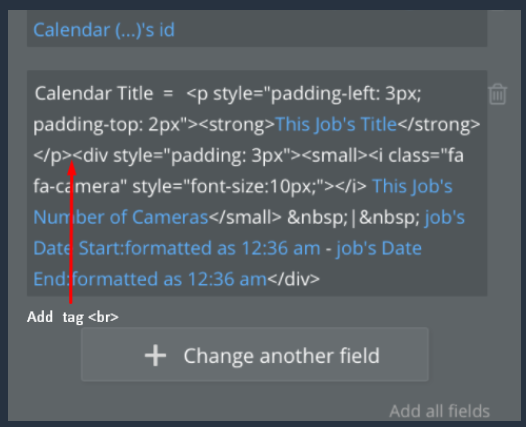
You should be able to fix the HTML issue (text out of the event block) on your own, if you add the breaker tag:
Hey @ZeroqodeSupport thanks for your effort on this. Unfortunately, no go with the break thought. In fact, it makes some of the other views that are working, get worse.
I understand what you’re saying about custom color for the calendar view, but it still seems like a glitch to me given that it works perfectly on the time grid week view. And, as demo’d in my loom video, the HTML is rendered correctly in the time grid week and list views. It’s only in the calendar view that it’s not correctly rendered.
Hopefully this loom video better demonstrates the change in behavior and the inconsistent rendering of HTML across the different views. Really hoping you can help address this as it has worked previously for over a year and is an important part of my user’s calendar needs.
Appreciate the feedback here @chris.williamson1996 . If this is the case though, why would the time grid week and list views continue to render HTML as expected, and the time grid week view continue to display custom colors as expected?
Other than keeping the plugin on an older version (what I’m currently doing), are there any other avenues to fix this behavior? Specifically, are you suggesting that I should get a license key? Or, that ZeroQode should get an updated license key to continue supporting the featureset that was marketed when I purchased this plugin?
@ZeroqodeSupport are you able to confirm what Chris has pointed out? And if so, do you have plans to update the plugin’s ability to pass in custom colors? It appears some of the new features of FullCalendar break previous custom CSS, but introduce new ways of passing in variables and injecting custom content. Perhaps this isn’t a matter of ‘fixing’ Sean’s approach but instead, taking a totally new approach utilizing the new tools provided by FullCalendar?
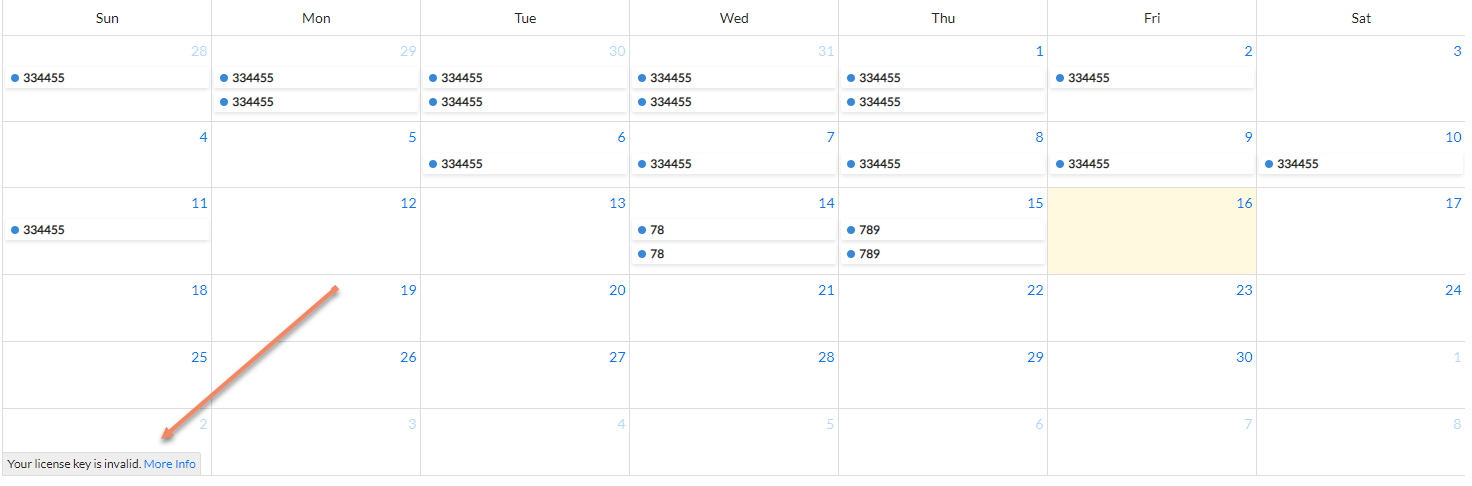
Low priority - I’m seeing message “your license key is invalid” at the bottom of my calendar. It doesn’t see to impact the functionality. My customers can see it and have asked about it. When you click on “more info” it takes you back to the fullcalendar.io website.
I’ve had to roll back the updates, but can you tell if this is something that I’m causing on my end? Everything had been working until the last update and I’m not sure where the issue is coming from.
Regarding your video record with the issues - the next plugin update should fix it. Please give us some time, the new plugin version should be available pretty soon.
Yes, unfortunately, this issue appears when you roll up the plugin to the latest version. In order to fix this, you have to remove the plugin from the page and add the new one again. Please check and let us know.
We have made another plugin update - Added a possibility to change the event display type. Fixed word-wrap in HTML-titles. (2.6.0)
Please choose the latest plugin version and don’t forget to reinstall the plugin element on the page (remove an old calendar element and place the AirCalendar element on the page in order to see the changes).
Now you can change the view type of an event from four types:
block ( it seems to display type in older versions of the calendar),
background ( is using for “blocked” events on our demo page),
inverse-background ( new view type. Like'background',but fills the reverse space )
list-item ( new view type added in v5 of Fullcalendar and used by default ).
The default view is set to ‘block’ because this view was used in older versions. Type can be changed in the same way as the title or color of the event.