Introducing File Uploader Pro Native Mobile - the ultimate solution for uploading files directly from your Bubble Native mobile app.
Key Features:
Universal File Uploads: Let users easily upload images, documents, videos, or any file type - right from their device.
Real-Time Upload Progress: Show smooth progress indicators to give users instant feedback during the upload process.
Dynamic Styling: Tailor the look and feel to perfectly match your app’s design - from icons to animations.
Designed for forms, user profiles, and media submissions, File Uploader Pro Native Mobile ensures a fast, intuitive, and well-integrated upload experience.
Empower your users with frictionless file uploading - native, responsive, and beautifully integrated!
For a simple, lightweight way to upload only images in your Bubble app, try our basic File Uploader Bubble Native - perfect for quick and easy visual uploads.
Thank you for reaching out!
We noticed you also reached out via the chat on the Zeroqode website. We’ve already started processing your issue there, but please let us know which channel works best for you (forum or website chat). It’s important we keep the conversation in a single place so we can track context and provide a solution as quickly as possible.
We noticed that you haven’t replied in our parallel chat on the Zeroqode website.
Is your question still relevant? If so, could you please provide a bit more detail on how you’re trying to play the uploaded video?
Specifically:
Are you using a video player element/plugin inside your Bubble app?
Or are you opening the file URL directly?
If the URL doesn’t load, it often indicates an issue with Bubble Privacy rules — the viewer role must have permission to read the video field and “View attached files.”
For a quick comparison, you can check our live setup and copy it into a test page in your app. This “mirror the demo” approach helps rule out configuration issues:
One more thing to check is the codec or format of the uploaded file. iOS devices often record in HEVC/H.265 (MOV/MP4), which plays fine on iPhones but may not be supported in desktop Chrome — especially on Windows or Linux. If that’s the case, try recording in Most Compatible (H.264) or transcoding the video to H.264/AAC before testing again.
I just wanted to thank you — after testing the latest update of the File Uploader Pro (Native Mobile) plugin, everything now works perfectly!
Previously, I had issues when uploading videos from the mobile gallery, but with the new “Fixed Video Upload Encoding” update, the videos are now correctly encoded and playable (including on Mux).
Really appreciate your support and the quality of your updates.
Thanks again for your great work!
As a small suggestion for a future update:
it would be great if we could choose whether the file picker shows only the gallery or only documents, instead of both options appearing by default after clicking the uploader.
We’re delighted to hear that everything is now working well. Please don’t hesitate to reach out if you need further help or assistance – we’re always happy to support you.
If you’re enjoying our plugin, we’d be so grateful if you could take a moment to rate it! You can head to the Plugins tab in the Bubble editor, search for the plugin by name, and leave the stars you think it deserves. Your feedback truly motivates us to keep improving.
Additionally, if you’re satisfied with your experience working with Zeroqode, we’d love to hear more! You can share your thoughts on the following platforms:
Your review would mean the world to us and help us continue delivering high-quality products and services to the entire Bubble community.
Regarding your suggestion: it is indeed a very useful functionality, and we have forwarded your idea to the development team. Unfortunately, we cannot provide an ETA for the release date, but we will reach out to you once it is implemented in the plugin. Stay tuned!
I’m contacting you again because after further testing, I’ve noticed some problems. Videos take an extremely long time to load: 30-40 seconds for a 10-second video and 1.30 / 2 minute for a 30-second video. Furthermore, I’ve noticed that I can’t upload videos longer than 30 seconds. The uploader doesn’t receive any HTTPS URLs. I’ve set the plugin’s maximum total size to 1000 MB, even though my video is only 30 MB, but nothing happens. The uploading process starts, then disappears after a while, and no URL is returned.
Thanks for the detailed follow-up — we’ve run additional tests on our side to verify the behaviour you described.
Here’s what we found:
Upload performance
On our demo page, a 22-second video (~30 MB) consistently uploaded in under 10 seconds, which is expected performance for the Native Uploader Pro.
After the upload, the file was successfully saved in Bubble’s database, and the returned URL worked as intended.
File size behaviour
However, during testing we did notice some unexpected behaviour with files larger than ~50 MB.
These uploads occasionally fail.
We’ve already passed this to our dev team for investigation, and we’ll update you as soon as we have more technical details.
Here’s a screenshot of the setup that works perfectly well for us, and updates the database field, where the file link is stored.
UPD
We just noticed your endpoint - in theory, the current one should work if you’re testing the live version of your app, but if it’s the test version, the endpoint will not be used by the page. To rule this out, we recommend copying the same structure as on our demo page - using ‘App version’ variable will ensure that the correct endpoint will be used both in test and live environments.
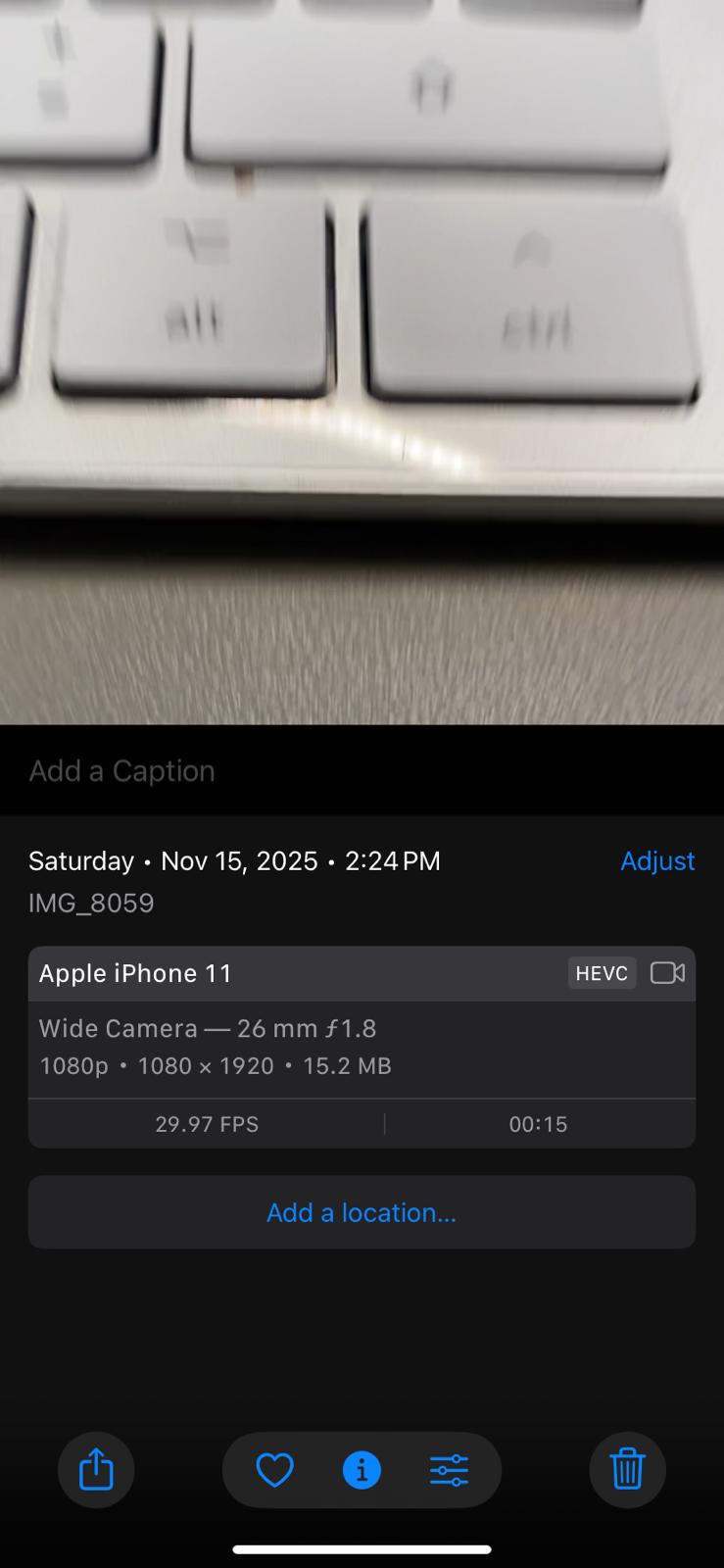
Hello, thank you for taking the time to look into this issue. I wanted to let you know that on my computer, or directly on your demo, the video loads very quickly, in about 10 seconds on average. I’m also able to upload videos larger than 50MB from time to time, just like you. I’m experiencing the exact same behavior when I test the app on the preview on my computer, but the problem is when I test it on my phone. I can’t upload videos larger than 30MB at all, and it’s much slower. I recorded a test with a 15-second video (15MB), and as you can see, it takes almost a minute to load. I’m sending you a video recording of my screen, which confirms what I’m saying, as well as a screenshot of my video settings.
I’ve checked with our development team, and they confirmed that the plugin cannot reliably handle files larger than 50 MB because this is a limitation of Bubble’s File Manager. This is why the files larger than 50 MB fail to upload to file manager.
That said, I’d like to run one more set of tests with you so we can clearly see whether part of the delay is coming from network speed, device performance, or the Bubble environment itself. When you have a moment, please try uploading the same video file under the following conditions:
Upload it on our demo page, connected to Wi-Fi.
Upload it on our demo page, using mobile data.
Upload it in your own app, connected to Wi-Fi.
Upload it in your own app, using mobile data.
Please also make sure that you are not connected to a VPN, as VPNs often introduce additional compression or routing delays that can dramatically affect the upload speed — especially for larger media files.
Once you complete these four tests, let us know if there is a noticeable difference in the upload time between the environments. This will help us determine whether the slowdown is network-related, device-specific, or fully tied to Bubble’s file constraints.
Looking forward to your results — we’ll continue from there!
Hi @ZeroqodeSupport, I’m contacting you again regarding the requested test.
My results are for the same file I sent previously, which is 15 seconds of video and 15.2 MB:
Tested on my Bubble Go app version 1.10.10 and on my iPhone 11, iOS 18.6.2:
Wi-Fi: approximately 35 seconds
4G: approximately 50 seconds
Tested with your demo plugin, tested on Safari:
Wi-Fi: approximately 25 seconds
4G: approximately 1 minute 10 seconds
The waiting time is still quite long considering it’s only a 15-second video, especially since I would have liked to offer the option to download videos of 1 minute or more.
I also noticed that when I downloaded a video with your plugin, my file, which was initially 15.2 MB, became 28.19 MB after uploading, almost double the size. Is this normal? 50MB isn’t much, especially since my application is video-based. Is there a solution to either increase the size of downloaded files or reduce the video size before uploading? I would like my users to be able to download videos of 1 minute or more.
Hi @Alexandre1605, thanks for sharing all the test results.
From what you described, it does look like a network-related issue rather than something coming from the plugin. On our end, even 20–30 MB files consistently upload in under ~10 seconds. Also, the fact that your Wi-Fi upload to your own app is faster than the upload to our demo page rules out a misconfiguration on your side or an issue in the plugin logic. Unfortunately, this type of delay is typically tied to network conditions, routing, or regional infrastructure, and isn’t something we can directly influence or fix.
Regarding the increase in file size after downloading:
Could you please clarify which plugin you’re using to download the files, and also share the workflow that triggers the download? Once we have that information, we can check whether the behavior is expected or if something else is happening.
Hello @ZeroqodeSupport , I’m using the File Uploader Pro Native Mobile extension ( File Uploader Pro Native Mobile Plugin | Bubble ). For my tests, I currently have no workflow associated with the extension; I simply click on “Native Uploader” and select the video above. Therefore, no workflow should be slowing down the extension. I contacted Bubble, who told me: “Here’s what’s probably happening: although our file uploader officially supports files up to 5GB, most browsers don’t handle uploads larger than 2GB properly on mobile devices.” Thus, Bubble supports files larger than 50MB because 50MB is a very small size, especially since the extension doubles the size of the original file. You mentioned that the limit is 50 MB. Is this based on the size of the original file or the downloaded file? Thank you in advance for your help. I’m stuck on this feature, which requires a plugin to retrieve videos of several minutes from the user’s gallery.
What do I need to do to make this feature work? Currently, your plugin only allows me to download videos of 25-30 seconds maximum. Is this plugin the best fit for my needs? What should I do?
After discussing this with our dev team, we can confirm that the ~50MB cap is a Bubble limitation, not a plugin limitation.
Bubble’s native mobile upload layer cannot reliably handle files larger than ~50MB at the moment, which causes uploads to fail regardless of the uploader plugin you use.
Once Bubble resolves these underlying native mobile upload constraints, larger files (50MB+) will upload normally without any changes required on your side.
The Bubble response mentioned in your message seems to be related to web plugin.
2. Slow Upload Speed
Regarding the upload speed:
We’re still unable to reproduce your 30–60 second upload times on our side — even 20–30MB files upload in under ~10 seconds in our tests. This strongly suggests that the slowdown is network-related or device-specific.
However, to completely rule out any other causes, we’d like to check your setup directly.
To continue investigation, please add our team as collaborator:
Go to Settings → Collaboration in your Bubble Editor
Hello @ZeroqodeSupport, okay, I understand. However, I haven’t received a response to my question. So, when I download a video with your plugin, the file size seems to double after downloading, even though I’m not using any workflows related to this action; I just click on your plugin and download a video. My original video is 15MB and ends up being 30MB after downloading. Is this normal? So, is the limit in Bubble based on the file size before upload or after downloading? If I were to purchase the “File uploads >50mb + Video Capture” plugin ( File uploads >50mb + Video Capture Plugin | Bubble ), would this allow me to download larger files? If I understand correctly, it uses an external service, Uploadcare, to do this, so I’m forced to use their paid solution, is that right? Is this the only current solution? Thank you for your help.
Thanks for the clarification — but I think there may be a misunderstanding, so before we continue I’d like to make sure we’re talking about the same setup.
The File Uploader Pro Native Mobile plugin doesn’t have any built-in download functionality.
When you tap the uploader element (and no workflow is attached), all it does is:
open your device’s file picker
upload the selected file from your device to your Bubble app
There is no “download” step happening at that moment, because the plugin does not download anything back to the device.
That’s why I’m confused about this part of your message:
“I click on your plugin and download a video… my 15MB video becomes 30MB after downloading.”
Could you explain your setup in more detail?
Specifically:
Which action or plugin are you using to download the video back to the device?
Are you using another plugin for downloading?
Once we understand where the download step is happening, we can explain why the file size changes and whether the behavior is expected.
We’re not aware about any hard limitation on .mov or HEVC files themselves, but issues like the ones you’re seeing in TestFlight (vs. the Bubble editor preview) are often tied to how workflows are triggered on mobile, especially in native wrappers.
To help us dig deeper, could you please share the following:
Screenshots of the plugin element settings on your page
The workflow(s) that run when a file is uploaded — including how the file is attached to the Lesson and displayed in the Horizontal List
A screenshot of your database structure (for both the file and Lesson relation)
Any relevant privacy rules you’ve set for the Lesson or File data types
Also, if you’re using any custom state or delay-based logic in the workflows, please highlight that — timing can behave differently in TestFlight/native mobile vs. the desktop web version.
Once we have that info, we’ll be able to test further and get back to you with more targeted guidance.
Is there a way to reset the plugin once all files have been uploaded? I do not want to see the photo previews after upload, as it’s redundant with my own custom preview.
Or else, is there a way to hide the photo previews?


 Key Features:
 For a simple, lightweight way to upload only images in your Bubble app, try our basic File Uploader Bubble Native - perfect for quick and easy visual uploads.
 ,
,


 Upload performance
 File size behaviour


 1. The 50MB Limit
 To continue investigation, please add our team as collaborator: